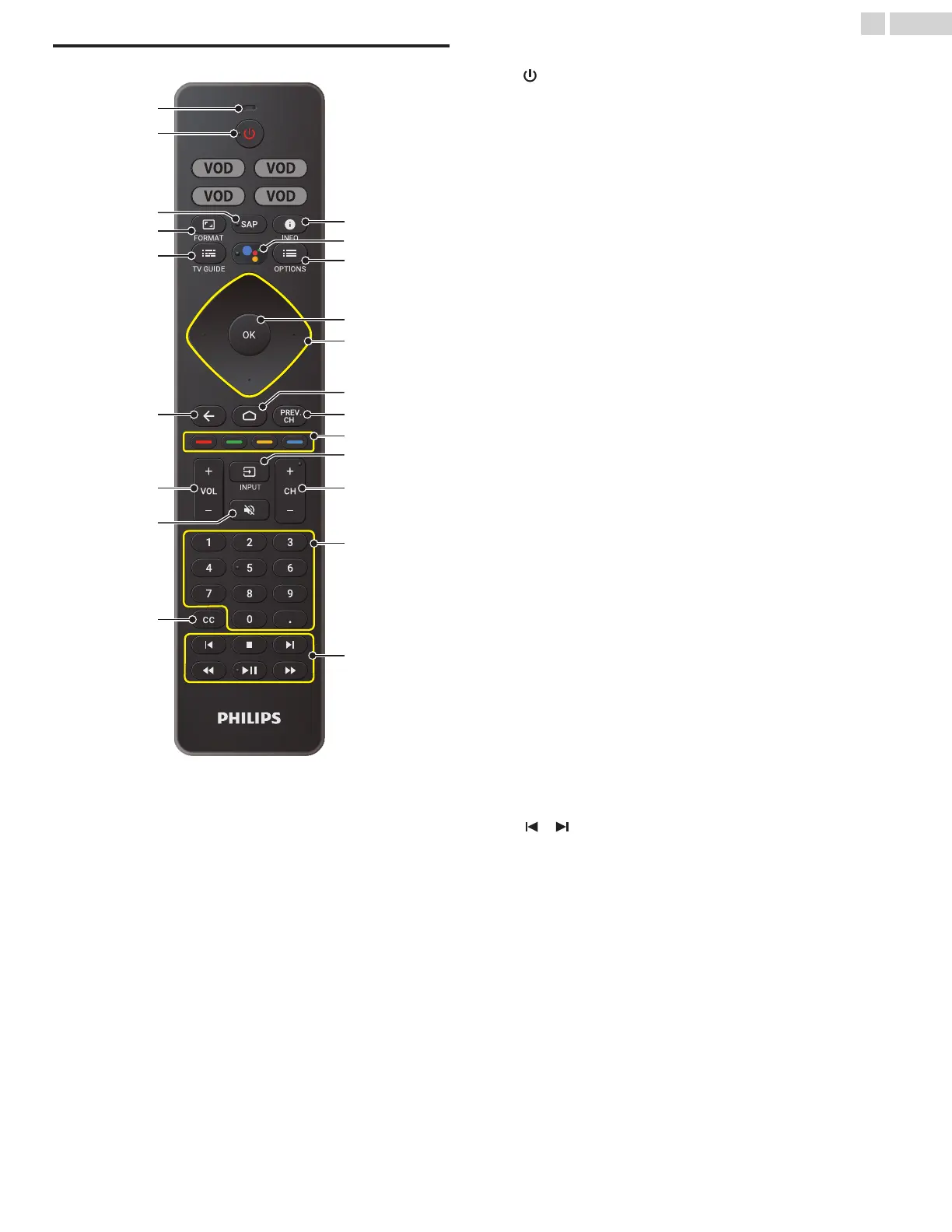
Remote
a
Microphone
b
(POWER)
Turns the TV on and off of standby.
c
SAP
Selects audio mode (MONO / STEREO / SAP) / audio language.
d
v (FORMAT)
Adjusts the picture size on the TV screen.
e
z (TV GUIDE)
Access to the Electronic Program Guide (EPG).
It allows you to find channels and content easily.
f
3 (BACK)
Returns to the previous menu screen.
g
VOL + / –
Adjusts the volume.
h
2 (MUTE)
Turns the sound on and off.
i
CC
Selects closed caption settings.
j
1 (INFO)
Displays input and resolution information.
k
The Google Assistant
Press the Assistant button on your remote to talk to your Google
Assistant.
l
y (OPTIONS)
Displays a list of menu options applicable to the active screen.
m
OK
Press to decide the command of setting when the Home menu is
displayed.
n
H I J K (NAVIGATION buttons)
Moves the cursor, selects the on-screen menu items.
o
x (HOME)
Access to your apps, Live TV, input devices, settings, and the
Google Play Store.
p
PREV.CH
Direct access to the Live TV channels.
Displays the last selected terminal or channel.
q
COLOR buttons
Works as direct access to user specified net apps.
r
w (INPUT)
Change input source.
Select and change access to the attached devices such as Blu-
ray player, gaming consoles, or cable box.
s
CH + / –
Selects a channel.
t
0 - 9 (NUMBER buttons)
Used to enter a channel / program number.
• (DOT)
: Use with 0-9 to select digital channels.
For example, to enter 2.1, press
u
EasyLink buttons
/
: Skips backward or forward chapters, titles or tracks
on a disc.
C
: Stops the disc playback.
JJ / KK
: Searches backward or forward through the disc.
K t
: Starts, pauses or resumes playback.
11 .English
Continued on next page.











 To Next Page