Change pin
1
Use H I to select Change pin, then press OK.
2
Use H I to enter the current 4-digit PIN code.
3
Use H I to enter the new 4-digit PIN code.
●
Enter PIN code again to confirm.
Caution(s)
●
If you have forgotten the current 4-digit PIN code, you can reset the code
by performing Factory data reset. (Refer to Storage & reset L p. 26)
●
Factory data reset will erase all data from your TV's internal storage,
including your Google account, system and app data and settings, and
downloaded apps.
Note(s)
●
Make sure new PIN code and confirm PIN code must be exactly the same.
If they are different, the space is cleared for reentering.
Multi audio
You can select the audio language while your TV is receiving the digital
broadcasting.
1
Use H I to select Multi audio, then press OK.
Multi audio
To select the language according to your
preference.
(It differs depending on the program.)
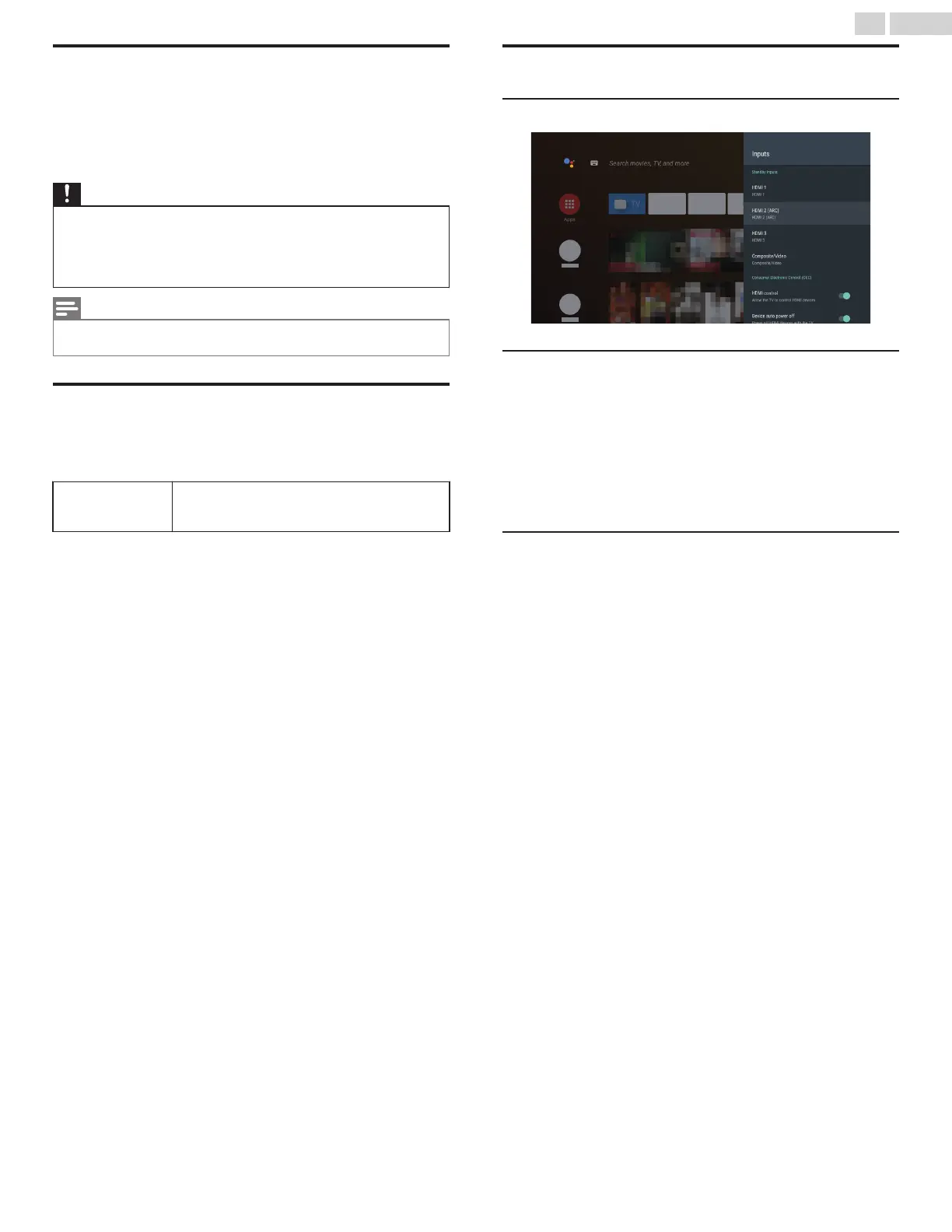
Inputs
Connected Input(s) / Standby Input(s)
Consumer Electronic Control (CEC)
HDMI control
Allow the TV to control HDMI devices.
Device auto power off
Power off HDMI devices with the TV.
TV auto power on
Power on the TV with HDMI devices.
HDMI EDID Version
Version of HDMI EDID.
Select EDID 2.0 for 4K@60 Hz or HDR signals. Select EDID 1.4 for
legacy devices that output 4K@30 Hz or less with no HDR.
23 .English
Continued on next page.








 To Next Page