English
27
8239 300 32892
DVD Setup Menu Options
Changing the password
You can change the four-digit password
used for Parental Control. Enter your
four-digit password to play a prohibited
disc or if prompted for a password. The
default password is ‘1234.’
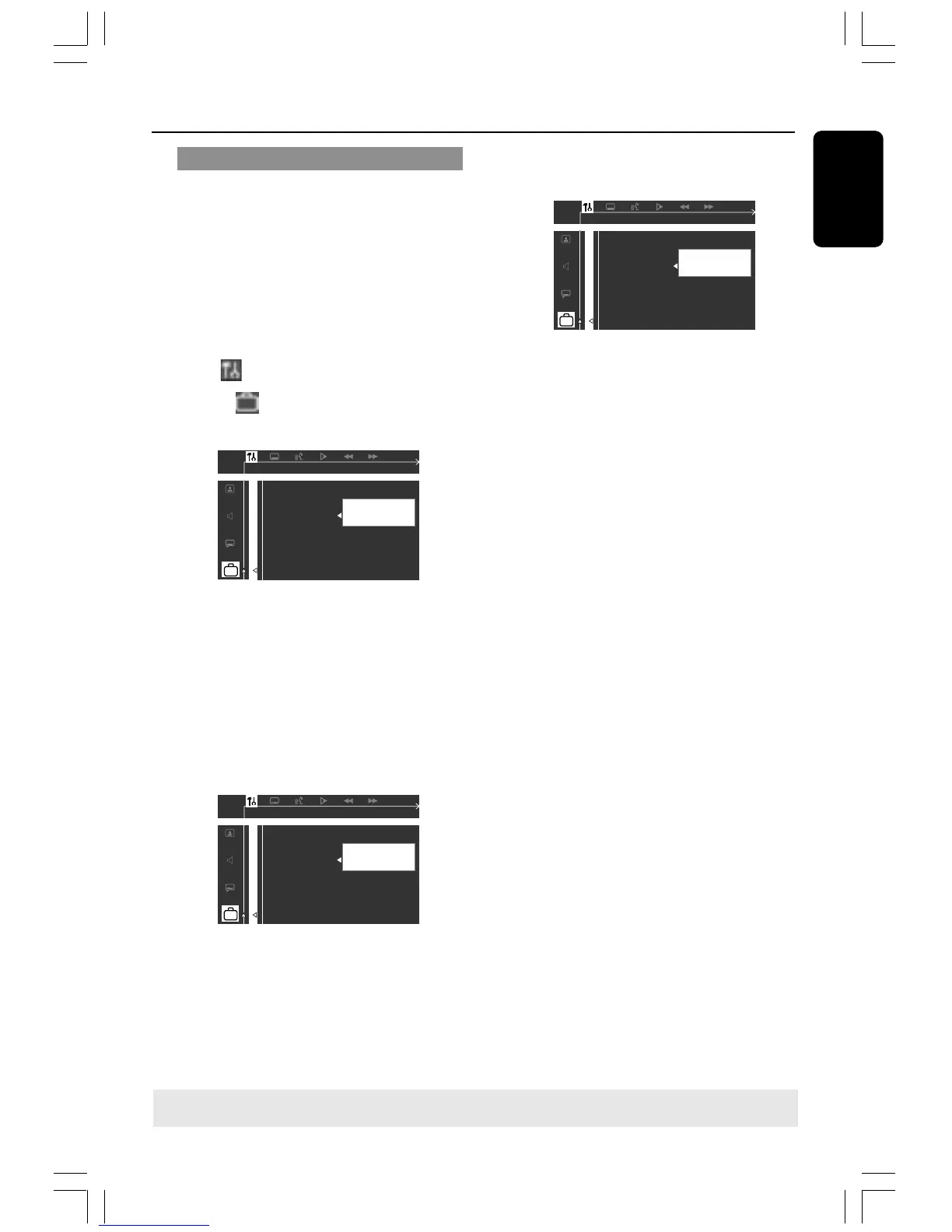
1 In disc mode, press SYSTEM MENU.
➜ Use the 1 2 3 4 keys on the remote
to navigate in the menu.
2 Select icon and press 4.
Move to and press 2.
Move to {PASSWORD} and press 2.
__ __ __ __
Enter old code
PLEASE ENTER OLD PASSWORD
PARENTAL
PASSWORD
MENU LANG
DEFAULTS
3 Use the numeric keypad (0-9) to enter
your original four-digit password at “Enter
old code”.
➜ If you are asked to enter the code for
the first time, key in ‘1234’.
➜ If you forget your password, press Ç
four times to restore to the default
password (1234).
4 Enter your new four-digit password.
__ __ __ __
Enter new code
PLEASE ENTER NEW PASSWORD
PARENTAL
PASSWORD
MENU LANG
DEFAULTS
5 Enter the same new four-digit password
again.
6 Press SYSTEM MENU again to remove
the menu.
TIPS: To return to the previous menu, press 1.
To remove the menu, press SYSTEM MENU.
001-035-MX2500D-78-Eng2 7/20/04, 3:12 PM27




 To Next Page