EasyManua.ls Logo

Philips AJ 3040 - Philips AJ3040 Clock Radio Power Failure and Battery Backup; Philips AJ3040 Clock Radio Maintenance and Care; Philips AJ3040 Clock Radio UK Specific Notes

Philips AJ 3040
11 pages
Print Icon
To Next Page IconTo Next Page
To Previous Page IconTo Previous Page
Loading...
ys!¡6uy
Additional
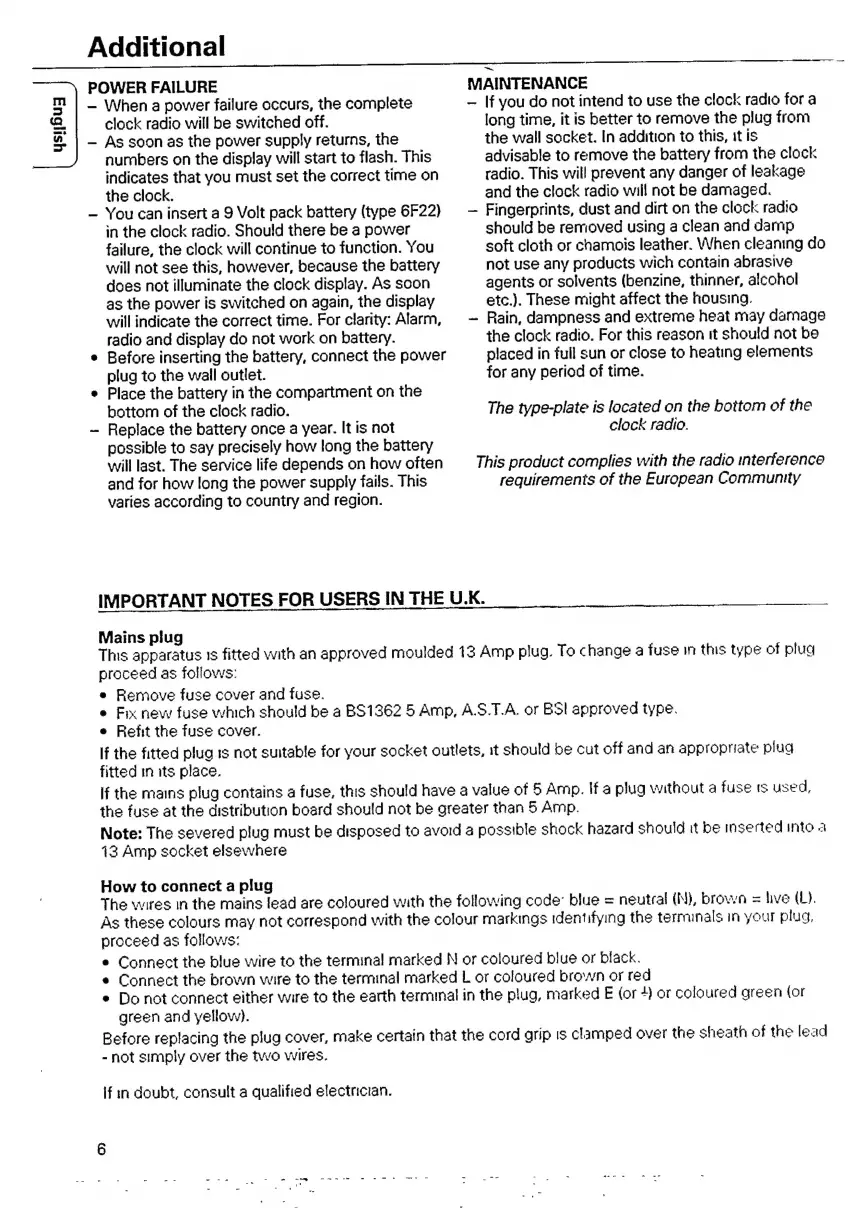
POWER
FAILURE
When
a
power
failure
occurs,
the
complete
MAINTENANCE
If
you
do
not
intend
to
use
the
clock
radio
for
a
IMPORTANT
NOTES
FOR
USERS
IN
THE
U.K.
clock
radio
will
be
switched
off.
As
soon
as
the
power
supply
returns,
the
numbers
on
the
display
will
start
to
flash.
This
indicates
that
you
must
set
the
correct
time
on
the
clock.
You
can
insert
a
9
Volt
pack
battery
(type
6F22)
in
the
clock
radio.
Should
there
be
a
power
failure,
the
clock
will
continue
to
function.
You
will
not
see
this,
however,
because
the
battery
does
not
illuminate
the
clock
display.
As
soon
as
the
power
is
switched
on
again,
the
display
will
indicate
the
correct
time.
For
clarity:
Alarm,
radio
and
display
do
not
work
on
battery.
Before
inserting
the
battery,
connect
the
power
plug
to
the
wall
outlet.
Place
the
battery
in
the
compartment
on
the
bottom
of
the
clock
radio.
Replace
the
battery
once
a
year.
It
is
not
possible
to
say
precisely
how
long
the
battery
will
last.
The
service
life
depends
on
how
often
and
for
how
long
the
power
supply
fails.
This
varies
according
to
country
and
region.
long
time,
it
is
better
to
remove
the
plug
from
the
wall
socket.
In
addition
to
this,
it
is
advisable
to
remove
the
battery
from
the
clock
radio.
This
will
prevent
any
danger
of
leakage
and
the
clock
radio
will
not
be
damaged.
Fingerprints,
dust
and
dirt
on
the
clock
radio
should
be
removed
using
a
clean
and
damp
soft
cloth
or
chamois
leather.
When
cleaning
do
not
use
any
products
wich
contain
abrasive
agents
or
solvents
(benzine,
thinner,
alcohol
etc.).
These
might
affect
the
housing.
Rain,
dampness
and
extreme
heat
may
damage
the
clock
radio.
For
this
reason
it
should
not
be
placed
in
full
sun
or
close
to
heating
elements
for
any
period
of
time.
The
type-plate
is
located
on
the
bottom
of
the
clock
radio.
This
product
complies
with
the
radio
interference
requirements
of
the
European
Community
A
d
e
mms
OSS
Sen
u
——
——
OG
Mains
plug
This
apparatus
1s
fitted
with
an
approved
moulded
13
Amp
plug.
To
change
a
fuse
in
this
type
of
plua
proceed
as
follows:
e
Remove
fuse
cover
and
fuse.
e
Fix
new
fuse
which
should
be
a
BS1362
5
Amp,
ASTA
or
BSI
approved
type.
e
Refit
the
fuse
cover.
If
the
fitted
plug
is
not
suitable
for
your
socket
outlets,
it
should
be
cut
off
and
an
appropriate
plug
fitted
in
its
place.
If
the
mains
plug
contains
a
fuse,
this
should
have
a
value
of
5
Amp.
If
a
plug
without
a
fuse
rs
used,
the
fuse
at
the
distribution
board
should
not
be
greater
than
5
Amp.
Note:
The
severed
plug
must
be
disposed
to
avoid
a
possible
shock
hazard
should
it
be
inserted
into
à
13
Amp
socket
elsewhere
How
to
connect
a
plug
The
wires
in
the
mains
lead
are
coloured
with
the
following
code:
blue
=
neutral
(N),
brown
=
live
(L).
As
these
colours
may
not
correspond
with
the
colour
markings
identifying
the
terminals
in
your
plug,
proceed
as
follows:
e
Connect
the
blue
wire
to
the
terminal
marked
N
or
coloured
blue
or
black.
a
Connect
the
brown
wire
to
the
terminal
marked
L
or
coloured
brown
or
red
e
Do
not
connect
either
wire
to
the
earth
terminal
in
the
plug,
marked
E
(or
4)
or
coloured
green
(or
green
and
yellow).
Before
replacing
the
plug
cover,
make
certain
that
the
cord
grip
is
clamped
over
the
sheath
of
the
lead
-
not
simply
over
the
two
wires.
If
in
doubt,
consult
a
qualified
electrician.

Other manuals for Philips AJ 3040

Related product manuals