10 EN
Listen to an external device
With this clock radio, you can also listen to an
external audio device such as an MP3 player.
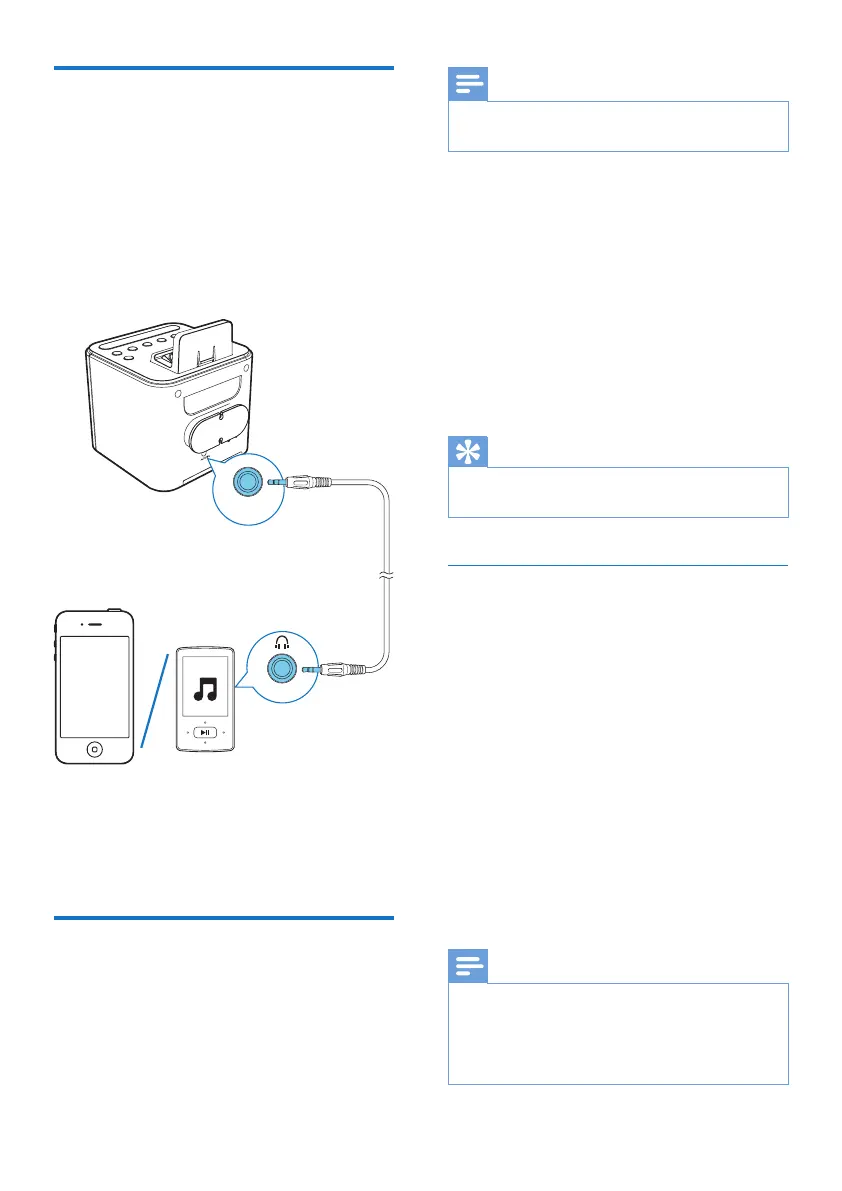
1 Connect an audio input cable with a 3.5
mm connector on both ends to
• the AUDIO IN socket on this speaker,
and
• the headphone socket on the external
device.
2 Press SOURCE repeatedly to select AUX
source.
3 Play audio on the external device (refer to
its user manual).
Set alarm timer
You can set two alarms to ring at different time.
AUDIO IN
Note
• You can only set alarm in standby mode.
• Make sure that you have set the clock correctly.
1 Press and hold AL1 or AL2 for two
seconds to activate alarm setting mode.
» The hour digits blink.
2 Press HR repeatedly to set the hour.
3 Press MIN repeatedly to set the minute.
4 Press AL1 or AL2toconrm.
5 Press HR or MIN to set the alarm source:
Buzzer or FM tuner.
6 Press AL1 or AL2toconrm.
Tip
• The clock radio exits alarm setting mode when being
idle for 10 seconds.
Activate or deactivate the alarm
timer
1 Press AL1 or AL2 to view alarm settings.
2 Press AL1 or AL2 again to activate or
deactivate the alarm timer.
» If the alarm timer is activated, the
alarm indicator for FM tuner or buzzer
is displayed.
» If the alarm timer is deactivated, the
alarm indicator disappears.
• To stop the ringing alarm, press the
corresponding AL1/AL2.
» The alarm repeats ringing for the next
day.
Note
• If FM tuner is selected and you are listening to
radio when alarm time comes, buzzer is activated
automatically.
• When alarm sounds, volume increases gradually. You
cannot adjust the alarm volume manually.



 To Next Page