4 EN
Overview of the clock radio
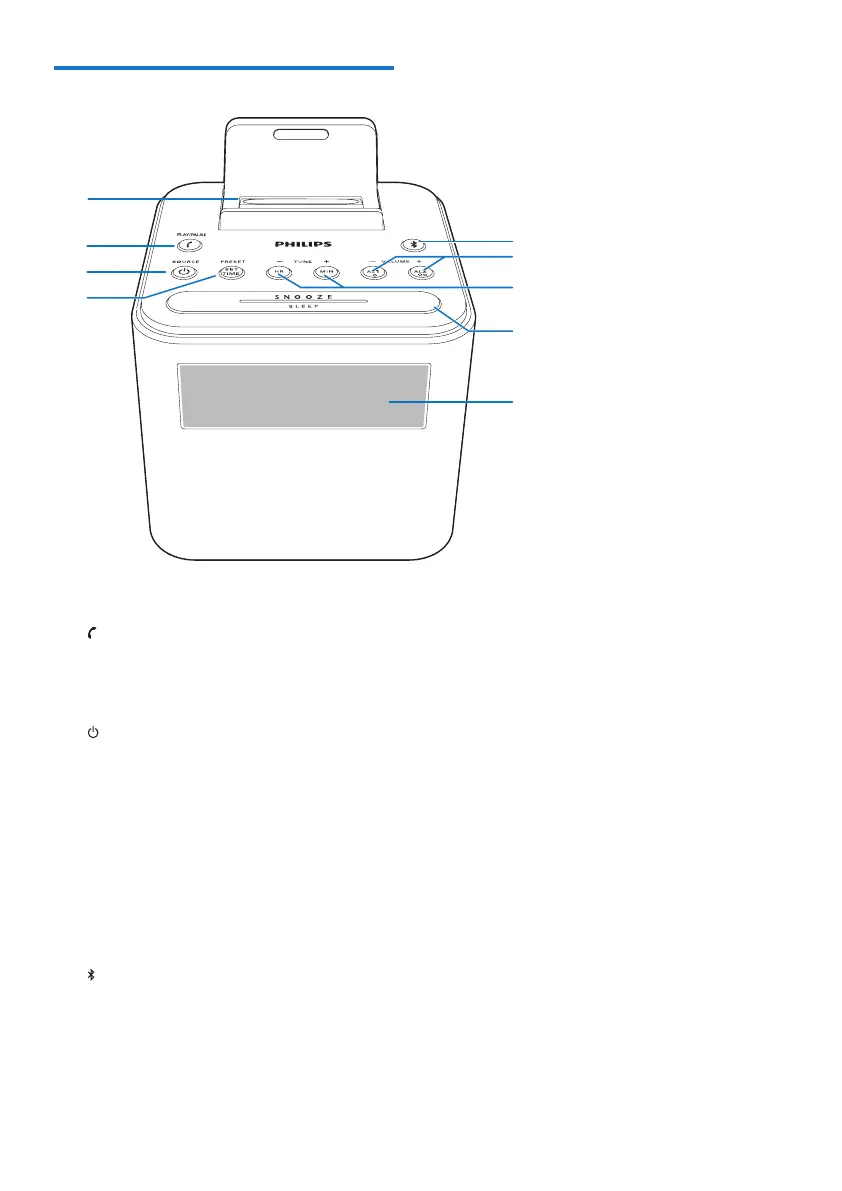
a Dock for charging mobile devices
b PLAY/PAUSE
• Answer, reject, or end an incoming call.
• In Bluetooth mode, start, pause, or
resume play.
c SOURCE
• Turn on the clock radio.
• Switch the clock radio to standby
mode.
• Select a source: Bluetooth, FM tuner,
or Aux.
d PRESET/SET TIME
• Store radio stations in memory.
• Select a preset radio station.
• Set time.
e
• Clear Bluetooth pairing information.
• Disconnect the Bluetooth-enabled
device.
a
c
d
h
i
g
e
f
b
f AL1/AL2/- VOLUME +
• Set alarm.
• Adjust volume.
g HR/MIN/- TUNE +
• Tune to FM radio stations.
• Set hour and minute.
h SNOOZE/SLEEP
• Snooze alarm.
• Set the sleep timer.
i Display panel
• Display current status.



 To Next Page