
 Need help?
Do you have a question about the Philips AJT5300 and is the answer not in the manual?
Explains safety symbols and their meanings for user protection.
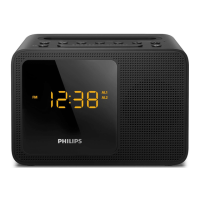
Overview of the clock radio's capabilities and features.
Lists all the items included in the product package.
Detailed explanation of all buttons and controls on the device.
Instructions for installing backup batteries for clock and alarm settings.
Steps and precautions for connecting the AC power adapter.
Procedure to power on the clock radio and select initial source.
How to put the clock radio into standby mode.
Instructions for setting the current time on the clock radio.
Procedure for setting one or two distinct alarm times.
How to enable or disable the set alarm timers.
Explanation of the alarm snooze function and its behavior.
Guidance on positioning the FM antenna for optimal reception.
Steps to tune into FM radio stations, including auto-tuning.
Method for automatically scanning and saving FM radio stations.
Process for manually saving specific FM radio stations.
How to select a previously saved FM radio station.
Instructions for pairing a Bluetooth-enabled device with the clock radio.
How to play audio streams from a connected Bluetooth device.
Managing incoming and ongoing phone calls via Bluetooth connection.
Instructions for charging a mobile phone using the USB port.
Connecting and playing audio from external devices via AUX input.
Procedure for setting the sleep timer to automatically turn off the device.
How to increase or decrease the audio volume.
Steps to select from different display brightness levels.
Details on AC power adapter, USB port, and operational power consumption.
Technical specifications including amplifier, tuner, and Bluetooth details.
Troubleshooting common issues like no power, no sound, or no response.
Tips for improving FM radio reception and reducing interference.
Solutions for when the alarm function fails to operate correctly.
Troubleshooting Bluetooth pairing, audio quality, and connection problems.
Instructions for environmentally responsible disposal of the product.
Information regarding packaging materials and their recyclability.
 General
| Type | Clock Radio |
|---|---|
| Brand | Philips |
| Model | AJT5300 |
| Bluetooth | Yes |
| USB Charging | Yes |
| Display Type | LED |
| Radio Type | FM |
| Tuner Bands | FM |
| Snooze function | Yes |
| Wake up to | Radio, Buzzer |
| Audio in (3.5 mm) | Yes |
| Presets | 20 |
| Battery Backup | Yes |
| Weight | 0.8 kg |
| Alarm | Yes |
| Power Source | Mains |

 To Next Page












