5EN
3 Get started
Always follow the instructions in this chapter in
sequence.
Install battery
The batteries can only back up clock and alarm
settings when AC power is disconnected.
Caution
• The batteries contain chemical substances, so they
should be disposed of properly.
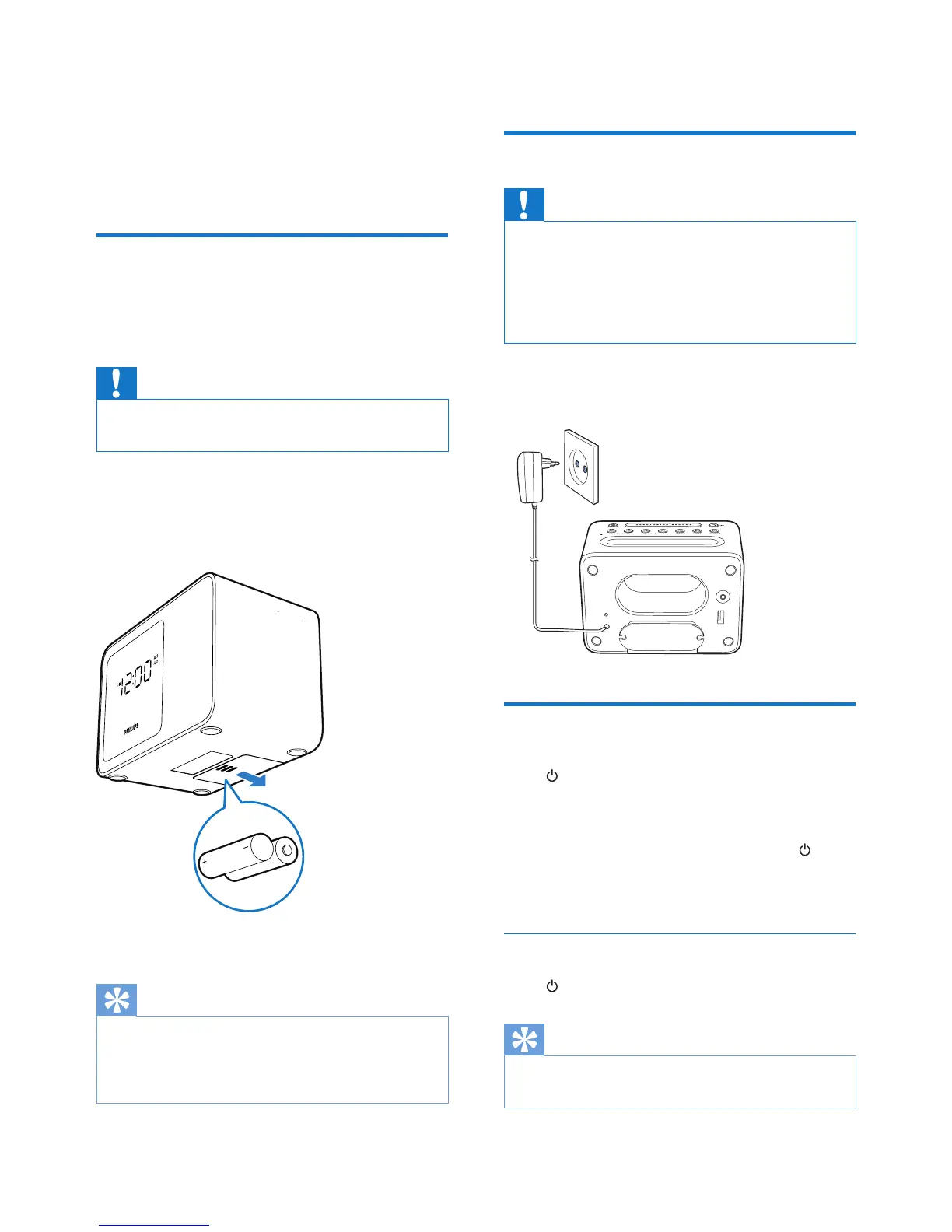
1 Open the battery compartment.
2 Insert 2 AA batteries with correct polarity
(+/-) as illustrated.
3 Close the battery compartment.
Tip
• When there is no battery inserted or the battery level
is low, the low battery indicator is displayed.
• The display backlight is off when AC power is
disconnected.
Connect power
Caution
• Risk of product damage! Make sure that the power
voltage corresponds to the voltage printed on the back
or underside of the clock radio.
• Risk of electric shock! When you unplug the AC
adapter, always pull the plug from the socket. Never
pull the cord.
Connect the AC power adaptor to the wall
socket.
Turn on
Press to turn on the clock radio.
» The clock radio switches to FM tuner
source.
• To select another source, press
repeatedly to switch to Bluetooth, FM,
or Aux mode.
Switch to standby mode
Press repeatedly to switch to standby mode.
Tip
• If the system is idle for 15 minutes, this product
switches to standby mode automatically.


 To Next Page