9EN
Store FM radio stations automatically
Note
•
Youcanstoreamaximumof20presetradiostations.
In FM tuner mode, press and hold for two
seconds.
» All available radio stations are stored
automatically,thentherststored
radio station is broadcast.
Tip
•
You can press / to stop auto scan.
Store FM radio stations manually
(only applicable to products with the
last 10 digits of the serial number
beyond 1633077076)
Note
•
Youcanstoreamaximumof20FMradiostations.
1 In FM tuner mode, tune to an FM radio
station.
2 Press MODE to activate programming
mode.
» The preset number begins to blink.
3 Press repeatedly to select a number.
4 Press MODEagaintoconrm.
5 Repeat steps 1 to 4 to store other stations.
Note
•
To remove a pre-stored station, store another station
in its place.
Select a preset radio station
In tuner mode, press repeatedly to select a
preset station.
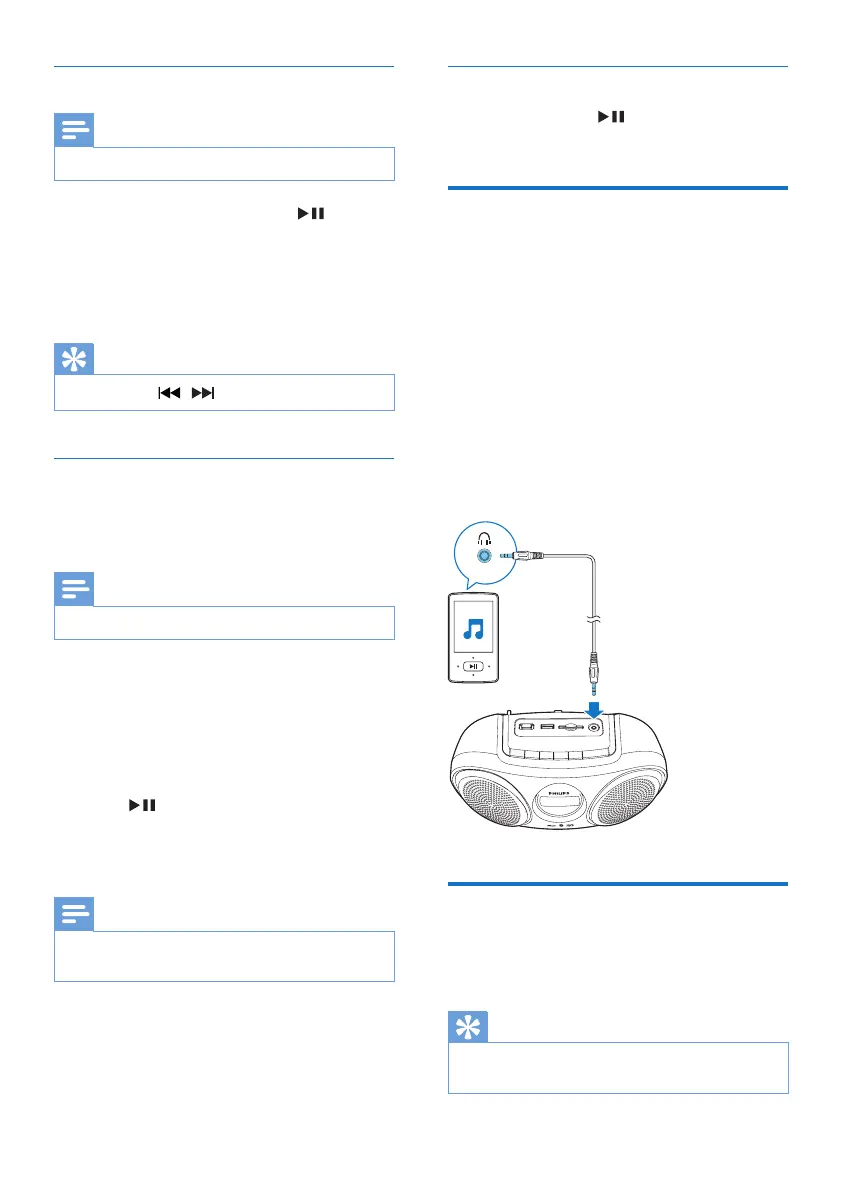
Play from an external device
With this product, you can listen to an external
audio device such as an MP3 player.
1 Press SOURCE repeatedly to select AUX
source.
2 Connect an audio input cable with a
3.5 mm connector on both ends to
• the AUDIO IN socket on the product.
• the headphone socket on an external
device.
3 Play audio on the device (refer to its user
manual).
Adjust volume
During play, press -/+ to increase or decrease
volume.
Tip
•
You can press and hold -/+ for 2 seconds to increase or
decrease volume continuously.



 To Next Page