English CONTROL
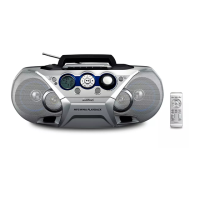
SUPPLIED ACCESSORIES
– AC mains lead
– Remote control
TOP AND FRONT PANELS (See 1)
1
p – 3.5 mm stereo headphone socket
Helpful hints: The speakers will be muted when
headphones are connected to the set.
2
AUX – 3.5 mm line-in jack for external audio
appliance
3
STANDBYy – power on/ off switch
4
Source selector – selects CD/ TUNER/ AUX/
TAPE function
5
IR Sensor – infrared sensor for remote control
6
Cassette recorder keys
RECORD 0 – starts recording
PLAY 1 – starts playback
SEARCH 5/6 – fast winds/rewinds tape
STOP
•
OPEN 9/
– opens the cassette compartment
– stops the tape
PAUSE ; – pauses playback or recording
7 OPEN•CLOSE - press to open/close CD door
8 DBB – switches the bass enhancement on (DBB1
or DBB2) / off
9 VOLUME – adjusts volume level
0 FM
•MW•DISPLAY
TUNER: selects wavebands
MP3/WMA: display MP3/WMA-CD information
! Navigation controls
PRESET (ALB/ PRE) -, + (down, up) –
MP3/WMA only : selects previous / next album.
TUNER : selects a preset station.
9 – stops CD playback;
– erases a CD programme
SEARCH ∞, § –
CD/MP3/WMA:
– searches backwards and forwards within a
track;
– skips to the beginning of a current/
previous/ later track
TUNER: tunes to radio stations (down, up).
MODE – selects different play modes:
e.g.
REPEAT or SHUFFLE (random order)
2; – starts or pauses disc playback
@ PROGRAM
CD/MP3/WMA: programs tracks and reviews the
program;
Tuner: programs preset radio stations
# Display – shows the status of the set
BACK PANEL
$ Telescopic aerial – improves FM reception
% AC MAINS – inlet for mains lead
^ Battery compartment – for 6 batteries, type
R-20, UM1 or D-cells
REMOTE CONTROL (See 1)
1 TUNER – selects tuner source
2 CD – selects CD sound source
3 TUNING -, + – tunes to tuner stations
4 ∞, § – skips to the beginning of a current/
previous/ subsequent disc track
5 REPEAT – select repeat modes
6 SHUFFLE – selects shuffle modes
7 ALBUM/PRESET 3,4 –
MP3/WMA only : select next/ previous album.
TUNER : select a preset station.
8 DBB – switches the bass enhancement on
(DBB1or DBB2)/ off
9 9 – stops disc playback;
– erases a disc program
0 2; – starts/ pauses disc playback
! PROGRAM
CD/MP3/WMA: programs tracks and reviews the
program;
Tuner: programs preset radio stations
@ SEARCH 5, 6 – searches backwards/ forwards
within a disc track
# BAND / DISPLAY
– selects wavebands
– display MP3/WMA-CD information
$ VOLUME +, - (up, down) – adjusts volume level
% MUTE – interrupts/ resumes sound
CAUTION
Use of controls or adjustments or performance
of procedures other than herein may result in
hazardous radiation exposure or other unsafe
operation.


 To Next Page