11EN
Note
•
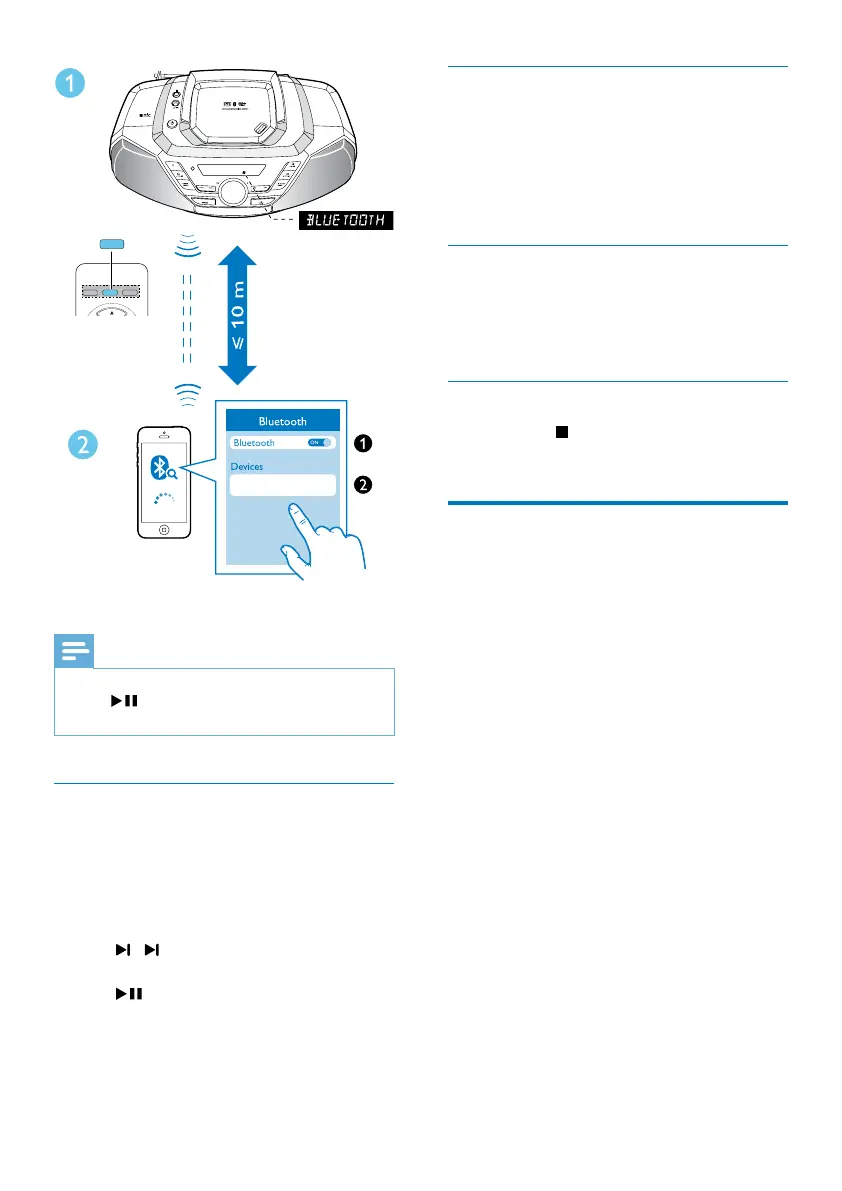
Ifyoucannotnd[Philips AZ700T] on your device,
press
/PAIRING for 2 seconds to enter pairing
mode,[PAIRING](Pairing)isdisplayonthescreen.
Play from Bluetooth device
After successful Bluetooth connection, play
audio on the Bluetooth device.
» Audio streams from your Bluetooth
device to the product.
• To skip to previous/next track, press
/ .
• To pause or resume the playback, press
.
Philips AZ700T
CD
TUNER
AUDIO IN
USB
BT
BT
Disconnect the Bluetooth-enabled
device
• Press and hold PAIRING for 2 seconds;
• Disable Bluetooth on your device; or
• Move the device beyond the
communication range.
Connect another Bluetooth-enabled
device
Disable Bluetooth on the current device, and
then connect another device.
Clear Bluetooth pairing history
Press and hold for 7 seconds to clear the
Bluetooth pairing history.
Play from an external device
You can also listen to an external audio device
such as an MP3 player through this product.
1 Press TUNER/AUDIO IN repeatedly to
select [AUDIO-IN] source.
2 Connect an audio cable (3.5mm, not
supplied)to:
• the AUDIO-IN socket on the unit.
• the headphone socket on an external
device.
3 Play the external device (see the device's
usermanual).



 To Next Page