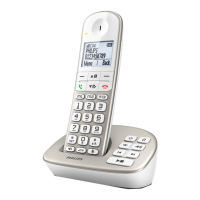
The Philips B160/B165 is a cordless phone designed for home or office use, with the B165 model offering an integrated answering machine. This short user manual provides essential information for setting up, using, and maintaining the device, ensuring a smooth communication experience.
Function Description
The primary function of the Philips B160/B165 is to facilitate cordless telephone communication. It allows users to make and receive calls wirelessly within a certain range from the base station. The B165 model extends this functionality by incorporating an answering machine, which automatically records incoming messages when the user is unavailable or chooses not to answer. The phone features a display screen that shows call information, menu options, and various status icons. The keypad includes standard numeric keys, navigation buttons, and dedicated function keys for common tasks like accessing the phonebook, redial list, and call log.
Usage Features
Basic Call Management:
- Making and Receiving Calls: The core functionality involves simply picking up the handset to make a call or answering an incoming call.
- Redial List: Users can easily access a list of recently dialed numbers to quickly redial them.
- Call Log: The phone keeps a record of incoming and outgoing calls, allowing users to view missed calls, answered calls, and dialed numbers.
- Volume Adjustment: The volume of the earpiece can be adjusted during a call to suit user preference.
- Mute Function: A mute feature allows users to temporarily silence the microphone during a call, useful for private conversations or when background noise needs to be suppressed.
- Pause Function: A pause can be entered during dialing, which is useful for accessing services that require pauses in the dialing sequence.
- Recall (Network Dependent): This function is available for network-dependent services, typically used for features like call waiting or transferring calls.
Phonebook Management:
- Adding Records: Users can store frequently called numbers with associated names in the phonebook for quick and easy dialing.
- Calling from Phonebook: Once numbers are stored, calls can be initiated directly from the phonebook by selecting the desired contact.
- Deleting Records: Unwanted or outdated entries can be removed from the phonebook.
- Saving Numbers from Call Log: Numbers from the call log can be conveniently saved directly into the phonebook.
Menu Navigation and Settings:
- Main Menu Access: A dedicated MENU button provides access to the phone's various settings and features.
- Confirmation/Selection: An OK button is used to confirm selections or enter option menus.
- Cancellation/Back: A REDIAL button often doubles as a "back" or "cancel" button in menu navigation.
- Up/Down Navigation: Arrow keys allow users to scroll through lists and adjust settings.
- Exit Menu: A dedicated button or a sequence of actions allows users to exit the menu and return to standby.
Text Input:
- Deleting Text: When entering text (e.g., for phonebook names), a specific function allows for deleting characters.
- Entering Space: A dedicated key or function is available for entering spaces during text input.
Special Features:
- Handset On/Off: The handset can be switched on or off by pressing and holding a specific button.
- Intercom Call (INT): This feature allows for internal calls between multiple registered handsets, useful in multi-handset setups.
- Keypad Lock/Unlock: The keypad can be locked to prevent accidental dialing and unlocked when needed.
- Ringer On/Off: The ringer can be turned off, indicated by a specific icon, for silent operation.
- Multi-Handset Support: The system supports the registration of additional handsets to the same base station, enabling multiple users or phones in different rooms.
- Power Bank Compatibility: The base station is designed to connect to a power bank, providing an alternative power source during AC power outages, ensuring continued operation.
Answering Machine (B165 only):
- Turning On/Off: The answering machine can be activated or deactivated through the menu.
- Answer Only Mode: Allows the answering machine to answer calls without recording messages.
- Record Also Mode: Enables the answering machine to answer calls and record messages.
- Listening to Messages: Users can play back incoming messages directly from the handset.
- Deleting Messages: Individual messages can be deleted after listening.
- Message Indicator: A flashing icon indicates new messages, while a steady icon signifies reviewed messages or a full memory.
Display Icons:
- Signal Strength: Bars on the display indicate the connection quality between the handset and the base station.
- Call Status: Icons show whether a call is incoming, outgoing, or active.
- Missed Calls: A flashing icon alerts users to new missed calls, which becomes steady after viewing.
- Ringer Off: An icon clearly indicates when the ringer is deactivated.
- Answering Machine Status (B165): Icons show if the answering machine is on, if there are new messages, or if the memory is full.
- Voice Messages Indicator: A flashing icon for new voice messages (network dependent).
- Scrolling Indicator: An arrow indicates that there are more digits or menu items to scroll through.
Maintenance Features
Charging and Battery Management:
- Initial Charge: The handset requires an initial charge of approximately 8 hours to ensure full battery capacity.
- Battery Level Indicator: The display shows the current battery level with different icons representing charge percentages (e.g., >70%, 40%-70%, 10%-40%).
- Low Battery Warning: A flashing battery icon indicates a low battery, prompting the user to place the handset on the charging cradle.
- Charging Progress: A scrolling battery icon indicates that the handset is actively charging.
- Handset Switch: It's important to ensure the handset switch is turned on for the batteries to charge.
Registration and Reset:
- Handset Registration: New or additional handsets must be registered to the base station. This involves a simple process of pressing a button on the base and then navigating through the handset menu.
- Restoring Default Settings: The phone can be reset to its original factory settings, which can be useful for troubleshooting or preparing the phone for a new user. This also recalls the original PIN/passcode.
Troubleshooting Guidance:
The manual provides a "Frequently asked questions" section to address common issues:
- Handset Displaying Errors: Guidance on what to do if the handset shows "SEARCHING," "UNAVAILABLE," or "UNREGISTERED," typically related to power supply, range, or registration.
- Failed Registration: Steps to troubleshoot if additional handsets fail to register, including checking base memory and power cycling the base station.
- Wrong Language Selection: Instructions on how to navigate the menu to change the language even if the current language is unreadable.
- No Display: Advice to check battery charge and power connections.
- Fast Battery Discharge: Suggests ensuring the handset is fully recharged for the recommended duration.
- Bad Audio Quality: Recommendations to check handset range, move the base station away from electrical interference, consider wall thickness, and use a DSL filter if applicable.
- Handset Not Ringing: Reminds users to check if the handset ringtone is turned on.
- Caller ID Not Displaying: Advises checking with the service provider for activation and noting if the caller's information is withheld.
Safety and Compliance:
- Power Supply: Emphasizes using only the specified power supply and ensuring the electrical outlet is easily accessible for disconnection.
- Liquid Contact: Warns against allowing the product to come into contact with liquids.
- Battery Disposal: Instructs users to dispose of used batteries according to guidelines.
- Heat Exposure: States that the integrated battery should not be exposed to excessive heat.
- Hearing Protection: Advises keeping the handset away from the ear when it rings or when handsfree is activated to prevent hearing damage.
- Regulatory Compliance: Mentions that the product complies with Directive 2014/53/EU and provides information on where to find the Declaration of Conformity online.
- GAP Compliance: Notes that the handset and base station are GAP compliant, ensuring basic interoperability with other GAP-compliant devices, though advanced features may vary.
The Philips B160/B165 is designed for user-friendliness, offering a reliable and feature-rich cordless phone experience with clear instructions for setup, daily use, and basic troubleshooting.

 Need help?
 General

 To Next Page