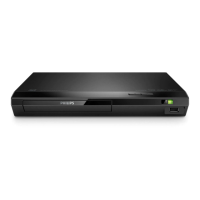
This document is a user manual for the Philips BDP2180K Blu-ray disc/DVD player. It provides instructions on how to set up, use, and troubleshoot the device, along with important safety and technical information.
Function Description:
The Philips BDP2180K is a Blu-ray disc/DVD player designed to play various disc formats including BD, BD 3D, DVD/VCD/CD, DivX Plus HD/MKV, MP3, and JPEG. It supports 3D video playback, requiring connection to a 3D TV via HDMI. The player also features USB connectivity for playing media from external storage devices and network connectivity for BD-Live content, software updates, and browsing PC media through DLNA. It includes karaoke functionality, smartphone control, and Philips EasyLink for integrated control with other Philips devices.
Important Technical Specifications:
- Compatibility: Hi-Speed USB (2.0)
- Class support: USB Mass Storage Class
- File system: FAT16, FAT32
- USB port: 5V===, 500mA
- Support HDD: A portable hard disc drive may be needed.
- Power supply rating: 100-240V~, 50Hz -60Hz
- Power consumption: 10W
- Power consumption in standby mode: < 0.5 W
- Dimensions (w x h x d): 310 x 39.5 x 217.7 (mm)
- Net Weight: 1.12 kg
- Accessories supplied: Remote control and 2 x AAA batteries, HDMI cable, User manual.
- Laser Specification:
- Laser Type (Diode): AlGaInN (BD), AlGaInP (DVD/CD)
- Wave length: 398nm to 413nm (BD), 645nm to 664nm (DVD), 770nm to 800nm(CD)
- Output power: 1.7mW (BD), 0.19mW(DVD), 0.25mW (CD)
- Playable media: BD-Video, BD 3D, DVD-Video, DVD+R/+RW, DVD-R/-RW, DVD+R/-R DL (Dual Layer), VCD/SVCD, Audio CD, CD-R/CD-RW, MP3 media, WMA media, JPEG files, DivX (Ultra)/DivX Plus HD media, MKV media, USB storage device.
- File format: Video: .avi, .divx, .mp4, .mkv, .rmvb, .rm; Audio: .mp3, .wma, .wav; Picture: .jpg, .gif, .png.
- Video Signal system: PAL / NTSC.
- HDMI output: 480i/576i, 480p/576p, 720p, 1080i, 1080p, 1080p/24Hz.
- Audio: Digital output: 0.5 Vp-p (75 ohm) Coaxial.
- HDMI output: Sampling frequency: MP3: 32 kHz, 44.1 kHz, 48 kHz; WMA: 44.1 kHz, 48 kHz.
- Constant bit rate: MP3: 112 kbps - 320 kbps; WMA: 48 kbps - 192 kpbs.
Usage Features:
- Setup and Connection: The player can be connected to a TV via HDMI or Coaxial. HDMI is recommended for optimal video and audio quality, especially for 3D content. Power connection is straightforward.
- Remote Control: A comprehensive remote control is provided for navigating menus, controlling playback, and accessing various functions. Batteries are inserted into the remote control.
- Disc Playback: Insert discs into the disc compartment. The player supports a wide range of formats, including Blu-ray, 3D Blu-ray, DVD, CD, and various multimedia files.
- USB Playback: Connect a USB storage device to the player to play media files (video, audio, pictures). The player will display a menu to browse the content on the USB device.
- Network Connectivity: Connect the player to the internet via wired (Ethernet) or wireless connection (requires a wireless router). This enables BD-Live features, software updates, and browsing media from a PC through DLNA.
- Basic Play Control: Standard playback controls (play, pause, stop, fast forward, rewind, skip) are available on the remote.
- Video, Audio, and Picture Options: Users can adjust various settings such as TV display format, HDMI video resolution, HDMI Deep Color, picture settings, night mode for audio, HDMI audio format, digital audio format (coaxial), PCM downsampling, and karaoke settings.
- DivX Videos: The player supports DivX video playback. Users can register their player for DivX VOD content.
- BonusView on Blu-ray: This feature allows for viewing picture-in-picture content on Blu-ray discs that support BonusView.
- BD-Live on Blu-ray: Access exclusive online services, such as movie trailers, games, ringtones, and other bonus content, by connecting the player to the internet.
- Play a Blu-ray 3D video: The player supports 3D Blu-ray disc playback when connected to a 3D TV.
- Set up a network: Instructions are provided for connecting the player to a home network, either wired or wirelessly, to access online features.
- Smartphone Control: Download the Philips MyRemote application to control the player from an iOS or Android device.
- Browse PC through DLNA: Stream video, music, and photo files from a computer on the home network to the player.
- Karaoke: Connect a microphone to the player and use the karaoke function with compatible discs. Adjust microphone volume and echo.
- Philips EasyLink: This feature allows for integrated control of multiple Philips devices connected via HDMI.
- Change Settings: Access the setup menu to customize video, audio, network, EasyLink, and preference settings.
- Update Software: The player's software can be updated via the internet or a USB storage device to improve performance and add new features.
Maintenance Features:
- Product Care:
- Do not insert objects other than discs into the disc compartment.
- Do not insert warped or cracked discs.
- Remove discs when not in use for extended periods.
- Use a microfiber cloth for cleaning.
- Troubleshooting: The manual provides solutions for common issues such as no picture on HDMI connection, no picture on the TV, disc not playing, DivX videos not playing, audio output problems, and network connectivity issues.
- Safety and Important Notice:
- 3D Health Warning: Advises caution for individuals with epilepsy or photosensitive seizures, and recommends against extended 3D viewing. Not recommended for children under 6.
- Risk of Electric Shock or Fire: Emphasizes not exposing the product to rain or water, keeping liquids away, and disconnecting from power if liquids are spilt.
- General Safety: Do not place near naked flames, insert objects into ventilation slots, or expose batteries to excessive heat. Disconnect from power during lightning storms.
- Laser Product: Class 1 laser product, avoid exposure to beam.
- Risk of Injury/Damage: Do not touch the disc optical lens.
- Risk of Overheating: Ensure proper ventilation and do not install in confined spaces.
- Risk of Contamination: Do not mix old and new batteries. Remove exhausted batteries. Dispose of batteries properly.
- Risk of Swallowing Batteries: Keep coin-type batteries out of reach of children.
- Environmental Care: Information on proper disposal of the product and batteries to minimize environmental impact.
- Copyright Information: Details on copyright and licensing for various technologies used in the player, including Blu-ray Disc, HDMI, Dolby Digital, DTS, DivX, Java, and Cinavia.

 Need help?
 General

 To Next Page