EasyManua.ls Logo

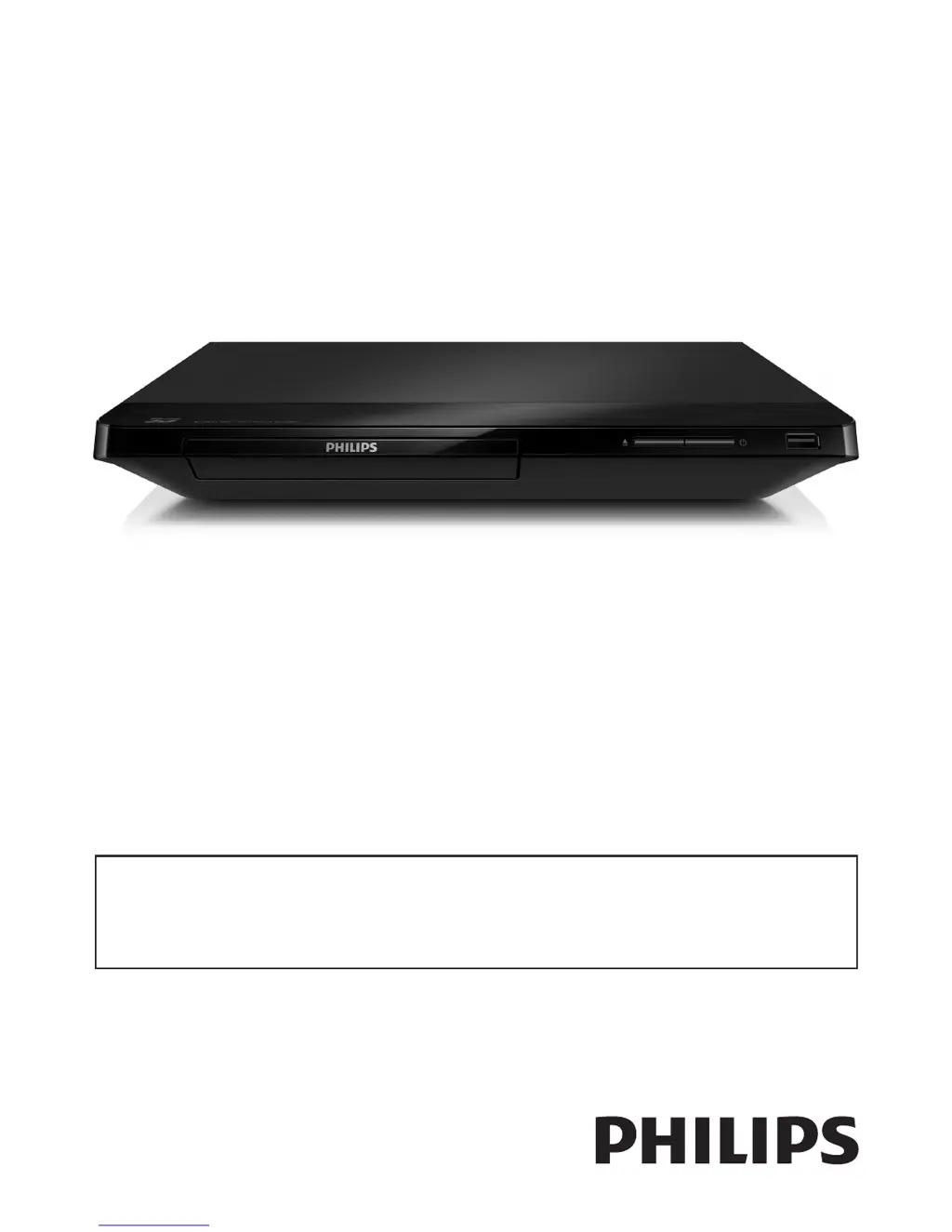
Philips BDP2205 - User Manual

Philips BDP2205
28 pages
Print Icon
To Next Page IconTo Next Page
Loading...
BDP2205
User manual
EN: For further assistance, call the customer support service in your country.
To obtain assistance in the U.S.A., Canada, Puerto Rico, or the U.S. Virgin Islands, contact Philips Customer
Care Center at 1-866-310-0744
To obtain assistance in Mexico, contact Philips Customer Care Center at 01 800 839 1989;
Mexico city: 5887-9736
For Product recycling information, please visit - www.recycle.philips.com
For product support, visit
www.hd.philips.com
P&F USA, Inc.

Other manuals for Philips BDP2205

Questions and Answers

  • D
    David ThompsonSep 2, 2025
    How to fix a Philips Blu-ray Player when the wireless network is not found or distorted?
    • S
      Sandra WebbSep 2, 2025
      Ensure that the network is correctly connected and the network installation is complete. Make sure the wireless network is not disturbed by microwave ovens, DECT phones, or other neighboring Wi-Fi devices. If the wireless network still does not work properly, try a wired network installation.
  • J
    James ThomasAug 31, 2025
    What to do if my Philips Blu-ray Player cannot play a disc?
    • K
      Kristine GeorgeAug 31, 2025
      Try cleaning the disc first. Then, make sure the disc is correctly loaded. Verify that the player supports the disc type, and that the player supports the region code of the DVD or BD. For DVD±RW or DVD±R discs, ensure that the disc is finalized.
  • D
    Danielle DiazAug 29, 2025
    Why internet services do not work on my Philips Blu-ray Player?
    • C
      Cheryl WilsonAug 29, 2025
      Ensure the Blu-ray player is correctly connected to the network and that the network installation is complete. Also, check the router connection, referring to its user manual for guidance.
  • K
    Katherine RubioAug 27, 2025
    How to fix Philips Blu-ray Player when I cannot access BD-Live features?
    • J
      Jennifer OlsenAug 27, 2025
      First, ensure that your player is connected to the network and that the network installation is complete. Also, verify that the Blu-ray disc supports BD-Live features. Finally, try clearing the memory storage.
  • H
    Holly BrooksAug 26, 2025
    Why does EasyLink feature not work on my Philips Blu-ray Player?
    • D
      dominicmedinaAug 26, 2025
      Make sure that the Blu-ray player is connected to a Philips brand EasyLink TV, and that the EasyLink option is turned on.
  • S
    stevenwoodAug 25, 2025
    Why is there no sound on HDMI connection with my Philips Blu-ray Player?
    • R
      robert04Aug 25, 2025
      You may not hear any sound from the HDMI output if the connected device is non-HDCP compliant or only DVI-compatible.
  • E
    Erin GreenAug 22, 2025
    What to do if my Philips Blu-ray Player has no picture?
    • V
      Vincent WilliamsAug 22, 2025
      Make sure that the TV is switched to the correct source input for this player.

Summary

Use your Blu-ray disc; DVD player

Basic play control

Learn how to control playback functions like play, pause, and stop.

Set up a network

Connect the player to the internet via wired or wireless connection.

Change settings

Picture

Configure display settings such as resolution, color, and TV aspect ratio.

Sound

Adjust audio output formats, night mode, and digital audio settings.

Network (installation, status...)

Manage network connections, view status, and name the product.

Update software

Update software via the Internet

Learn how to update the player's software using an internet connection.

Troubleshooting

Philips BDP2205 Specifications

Power IconPower
power consumption11 W
power supply110V, 60Hz
standby power consumption< 1W
Connectivity IconConnectivity
front connectionsUSB 2.0
rear connectionsDigital coaxial out, Ethernet, HDMI output
integrated connectionsWi-Fi
Weight and Dimensions IconWeight and Dimensions
product dimensions (W x H x D)310 x 40 x 217 mm
product weight1.2 kg
packaging dimensions (W x H x D)355 x 87 x 279 mm
weight incl. packaging1.56 kg
outer carton dimensions (L x W x H)35.5 x 27.9 x 8.7 cm

Related product manuals