EasyManua.ls Logo

Philips BDP2285/F7 - User Manual

Philips BDP2285/F7
3 pages
Print Icon
To Next Page IconTo Next Page
Loading...
Philips
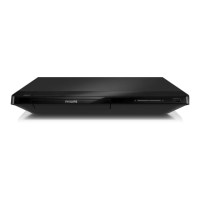
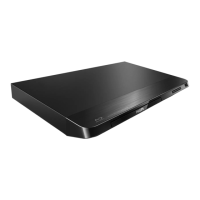
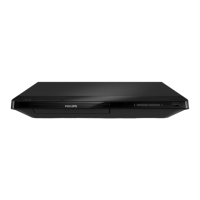
Blu-ray Disc/ DVD player
3D Blu-ray Disc playback
Netflix
Built-in WiFi
BDP2285
3D Blu-ray with built-in Wi-Fi
Stunning 3D effect in picture depth and action that both leap off the screen, and draw
you deep into the experience. Enjoy the best of internet on your TV with Netflix, Vudu
and YouTube.
See more
Blu-ray 3D Disc playback for a full HD 3D experience at home
DivX Plus HD Certified for high definition DivX playback
Netflix-Streaming TV Episodes and Movies over the Internet
DVD video upscaling to 1080p via HDMI for near-HD images
Subtitle Shift for widescreen without any missing subtitles
Access your favorite YouTube videos & Picasa photos easily
Hear more
Dolby TrueHD for high fidelity sound
Engage more
BD-Live (Profile 2.0) to enjoy online Blu-ray bonus content
Direct remote access to Netflix and Vudu movie services
USB 2.0 plays video/music from USB flash/hard disk drive
Built-in WiFi-n for faster, wider wireless performance
EasyLink to control all HDMI CEC devices via a single remote

Questions and Answers

  • G
    Gary OrrSep 10, 2025
    Why Philips BDP2285/F7 Blu-ray Player disc does not play high-definition video?
    • W
      wilsonjohnSep 10, 2025
      If the disc does not play high-definition video on your Philips Blu-ray Player, ensure that the disc contains high-definition video. Also, make sure that the TV supports high-definition video.
  • A
    Allen WilliamsAug 23, 2025
    Why is there no sound on HDMI connection with Philips Blu-ray Player?
    • L
      Leah CastroAug 23, 2025
      You may not hear any sound from the HDMI output on your Philips Blu-ray Player if the connected device is non-HDCP compliant or only DVI-compatible.
  • T
    Tyler SaundersAug 25, 2025
    How to fix Philips BDP2285/F7 Blu-ray Player buttons that do not work?
    • A
      Anthony OdonnellAug 25, 2025
      If the buttons on your Philips Blu-ray Player do not work, disconnect the player from the power supply for a few minutes, and then reconnect it.
  • M
    Madison ChapmanAug 27, 2025
    Why no audio output from loudspeakers with Philips BDP2285/F7 Blu-ray Player?
    • C
      Corey MayAug 27, 2025
      If there is no audio output from the loudspeakers of the external audio device (home theater or amplifier) when using your Philips Blu-ray Player, ensure that the audio cables are connected to the audio input of the audio device. Also, switch the external audio device to the correct audio source input.
  • A
    Ashlee KnightAug 27, 2025
    Why EasyLink feature does not work on Philips BDP2285/F7?
    • W
      wrollinsAug 27, 2025
      If the EasyLink feature does not work on your Philips Blu-ray Player, ensure that the player is connected to a Philips brand EasyLink TV and that the EasyLink option is turned on.
  • J
    jacob08Aug 29, 2025
    Why Philips Blu-ray Player cannot play a disc?
    • A
      Alan NguyenAug 29, 2025
      If your Philips Blu-ray Player cannot play a disc, try the following: First, clean the disc. Then, make sure the disc is correctly loaded. Check the 'Specifications' section to confirm that the player supports the disc type. Also, verify that the player supports the region code of the DVD or BD. If you are using a DVD±RW or DVD±R, ensure that the disc is finalized.
  • D
    David HernandezSep 18, 2025
    Why Philips BDP2285/F7 Blu-ray Player cannot play online video via Miracast?
    • G
      Glenda CooperSep 18, 2025
      If you cannot play and stream online video through Miracast on your Philips Blu-ray Player, ensure that Miracast is enabled on the Miracast source device and on the player itself. If the Miracast connection fails, press the setup button, select [Setup] > [Network] > [Miracast role] > [Group owner] > [Auto], then repeat the Miracast connection. Also, ensure that the Miracast source device supports playing videos from the internet while performing Miracast streaming to an external player simultaneously.
  • J
    Juan CarrSep 12, 2025
    What to do if Philips Blu-ray Player cannot play DivX video files?
    • D
      david30Sep 12, 2025
      If your Philips Blu-ray Player cannot play DivX video files, ensure that the DivX video file is complete and that the video file name extension is correct.
  • S
    Susan JacobsonSep 8, 2025
    Why do internet services work slowly on Philips BDP2285/F7?
    • D
      Dylan SmithSep 8, 2025
      If internet services work slowly on your Philips Blu-ray Player, consult your wireless router’s user manual for information on indoor range, transfer rate, and other factors of signal quality. You may also need a high-speed internet connection for your router.
  • B
    Brian BanksSep 5, 2025
    How to access BD-Live features on Philips BDP2285/F7 Blu-ray Player?
    • J
      Joshua HouseSep 5, 2025
      If you cannot access BD-Live features on your Philips Blu-ray Player, make sure the player is connected to the network and that the network installation is complete. Also, verify that the Blu-ray disc supports BD-Live features. Finally, clear the memory storage.

Philips BDP2285/F7 Specifications

General IconGeneral
TypeBlu-ray Player
Video upscalingYes
HDMI Output1
USB Port1
Internet ConnectivityYes
Wi-FiNo
3D PlaybackNo
Playable disc formatsCD
Video OutputComposite Video

Related product manuals