7
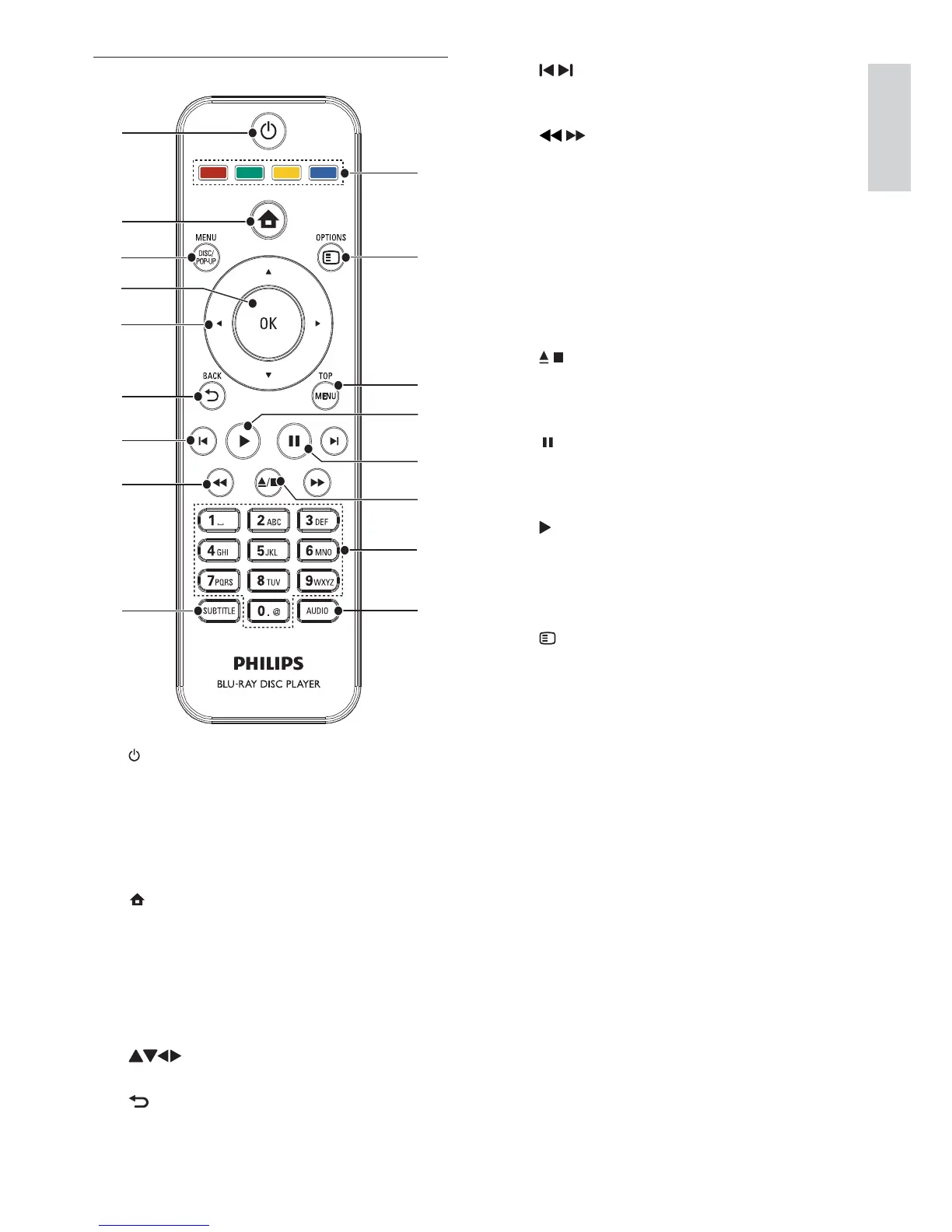
g /
Skip to the previous or next title, chapter, •
or track.
h
/
Search backward or forward.•
i SUBTITLE
Select a subtitle language on a disc.•
j AUDIO
Select an audio language or channel on •
a disc.
k Alphanumeric buttons
Select an item to play.•
Enter values.•
l
/
Stop play.•
Press and hold to open/close the disc •
compartment.
m
Pause play.•
Move the paused picture one step •
forward.
n
Start or resume play.•
o TOP MENU
• BD: Display the top menu.
• DVD: Display the title menu.
p
OPTIONS
Access options for the current activity or •
selection.
q Color buttons
• BD: Select tasks or options.
Remote control
a
b
c
d
e
f
g
h
i
j
k
l
m
n
o
p
q
a
Turn on this product or switch to •
standby mode.
When EasyLink is enabled, press and •
hold for at least three seconds to turn all
connected HDMI CEC compliant devices
to standby.
b
Access the home menu of this product.•
c DISC MENU / POP-UP MENU
• BD: Access or exit the pop-up menu.
• DVD: Access or exit the disc menu.
d OK
Confirm an entry or selection.•
e
Navigate through the menus.•
f
BACK
Return to a previous display menu.•
English
EN



 To Next Page