14
FUNCTIONAL OVERVIEW
EN
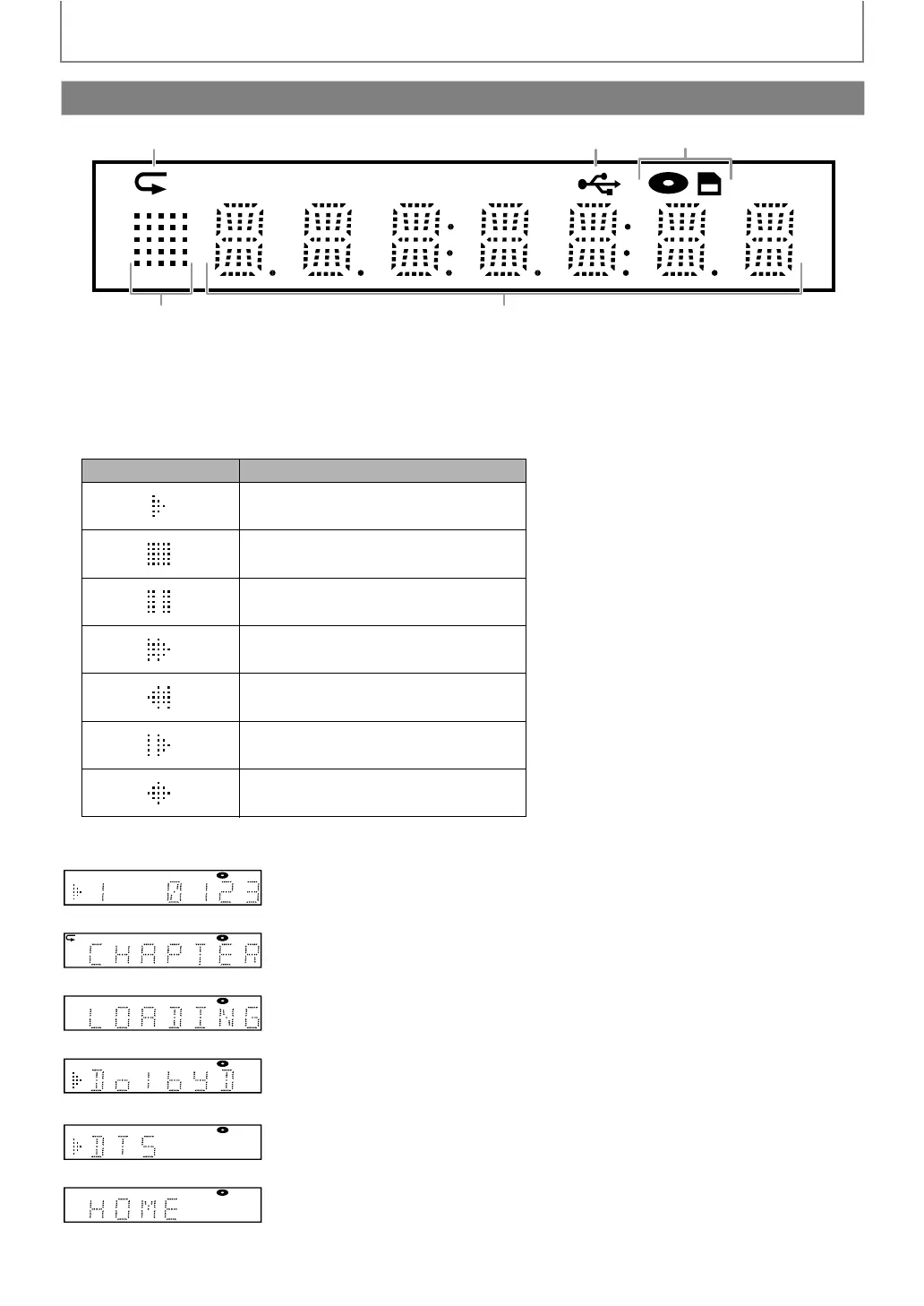
1. Displays repeat icon. (Appears during repeat playback.)
2. Displays USB icon (when the supplied USB wireless LAN adapter is connected).
3. Displays media mode icon (disc mode or SD card mode).
4. Displays playback status icon. Refer to the table below.
5. Displays information such as title number, elapsed playing time, repeat type, menu type, etc.
e.g.)
Front Panel Display
1 2 3
4
5
* Brightness of the display can be adjusted. Refer to “Front Panel Brightness” in “LIST OF SETTINGS” on page 46.
Playback status icon Mode
Playback is in progress
Stop mode
Pause mode
Fast forward mode
Fast reverse mode
Slow forward mode
Loading
Disc is being played back.
Indicating the current title number and the elapsed time.
Current chapter is in chapter repeat mode during playback of disc.
Loading a disc.
Dolby Digital audio is being played back during playback of disc.
DTS audio is being played back during playback of disc.
Home menu is displayed and the unit is in disc mode.



 To Next Page