EasyManua.ls Logo

Philips BDP5320 - Page 17

Philips BDP5320
68 pages
Print Icon
To Next Page IconTo Next Page
To Previous Page IconTo Previous Page
Loading...
17
CONNECTIONS
EN
EN
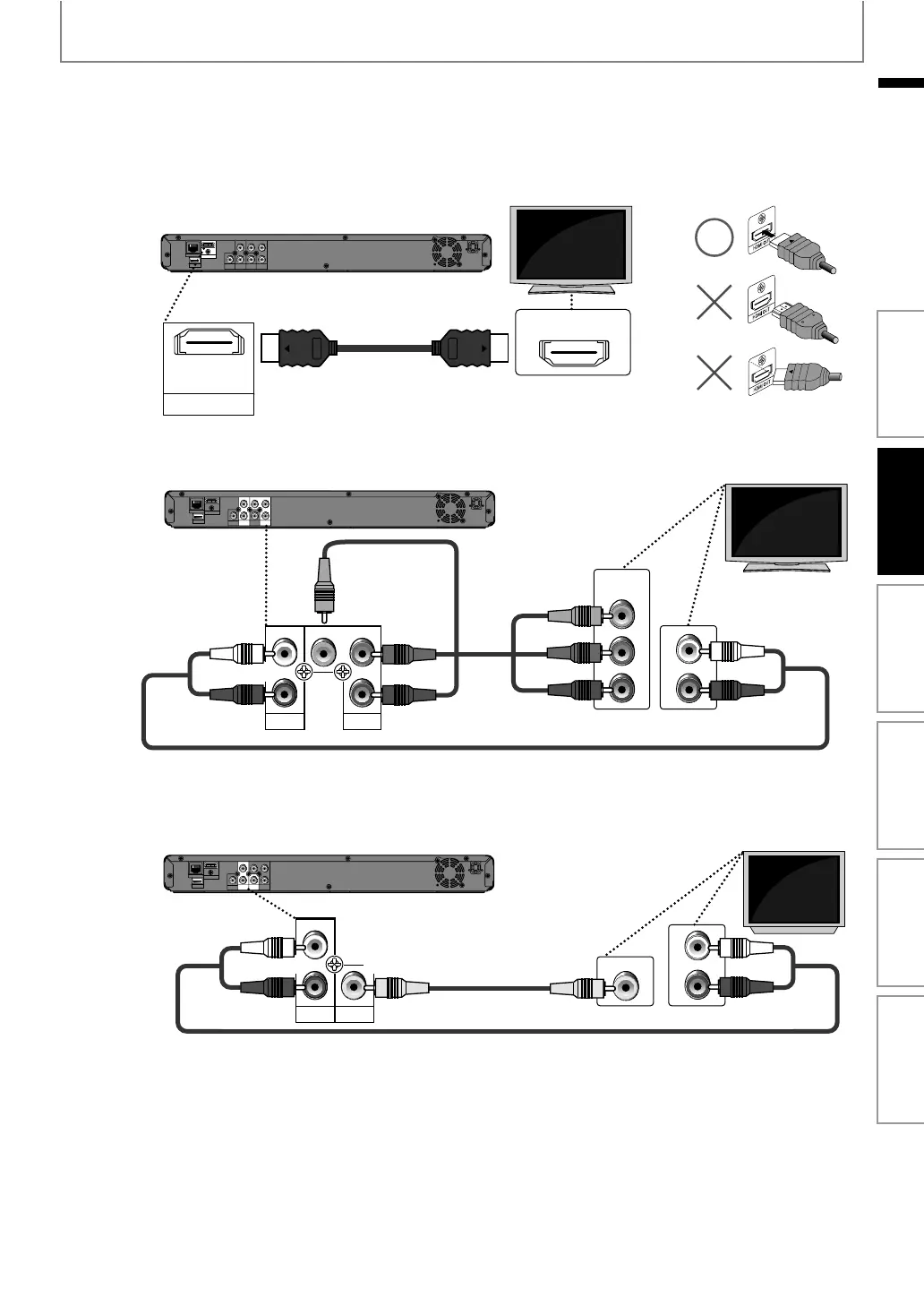
HDMI Video / Audio Connection
Component Video + Standard Audio Connection
Standard Video + Standard Audio Connection
2
Connect the cables by following the descriptions below.
DIGITAL OUT
PCM/BITSTREAM
PR/CR
PB/CB
Y
L
R
COMPONENT
VIDEO OUT
AUDIO
OUT
VIDEO
OUT
LAN
Wireless LAN
HDMI OUT
COAXIAL
A
HDMI IN
($-)/54
HDMI cable
Your TV
L
Y
P
R
/C
R
P
B
/C
B
R
COMPONENT
VIDEO OUT
AUDIO
OUT
DIGITAL OUT
PCM/BITSTREAM
PR/CR
PB/CB
Y
L
R
COMPONENT
VIDEO OUT
AUDIO
OUT
VIDEO
OUT
LAN
Wireless LAN
HDMI OUT
COAXIAL
B
COMPONENT
VIDEO IN
Y
PR/CR
PB/CB
AUDIO IN
R
L
RCA component
video cable
Your TV
RCA audio cable
DIGITAL OUT
PCM/BITSTREAM
PR/CR
PB/CB
Y
L
R
COMPONENT
VIDEO OUT
AUDIO
OUT
VIDEO
OUT
LAN
Wireless LAN
HDMI OUT
COAXIAL
C
AUDIO IN
R
L
L
R
AUDIO
OUT
VIDEO
OUT
VIDEO IN
Your TV
RCA video cable
RCA audio cable
Introduction Connections Basic Setup Playback OthersFunction Setup

Table of Contents

Other manuals for Philips BDP5320

Related product manuals