4 EN
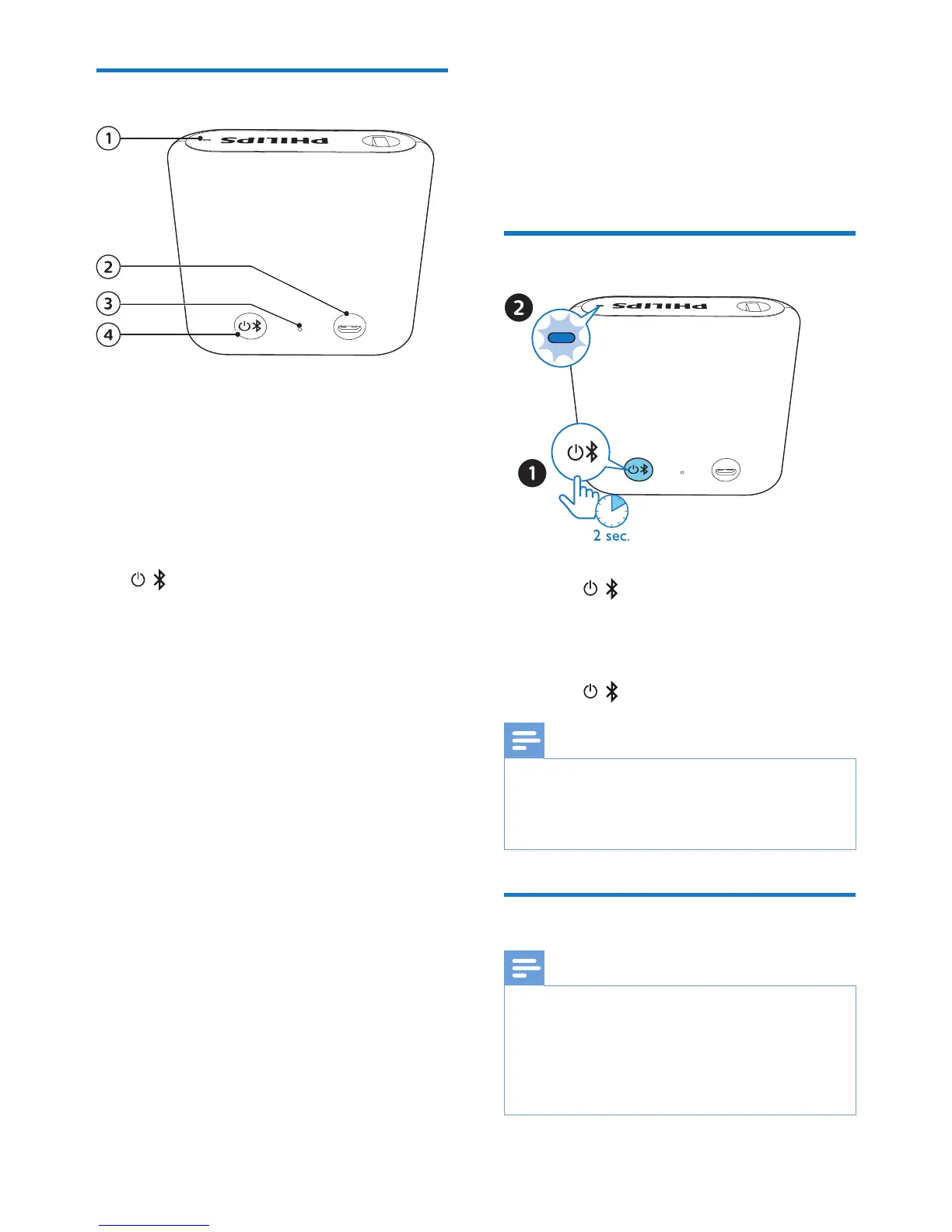
Overview of the speaker
a LED indicator
• Indicate the battery or Bluetooth
connection status.
b Micro USB socket
• Charge the speaker.
c Reset hole
• Reset the speaker.
d
/
• Turn the speaker on or o.
• Enter Bluetooth pairing mode.
• Disconnect Bluetooth connection.
4 Get started
Always follow the instructions in this
chapter in sequence.
Turn on/o
• To turn the speaker on, press and
hold
/ for two seconds.
» The LED indicator starts ashing.
» The speaker beeps.
• To turn the speaker o, press and
hold
/ for two seconds again.
Note
•
When there is no Bluetooth connection
for 15 minutes or the battery is at low level,
the speaker turns o automatically to save
power.
Charge the built-in battery
Note
•
It takes you approximately two hours to
fully charge the battery.
• The micro USB socket is for charging only.
• Rechargeable battery has a limited number
of charge cycles. Battery life and number of
charge cycles vary by use and settings.



 To Next Page