11 EN
Skip to a track
For CD:
Press / to select another track.
For MP3 disc and USB:
1 Press / to select an album or a folder.
2 Press / toselectatrackorale.
Program tracks
You can program a maximum of 20 tracks.
1 Press PROG to activate the program
mode.
2 For MP3 tracks, press / to select an
album.
3 Press / to select a track, and then
press PROGtoconrm.
4 Repeat steps 2-3 to program more tracks.
5 Press to play the programmed tracks.
» During play, [PROG] (program) is
displayed.
• To erase the program, in the stop
position, press .
Play from Bluetooth-enabled
devices
Note
• The effective operation range between the unit and
your Bluetooth enabled device is approximately 10
meters (30 feet).
• Any obstacle between the system and the device can
reduce the operational range.
• Compatibility with all Bluetooth devices is not
guaranteed.
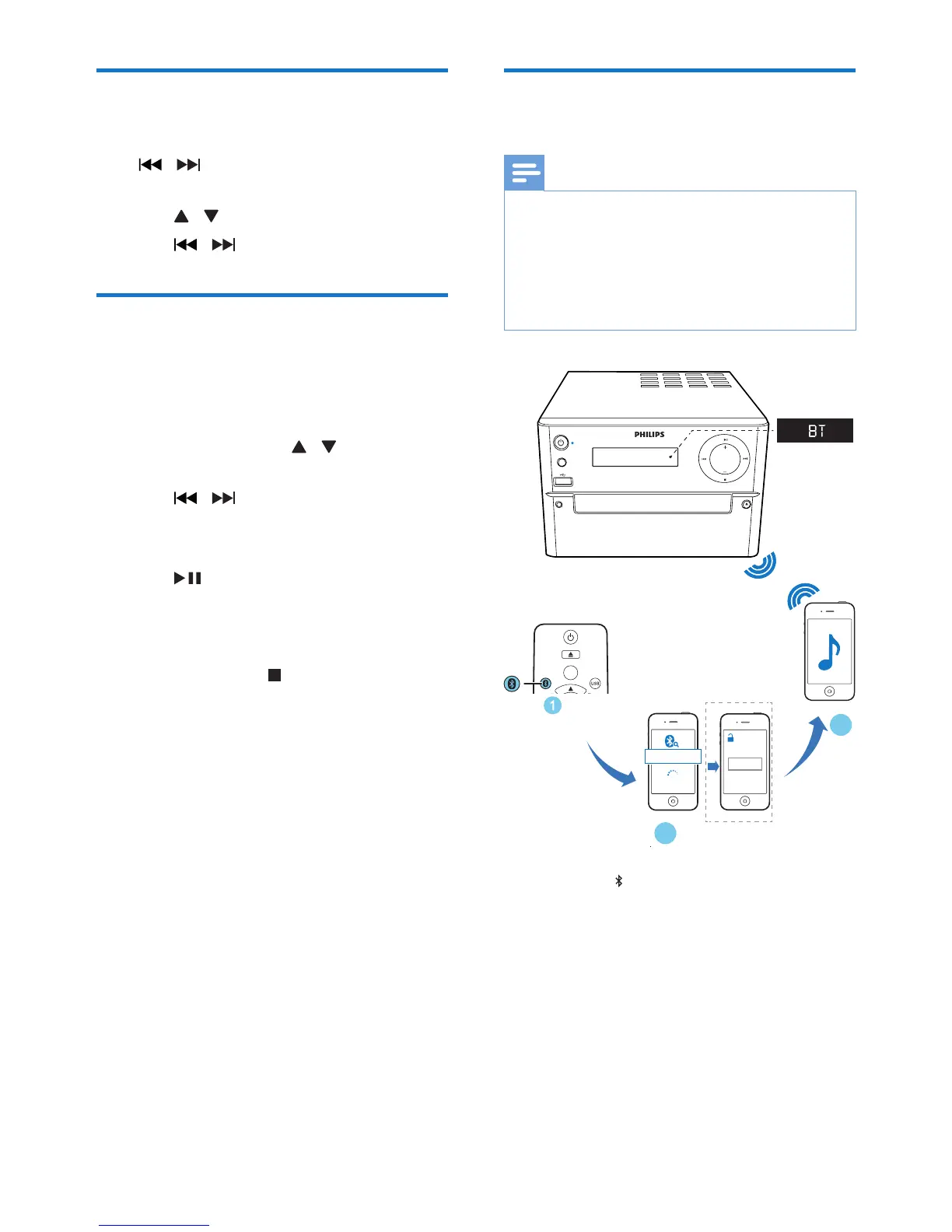
1 Press FM/ repeatedly to select the
Bluetooth source.
» [BT] (Bluetooth) is displayed.
» TheBluetoothindicatorashesblue.
2 On your device that supports Advanced
AudioDistributionProle(A2DP),enable
Bluetooth and search for Bluetooth devices
that can be paired (refer to the user
manual of the device).
SOURCE
AUDIO IN
VOLUME
0000
PIN
BTM2180
CD
AUDIO IN
PRESET/ALBUM
FM



 To Next Page