9EN
4 Play
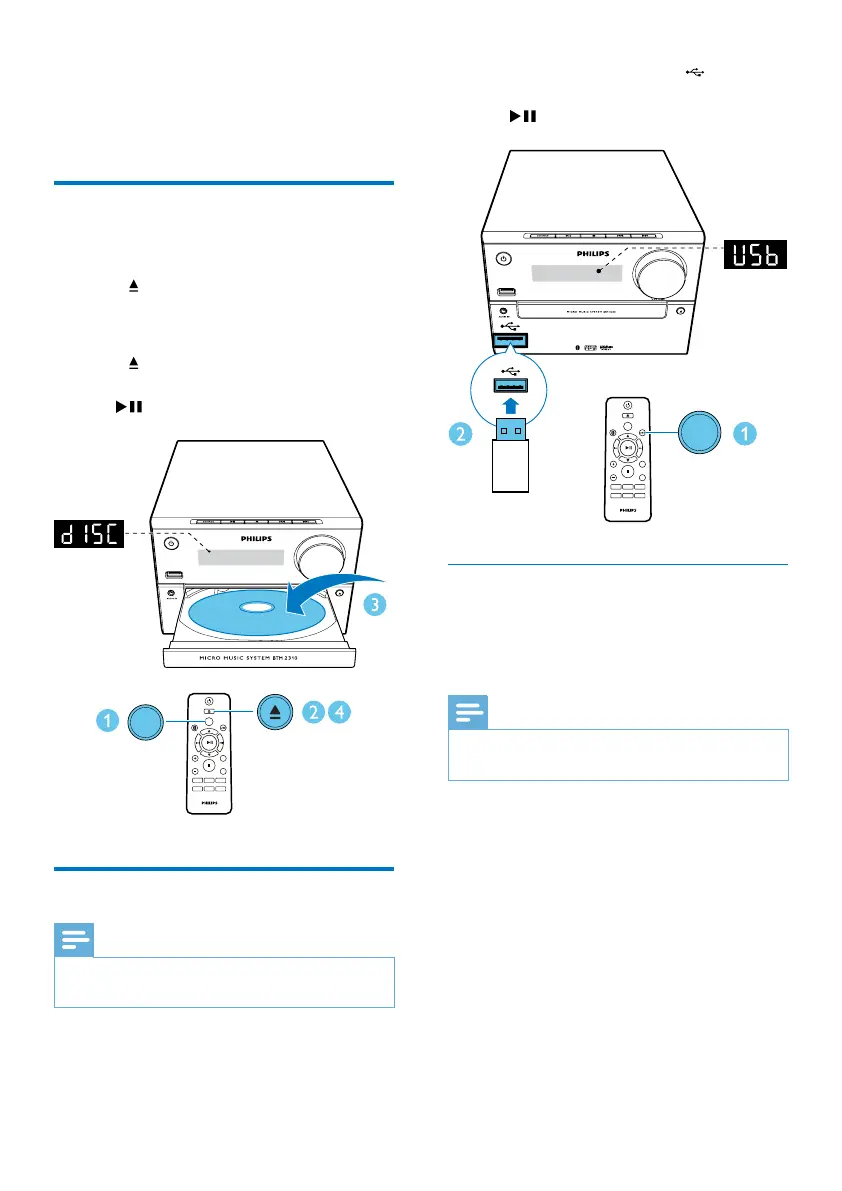
Play from disc
1
Press CD to select the CD source.
2 Press to open the disc compartment.
3 Insert a disc with printed side facing
upward.
4 Press to close the disc compartment.
» Play starts automatically. If not, press
.
Play from USB
Note
•
Make sure that the USB device contains playable audio
content.
1 Press USB/AUDIO IN repeatedly to select
the USB source.
CD
AUDIO IN
PRESET/ALBUM
MUTE
SHUFFLE
CLOCK SLEEP
TIMER
PROG
SOUND
FM
VOL
DISPLAY
REPEAT
CD
2 Insert a USB device into the socket.
» Play starts automatically. If not, press
.
Charge your device
You can charge your device through the USB
socket on this product with a USB cable (not
supplied).
Note
•
The maximum current for USB charging is 1 A.
• Not all devices for USB charging are guaranteed.
CD
AUDIO IN
PRESET/ALBUM
MUTE
SHUFFLE
CLOCK SLEEP
TIMER
PROG
SOUND
FM
VOL
DISPLAY
REPEAT
USB



 To Next Page