11EN
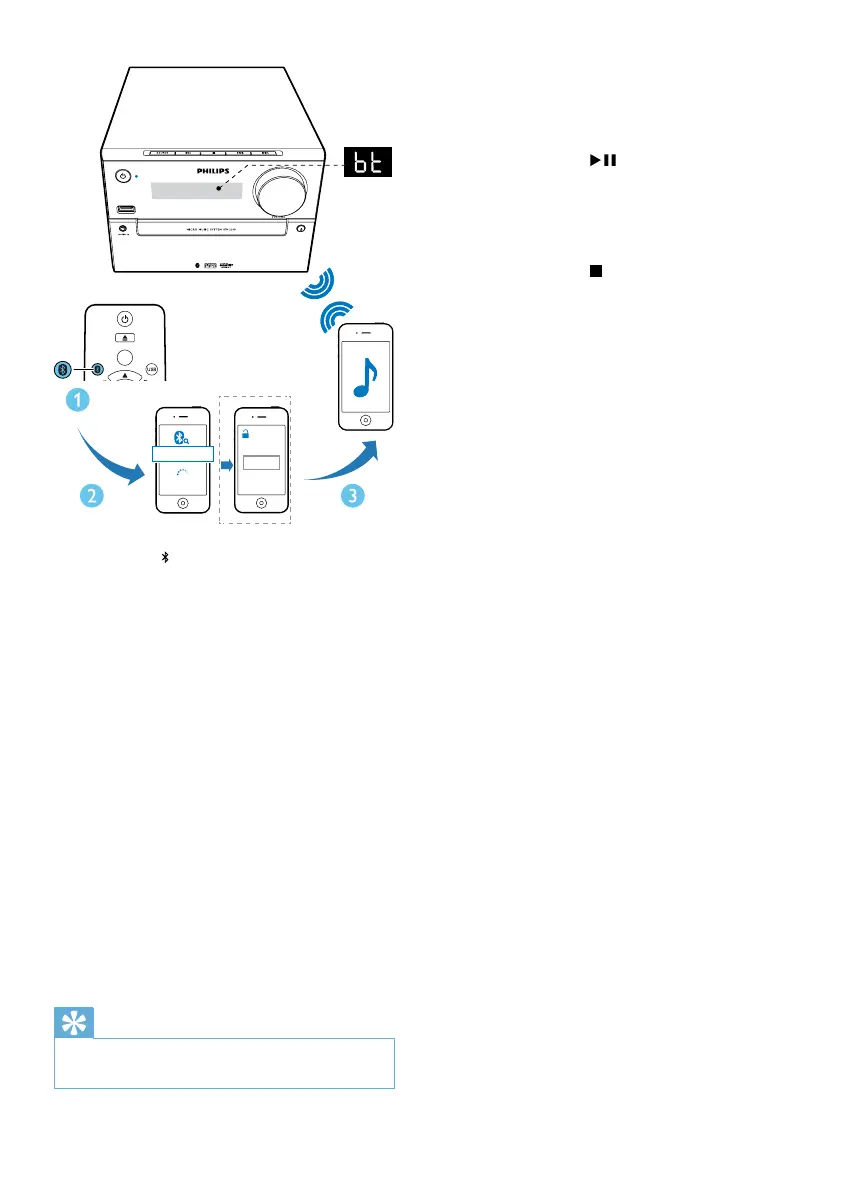
1 Press FM/ repeatedly to select the
Bluetooth source.
» [BT] (Bluetooth) is displayed.
» TheBluetoothindicatorashesblue.
2 On your device that supports Advanced
AudioDistributionProle(A2DP),enable
Bluetooth and search for Bluetooth devices
that can be paired (refer to the user
manual of the device).
3 Select 'PHILIPS BTM2310' on your
Bluetooth enabled device and if necessary
input '0000' as the pairing password.
» After successful pairing and connection,
the Bluetooth indicator turns solid
blue, and the unit beeps.
4 Play audio on the connected device.
» Audio streams from your Bluetooth
enabled device to this unit.
Tip
•
The unit can memorize up to 4 previously connected
Bluetooth devices.
CD
AUDIO IN
PRESET/ALBUM
FM
0000
PIN
BTM2310
To disconnect the Bluetooth-enabled device:
• Deactivate Bluetooth on your device; or
• Move the device beyond the
communication range; or
• Press and hold
for 3 seconds.
» The current Bluetooth connection is
disconnected.
To clear Bluetooth pairing history:
• Press and hold
for 8 seconds.
» The current Bluetooth is cleared.



 To Next Page