Set time
1. Press
2. Press
3. Enter the time (HH-MM) in 24-hour format
4. Press to save the settings
Make a call
Press and dial the number
OR
Dial the number and press
Answer a call
When the phone rings, press .
End a call
Press
3
Enjoy
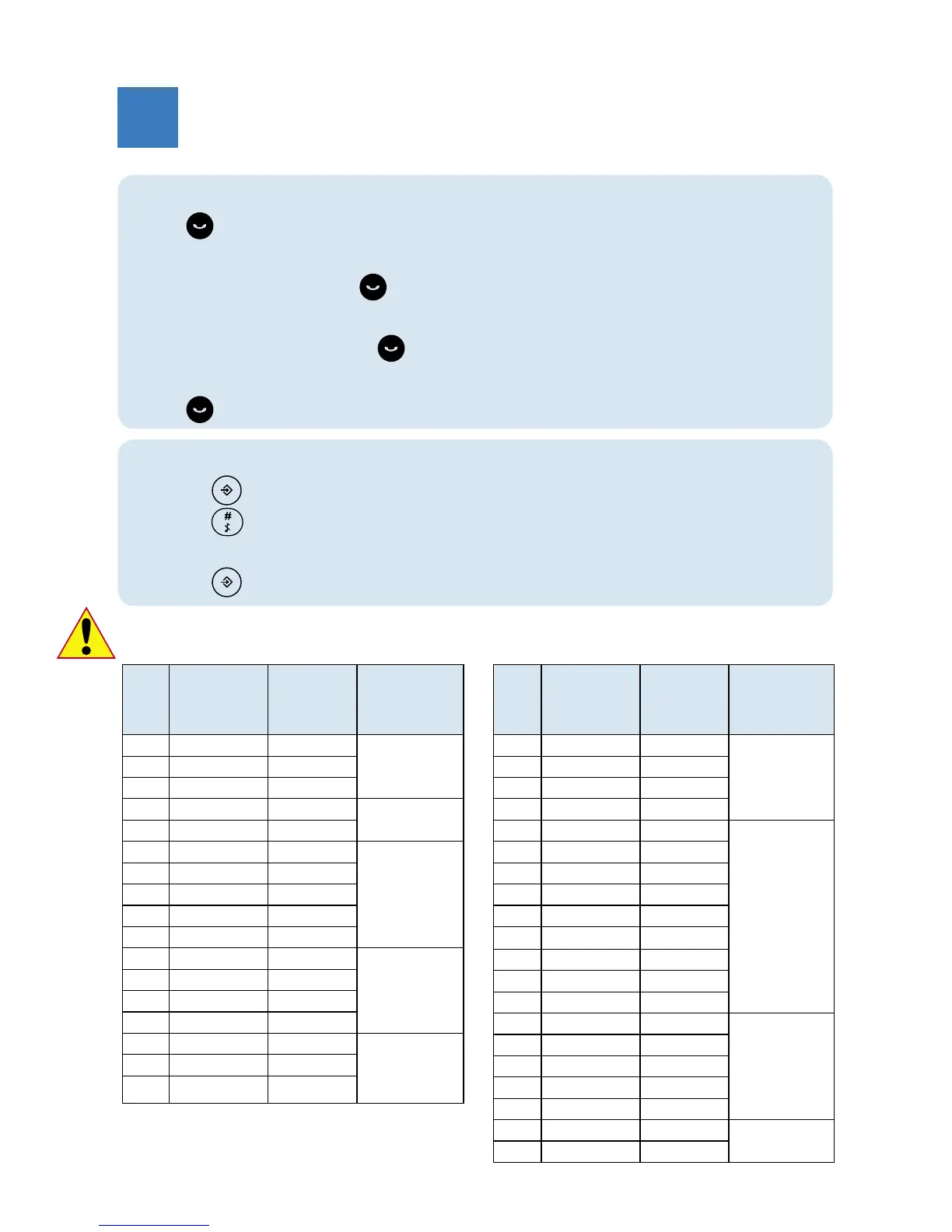
Country setting table
Code Country * Default
outgoing
message
language
* Outgoing
message
languages
available
01 Germany German 1 – German
2 – Turkish
02 Austria German
03 Turkey Turkish
04 UK English 1 – English
05 Ireland English
06 France French 1 – French
2 – Italian
3 – Portuguese
4 – Greek
5 – Spanish
07 Italy Italian
08 Portugal Portuguese
09 Greece Greek
10 Spain Spanish
11-1 Switzerland German 1 – French
2 – German
3 – Italian
4 – English
11-2 Switzerland French
11-3 Switzerland Italian
12 France French
13 Netherlands Dutch 1 – Dutch
2 – French
3 – German
4 – English
14-1 Belgium Dutch
14-2 Belgium French
Code Country * Default
outgoing
message
language
* Outgoing
message
languages
available
15 Sweden Swedish 1 – Sweden
2 – Norwegian
3 – Finnish
4 – Danish
16 Norway Norwegian
17 Finland Finnish
18 Denmark Danish
21 Romania Romanian 1 – Romanian
2 – Polish
3 – Czech
4 – Hungarian
5 – English
22 Poland Polish
23 Czech Czech
24 Hungary Hungarian
25 Slovakia Czech
26 Slovenia English
27 Croatia English
28 Bulgaria English
29 Serbia English
30 Singapore English 1 – English
2 – Bahasa
31 Indonesia English
32 Malaysia English
35 Australia English
36 New Zealand English
39 Brazil Brazilian 1 – Brazilian
2 – Spanish
40 Mexico Spanish
* This is applicable to CD145 only. For more information about changing the outgoing message
languages, see section 5.6.5 of the CD145 user manual.



 To Next Page