8
EN
Note
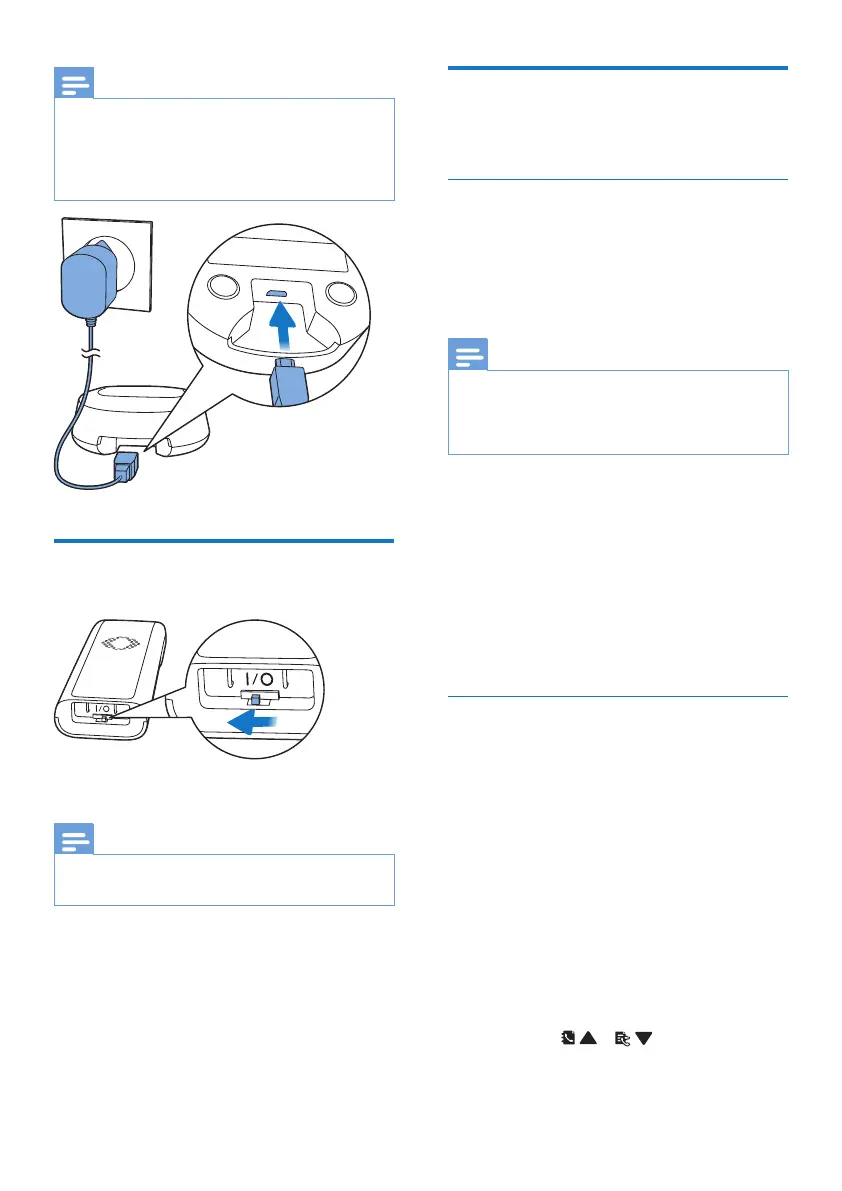
• For the minimum requirement of the power
bank, see the chapter “Technical Data”.
• While using a power bank as an alternative
power source, it may drain very soon if you
charge the handset at the same time.
Switch on the handset
Note
• The batteries will not charge if the handset
switch is not turned on.
Congure your phone
(country dependent)
Set the country/language
Select your country/language, then
press MENU/OK to conrm.
» The country/language setting is
saved.
Note
• The country/language setting option is
country dependent. If no welcome message
is displayed, it means the country/language
setting is preset for your country.
To re-set the language, see the
following steps.
1
Select MENU/OK > [PHONE
SETUP] > [LANGUAGE], then press
MENU/OK to conrm.
2
Select a language, then press
MENU/OK to conrm.
» The setting is saved.
Set the date and time
1
Press MENU/OK.
2
Select [PHONE SETUP] >
[DATE/TIME], then press
MENU/OK to conrm.
3
Press the numeric buttons to enter
the date, then press MENU/OK to
conrm.
» The time setting menu is
displayed on the handset.
4
Press the numeric buttons to enter
the time.
• If the time is in 12-hour format,
press / to select [AM]
or [PM].
5
Press MENU/OK to conrm.



 To Next Page