9
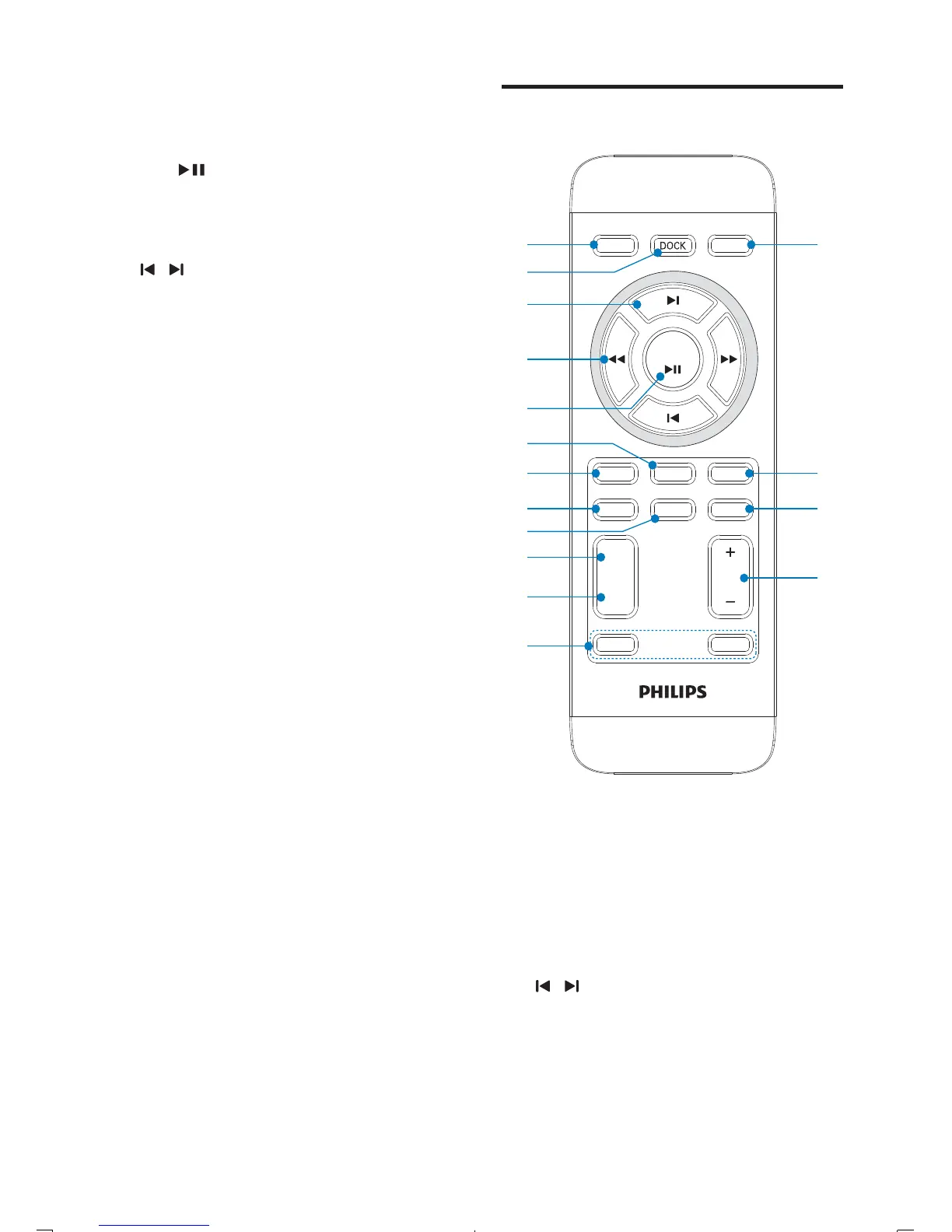
Overview of the remote
control
a POWER
Turn on the unit or switch to •
standby mode.
Stop alarm.•
Deactivate the sleep timer.•
b DOCK
Select iPhone/iPod/iPad source.•
c
/
Skip to the previous/next audio file.•
Select a preset radio station.•
Navigate through the iPod/iPhone/•
iPad menu.
Adjust time.•
REP ALM
SLEEP
SET TIME
MENU
VOL
DSC
DBB
POWER
OK
TUNER
MP
3
LINK
MUTE
BRIGHTNESS
PROG
ALM 1
ALM 2
d
c
e
a
b
g
f
h
j
i
k
l
p
o
n
m
i SOURCE
Select a source: iPod/iPhone/iPad, •
FM tuner or MP3 link.
j OK/
Start or pause iPod/iPhone/iPad play.•
Confirm selection.•
Select FM stereo or FM mono.•
k
/
Skip to the previous/next audio file.•
Select a preset radio station.•
Adjust time.•
l VOL +/-
Adjust volume.•
m Dock for iPod/iPhone/iPad
Load an iPod/iPhone/iPad.•
n FM antenna
Improve FM reception.•
o MP3-LINK
Jack for an external audio device.•
EN



 To Next Page