VOL
POWER
SLEEP
AL 1 AL 2
OK
PROG
MENU
TUNERDOCK
REP ALM
AUDIO IN
BRIGHTNESS
SET TIME
MUTE
VOL
POWER
SLEEP
AL 1 AL 2
OK
PROG
MENU
TUNERDOCK
REP ALM
AUDIO IN
BRIGHTNESS
SET TIME
MUTE
User Manual
www.philips.com/welcome
Always there to help you
Register your product and get support at
Question?
Contact
Philips
VOL
POWER
SLEEP
AL 1 AL 2
OK
PROG
MENU
TUNERDOCK
REP ALM
AUDIO IN
BRIGHTNESS
SET TIME
MUTE
VOL
POWER
SLEEP
AL 1 AL 2
OK
PROG
MENU
TUNERDOCK
REP ALM
AUDIO IN
BRIGHTNESS
SET TIME
MUTE
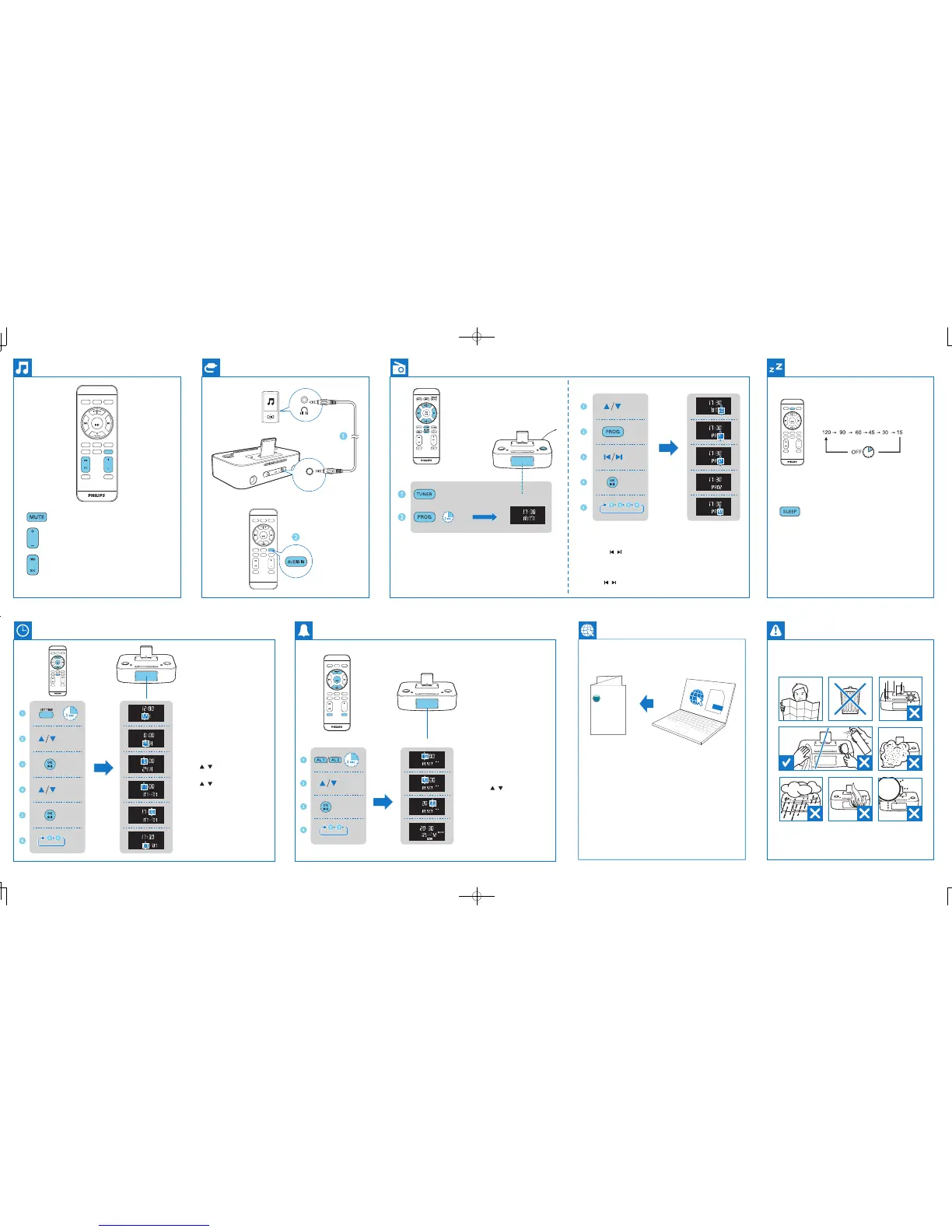
When the system is turned on, press it to select the sleep timer period.
When [OFF] is displayed, the sleep timer is deactivated.
Program radio stations manually
1 Tune to a radio station.
2 Press PROG to activate the program mode.
3 Press
/ to select a number.
4 Press OK to conrm.
5 Repeat the above steps to program other stations.
Select a preset radio station
Press / to select a preset number.
Program radio stations automatically
In the tuner mode, press and hold PROG for more than 3 seconds to activate
automatic program mode.
Set Alarm
1 Press and hold AL 1/AL 2 for 3
seconds.
2 Press
/ to set the hour.
3 Press OK to conrm.
4 Repeat steps 2-3 to set the minute,
select when to ring the alarm,
choose alarm sound source, and set
alarm volume.
Set Time
1 In standby mode, press and hold
SET TIME for 3 seconds.
2 Press
/ to select the 12/24 hour
format.
3 Press OK to conrm.
4 Press
/ to set the hour.
5 Press OK to conrm.
6 Repeat steps 4-5 to set the minute, day,
month, and year.
Mute or resume sound.
VOL
Increase or decrease volume.
DBB: Turn on or off dynamic bass enhancement.
DSC: Press to select a sound effect: [POP] (pop); [JAZZ] (Jazz);
[ROCK] (rock); [CLAS] (classic); and [FLAT] (at).
AUDIO IN
VOL
POWER
SLEEP
AL
1
AL
2
OK
PROG
MENU
TUNERDOCK
REP ALM
AUDIO IN
BRIGHTNESS
SET TIME
MUTE
To download the full user manual, visit www.philips.
com/support.



 To Previous Page