EasyManua.ls Logo

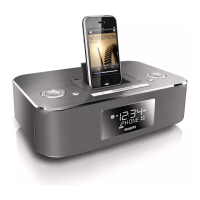
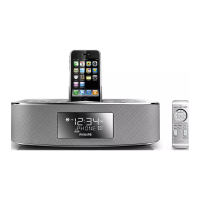
Philips DC290B/37 - User Manual

Philips DC290B/37
19 pages
Print Icon
To Next Page IconTo Next Page
Loading...
Register your product and get support at
www.philips.com/welcome
EN User manual 3
ES Manual del usuario 17
FR Mode d’emploi 33
DC290B

Other manuals for Philips DC290B/37

Question and Answer IconNeed help?

Do you have a question about the Philips DC290B/37 and is the answer not in the manual?

Summary

Product Support and Registration

Getting Quick Help

Accessing fast tips and online support for your Philips product.

Regulatory Compliance

Canadian and FCC Standards

Details on compliance with Canadian ICES-003 and FCC rules.

Product Registration Benefits

Notifications and Additional Offers

Benefits of registering your product, including safety notifications and special offers.

Safety Symbols Guide

Understanding Warning Icons

Explanation of common safety symbols used on the apparatus.

Limited Warranty Details

Warranty Coverage and Exclusions

Details on what the one-year limited warranty covers and its limitations.

Customer Assistance Contact

Contact numbers for obtaining support in the USA and Canada.

Important Safety Instructions

General Safety Guidelines

Essential instructions for safe operation and handling of the apparatus.

User Notices and Precautions

Important notices regarding modifications, usage, and general precautions.

Product Disposal and Environmental Care

Guidelines for responsible disposal of old products and batteries.

System Overview

Introduction and Package Contents

Overview of the docking entertainment system and its included items.

Main Unit Description

Detailed explanation of the main unit's controls, display, and ports.

Remote Control Description

Explanation of the functions of each button on the remote control.

Getting Started

Installing Backup Batteries

Instructions for inserting backup batteries into the unit.

Connecting Power and Setting Time

Steps for connecting the AC power and setting the clock and date.

Powering On and Standby Mode

How to turn the unit on and switch it to standby mode.

Audio Playback

iPod and iPhone Playback

How to play audio from your iPod or iPhone.

External Device Audio Playback

Connecting and playing audio from external devices via MP3 link.

Radio Operations

Tuning Radio Stations

Instructions for finding and tuning to FM radio stations.

Programming Radio Stations

How to automatically and manually program preset radio stations.

Selecting Preset Stations

How to select a previously programmed radio station.

Additional Features

Setting and Managing Alarms

How to set, activate, and deactivate the alarm timers.

Sleep Timer Functionality

How to set and deactivate the sleep timer for automatic standby.

Display Brightness Control

Adjusting the brightness level of the unit's display.

Sound Adjustments

Volume, Mute, and Bass

Controlling volume, muting sound, and enhancing bass.

Preset Sound Effects

Selecting different sound effect presets for audio playback.

Product Information

General and Technical Specifications

Details on the unit's power, dimensions, weight, and technical specifications.

Troubleshooting Guide

Common Issues and Solutions

Guidance on resolving common problems encountered with the apparatus.

Summary

Product Support and Registration

Getting Quick Help

Accessing fast tips and online support for your Philips product.

Regulatory Compliance

Canadian and FCC Standards

Details on compliance with Canadian ICES-003 and FCC rules.

Product Registration Benefits

Notifications and Additional Offers

Benefits of registering your product, including safety notifications and special offers.

Safety Symbols Guide

Understanding Warning Icons

Explanation of common safety symbols used on the apparatus.

Limited Warranty Details

Warranty Coverage and Exclusions

Details on what the one-year limited warranty covers and its limitations.

Customer Assistance Contact

Contact numbers for obtaining support in the USA and Canada.

Important Safety Instructions

General Safety Guidelines

Essential instructions for safe operation and handling of the apparatus.

User Notices and Precautions

Important notices regarding modifications, usage, and general precautions.

Product Disposal and Environmental Care

Guidelines for responsible disposal of old products and batteries.

System Overview

Introduction and Package Contents

Overview of the docking entertainment system and its included items.

Main Unit Description

Detailed explanation of the main unit's controls, display, and ports.

Remote Control Description

Explanation of the functions of each button on the remote control.

Getting Started

Installing Backup Batteries

Instructions for inserting backup batteries into the unit.

Connecting Power and Setting Time

Steps for connecting the AC power and setting the clock and date.

Powering On and Standby Mode

How to turn the unit on and switch it to standby mode.

Audio Playback

iPod and iPhone Playback

How to play audio from your iPod or iPhone.

External Device Audio Playback

Connecting and playing audio from external devices via MP3 link.

Radio Operations

Tuning Radio Stations

Instructions for finding and tuning to FM radio stations.

Programming Radio Stations

How to automatically and manually program preset radio stations.

Selecting Preset Stations

How to select a previously programmed radio station.

Additional Features

Setting and Managing Alarms

How to set, activate, and deactivate the alarm timers.

Sleep Timer Functionality

How to set and deactivate the sleep timer for automatic standby.

Display Brightness Control

Adjusting the brightness level of the unit's display.

Sound Adjustments

Volume, Mute, and Bass

Controlling volume, muting sound, and enhancing bass.

Preset Sound Effects

Selecting different sound effect presets for audio playback.

Product Information

General and Technical Specifications

Details on the unit's power, dimensions, weight, and technical specifications.

Troubleshooting Guide

Common Issues and Solutions

Guidance on resolving common problems encountered with the apparatus.

Philips DC290B/37 Specifications

General IconGeneral
BrandPhilips
ModelDC290B/37
CategoryDocking Station
CompatibilityiPod, iPhone
ClockYes
Power Output2 x 2W RMS
Dimensions191 x 127 x 125 mm
Connectivity3.5mm audio jack
RadioFM
DisplayLCD
Ports3.5mm audio jack
AlarmYes, Wake up to your iPod/iPhone music, radio or buzzer

Related product manuals