8
English
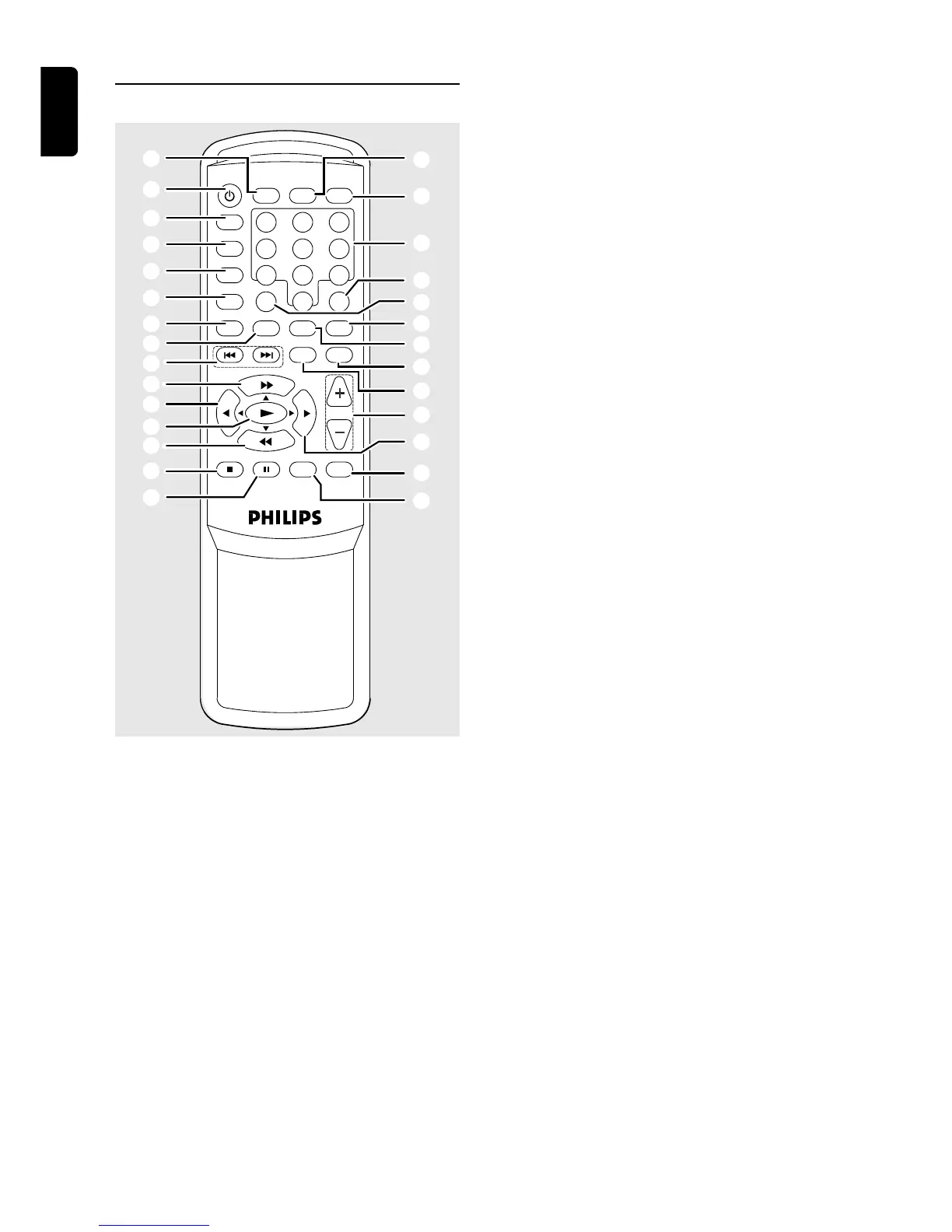
FUNCTIONAL OVERVIEW
9
!
0
@
#
9
8
7
6
5
4
3
2
1
§
0
^
%
$
&
*
(
)
¡
™
£
≤
∞
MUTE
DISPLAY OPEN/CLOSE
123
456
789
0
SLEEPTITLE
MENU
SYSTEM DISC EXIT
TONE MODE
MENU
VOL
FM MODE SEARCH DISPLAY
RDS RDS
VCR
TV
CDR
TUNER
DVD
Remote Control
Notes for remote control:
– First, select the source you wish to control by
pressing one of the source select keys on the remote
control (DVD or TUNER, for example).
– Then select the desired function (
É
,
Q
,
R
for example).
1 y
– to switch between Power On and Standby modes.
2 VCR
– to select VCR as the input source.
3 TV
– to select TV as the input source.
4 CDR
– to select CDR as the input source.
5 TUNER
– to select Tuner mode. It can also switch between
MW and FM band.
6 DVD
– to select the DVD/CD mode.
7 SYSTEM MENU
– in DVD/CD mode, to enter the Disc Setup Menu or
Disc Contents Menu.
– in all other modes, to enter System Setup : SPEAKER,
CLOCK or TIMER.
8 S / T (DVD/CD mode only)
– to skip to the previous or next chapter/track.
9 à / á
– in DVD/CD mode, to fast reverse or fast forward the
disc.
– in Tuner mode, to tune down or up.
– in Tone mode, to adjust the treble/bass tone level.
– use during menu and setup navigation.
– to select movement direction in Disc Setup /Disc
Contents /Active Navigation menus.
0 ( / )
– in DVD/CD mode, to slow reverse or slow forward
the disc.
– in Tuner mode, to select a preset channel number.
– to select movement direction in Disc Setup /Disc
Contents /Active Navigation menus.
! £
– in DVD/CD mode, to start disc playback.
– in Tuner mode, to enter preset programming mode or
to confirm a preset.
– to enter or confirm menu and setup navigation.
@ Ç FM Mode
– in DVD/CD mode, to stop disc playback.
– in Tuner mode, to select Mono/Stereo.
# Å
– to freeze the picture and sound.
$ RDS SEARCH
– in DVD mode, press to display the Index Menu.
– in Tuner mode, press to search RDS station.
% RDS DISPLAY
– in DVD/CD mode, to set the limits for section repeat.
– in CD mode, press to display the CD Programme
Menu.
– in Tuner mode, to display RDS information.
^ VOL +/-
– to increase or decrease the volume.
& TONE
– to select Bass/Treble adjustment mode.
* MODE
– to select various surround modes or soundfield
modes.
( DISC MENU (DVD/CD mode only)
– to enter or exit Active Navigation Menu.
) EXIT
– to leave the Disc Setup Menu or System Setup.
¡ TITLE (DVD mode only)
– to display the Title Menu if present on the disc.
™ SLEEP
– to set the sleep (auto-off) timer function.
£ Numeric Keys (0-9)
– for direct access of preset channels or for use in Disc
Player menus.
≤ MUTE
– to mute or unmute the sound.
∞ OPEN/CLOSE (DVD/CD mode only)
– to open or close the disc tray.
§ DISPLAY
– to dim the display screen.


 To Next Page