10 EN
4 Play
Play from iPod/iPhone/iPad
You can enjoy audio from iPod/iPhone/iPad
through this unit.
Compatible iPod/iPhone/iPad
The unit supports the following iPod, iPhone,
and iPad models:
Made for:
• iPod nano (7th generation)
• iPod touch (5th generation)
• iPad (4th generation)
• iPad mini
• iPhone 5
Listen to the iPod/iPhone/iPad
1 Press SOURCE repeatedly to select the
DOCK source.
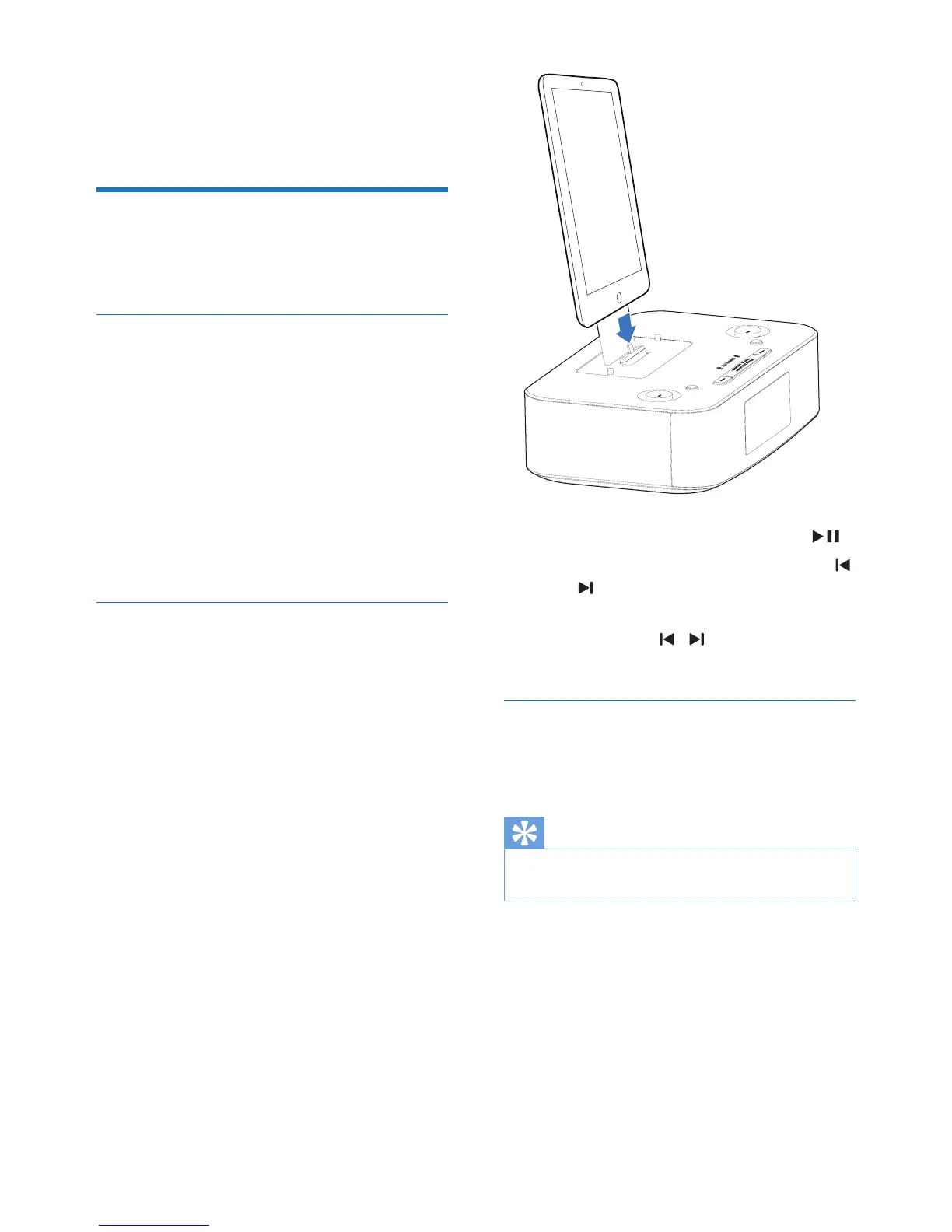
2 Load the iPhone/iPod/iPad.
» Once the iPod/iPhone/iPad is
recognized, the clock on your unit is
synchronized with your iPod/iPhone/
iPad automatically.
• To pause/resume play, press OK/ .
• To skip to a track, press PRESET +/-
/ .
• To search during play, press and hold
PRESET +/- / , then release to
resume normal play.
Charge the iPod/iPhone/iPad
When the unit is connected to power, the
docked iPod/iPhone/iPad begins to charge.
Tip
• For certain iPod models, it may take up to a minute
before the charging indication appears.


 To Next Page