EN
Play from a Bluetooth device
Note
• Before you connect a Bluetooth-enabled device to the
unit, familiarize yourself with the Bluetooth capabilities
of the device.
• Keep the unit away from other electronic devices that
may cause interference.
• The effective operation range between the unit and the
paired device is approximately 10 meters (30 feet).
• Any obstacle between the unit and the device can
reduce the operational range.
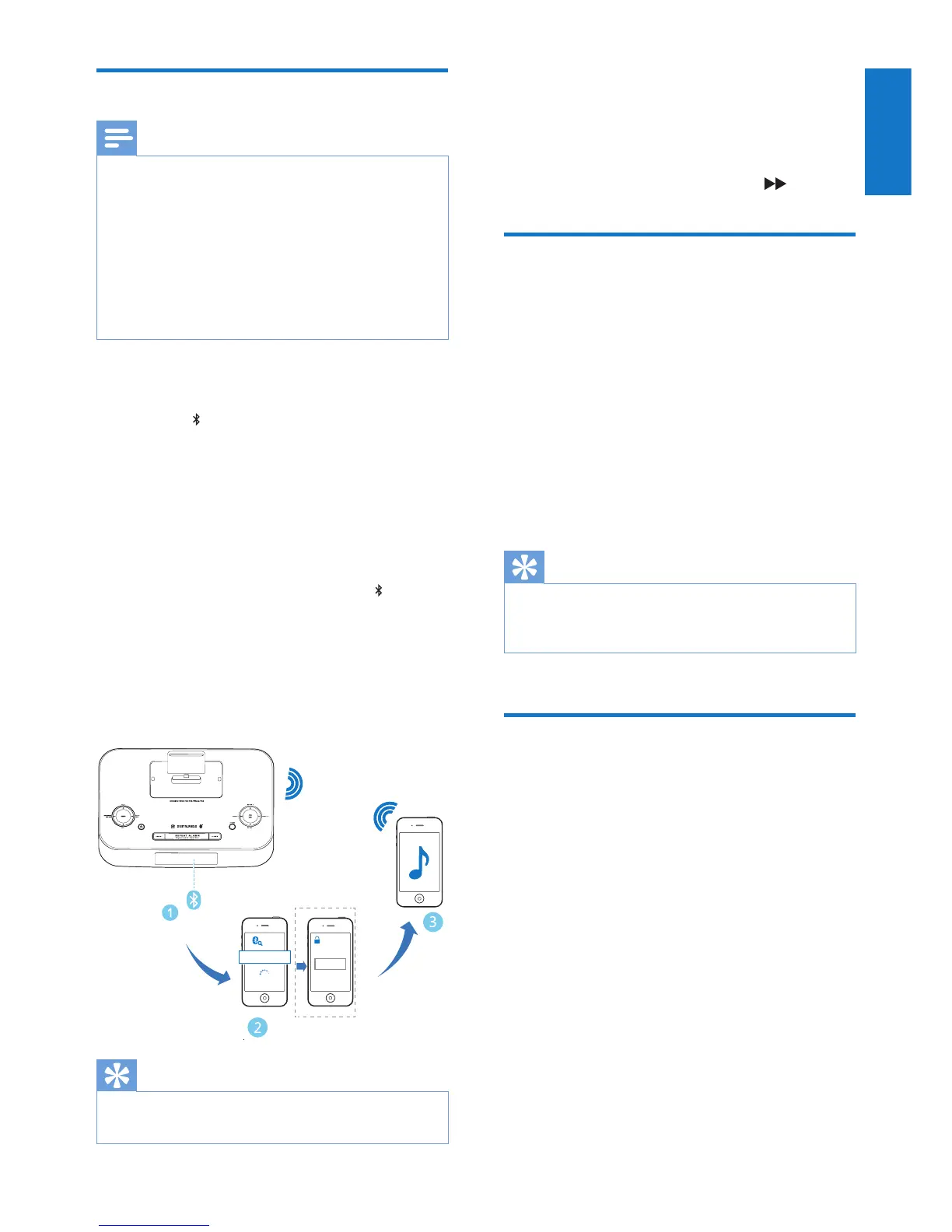
1 Press SOURCE repeatedly to select the
BT (Bluetooth) source.
» The on the display panel starts blinking.
2 Activate the Bluetooth function on your
Bluetooth device (see the device user
manual).
3 Select ‘PHILIPS DTB297’ on your device
for pairing.
» After successful pairing and connection,
the unit beeps twice and the stops
blinking.
• For some devices, you may need to
input “0000” as the pairing password.
4 Start music play on your Bluetooth
enabled device.
Tip
• The unit can memorize up to 8 previously connected
Bluetooth devices.
0000
PIN
DTB297
To disconnect the Bluetooth-enabled device:
• Deactivate Bluetooth on your device;
• Move the device beyond the
communication range; or
• Press and hold SCAN/PROG/ .
Play from Philips DigitalRadio
application
An application Philips DigitalRadio is available
on Apple App Store and Google Play.
To fully enjoy features of this unit, download and
install the application onto your smart device.
With this application, after connection of your
iPod/iPhone/iPad or your Bluetooth-enabled
device to this unit, you can control BT, DAB,
TUNER, and AUDIO IN play modes from your
smart device.
Tip
• When you switch to the dock source, the Bluetooth
connection disconnects automatically and the Philips
DigitalRadio app stops working.
Play from an external device
You can also listen to an external audio device
through this unit.
1 Press SOURCE repeatedly to select the
AUDIO IN source.
2 Connect a 3.5mm audio link cable (not
supplied) to:
• the AUDIO IN socket (3.5mm) on the
back of the unit.
• the headphone socket on an external
device.
» the screen displays text message
[AUDIO IN] and the current time.
3 Start to play the device (see the device
user manual).


 To Next Page