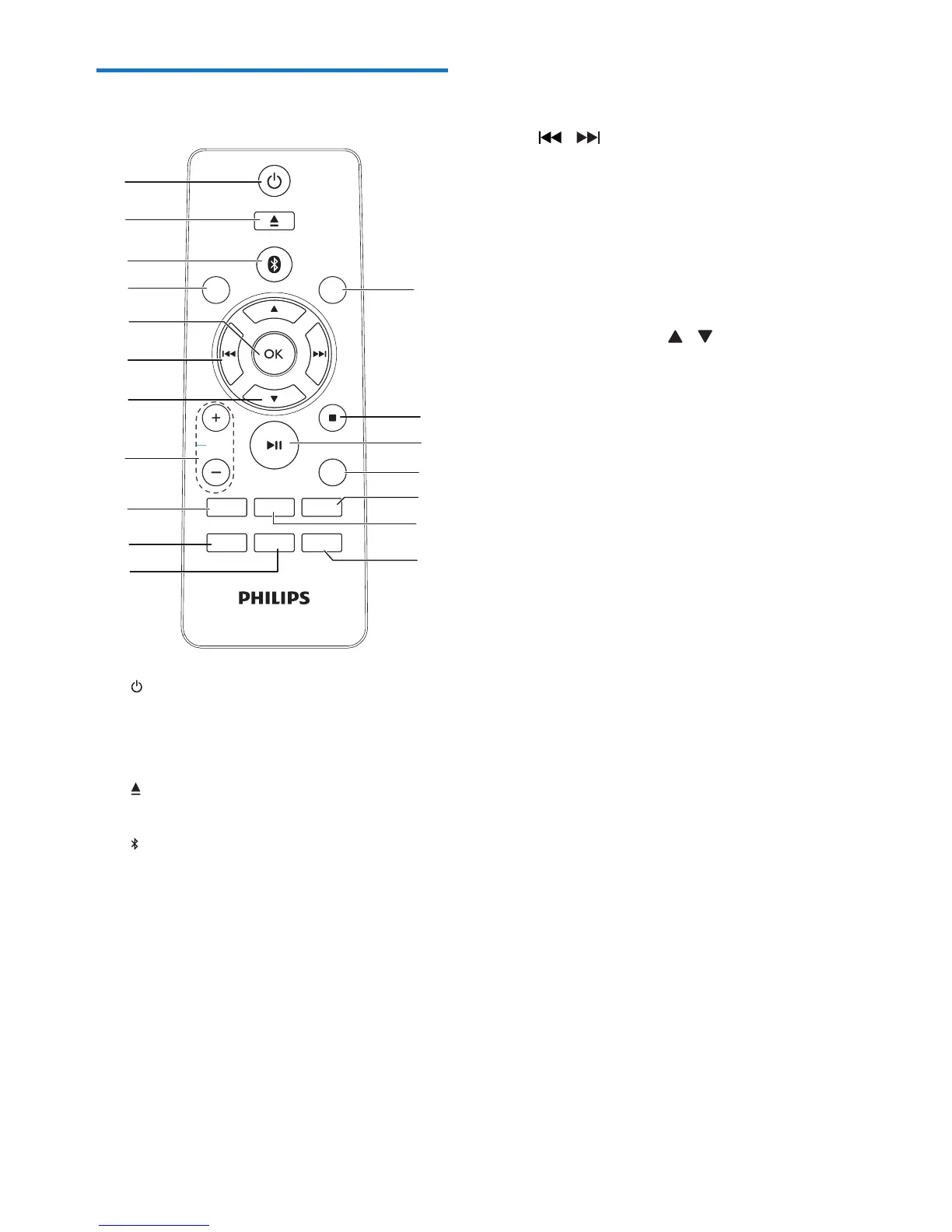
a
• Turn the unit on.
• Switch to standby mode or Eco power
standby mode.
b
• Eject the disc.
c /DOCK
• Select the Bluetooth source.
• Select iPod/iPhone/iPad source.
d CD/FM
• Select a disc source
• Select radio source.
e OK
• Conrm a selection.
USB
SLEEP
DISPLAY
CD
DOCK
VOL
CLOCK
TIMER
RDS
PROG
SHUFFLE
REPEAT
SOUND
MUTE
AUDIO IN
FM
PRESET/ALBUM
MENU
a
b
c
d
e
f
g
h
i
j
k
l
m
n
o
p
q
r
f /
• In Disc/USB/Dock source, press to skip
to the previous/next track.
• In Disc/USB/Dock source, press to
search within a track.
• In tuner source, press to tune to a
radio station.
• Set clock and timer.
g PRESET/ALBUM /
• Skip to the previous/next album.
• Select a preset radio station.
• Navigate through the iPod/iPhone
menu.
• Adjust time.
h VOL +/-
• Adjust volume.
i MUTE
• Mute or restore sound.
j SOUND
• Select a preset sound settings.
k CLOCK
• In standby mode, press and hold to set
the clock.
l SLEEP/TIMER
• Set the sleep timer.
• Set the alarm timer.
m REPEAT/SHUFFLE
• Select repeat play.
• Select shufe play.
n PROG
• In Disc/USB source, press and hold to
program tracks.
• In tuner source, press and hold to
program radio stations.


 To Next Page