9
Remote Control
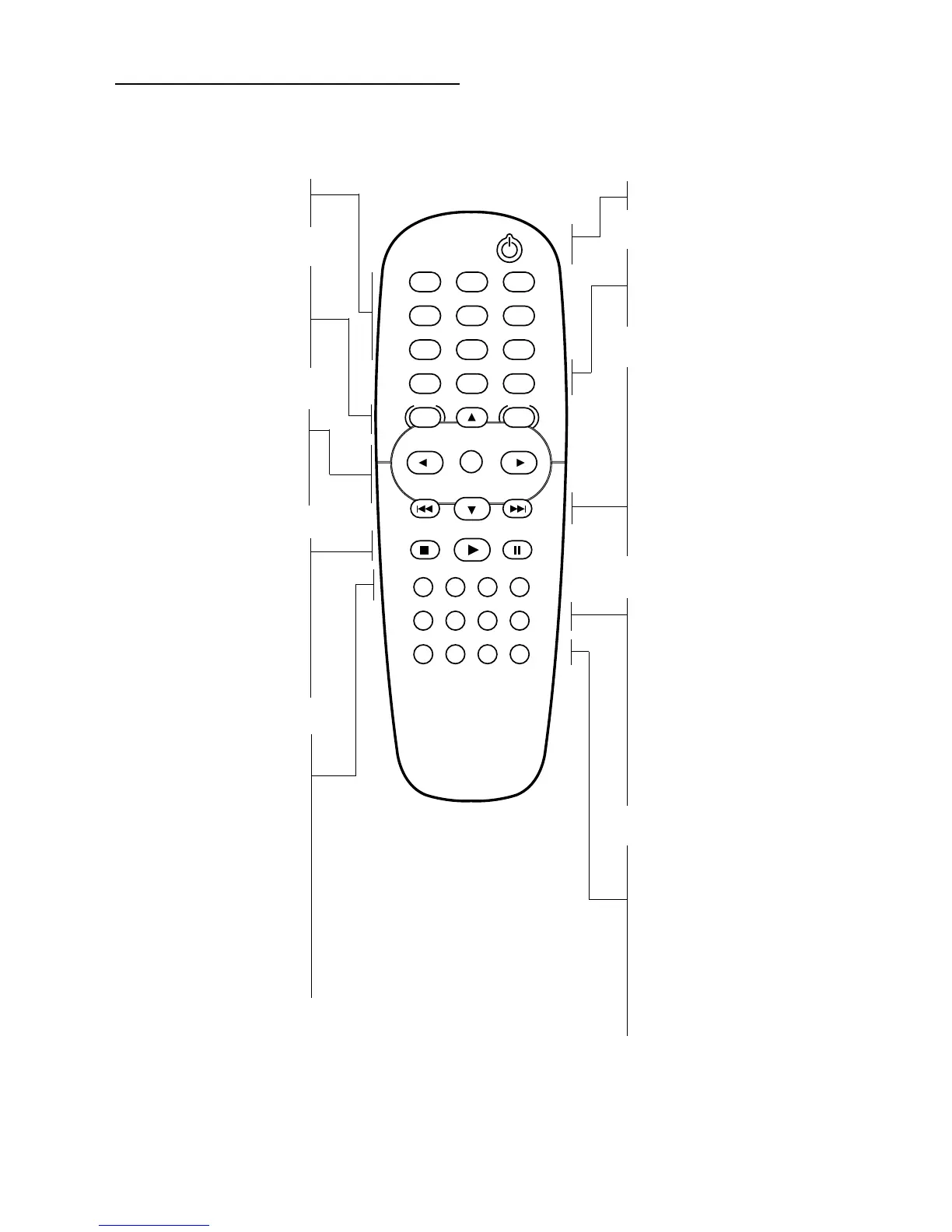
FUNCTIONAL OVERVIEW
POWER
RETURN
STOP
CLEAR MARKER FTS TITLE
SUBTITLE ANGLE ZOOM AUDIO
REPEAT A-B RANDOM SOUND
PAUSE
PLAY
MENU
DISC SYSTEM
MENU
DISPLAY
123
456
789
0
OK
0-9 numerical key pad
– select numbered items in a
menu
DISC MENU
– access menu of a DVD disc
SYSTEM MENU
– access or remove DVD Player’s
menu
1 2 3 4
– (left/right/up/down) select an
item in the menu
OK
– acknowledge menu selection
STOP ( 9 )
– stops playback
PLAY ( 2 )
– starts playback
PAUSE ( ; )
– pause playback temporarily /
press repeatedly for frame-by-
frame playback
CLEAR
– clear a track number on the
Program FTS menu or a mark
on the MARKER SEARCH menu
MARKER
– access or remove MARKER
SEARCH menu
FTS (PROGRAM)
– access or remove Program FTS
menu
TITLE
– display the Title menu of the
disc if available
POWER
– switch DVD Player ON or OFF
RETURN
– remove the DVD Player’s menu
DISPLAY
– access the On-Screen Display
T
– search forward* / go to next
chapter or track
S
– search backward* / go to
beginning of current chapter or
track or go to previous chapter
or track
* Press and hold key for about two
seconds
SUBTITLE
– select a subtitle language
ANGLE
– select DVD camera angle if
available
ZOOM
– enlarge video image
AUDIO
– select an audio language (DVD)
or an audio channel (Audio CD)
REPEAT
– repeat chapter, track, title, disc
A-B
– repeat sequence
RANDOM
– play tracks in random order
SOUND
– select 3D SURROUND during
disc playback


 To Next Page