English
11
Remote Control (continued)
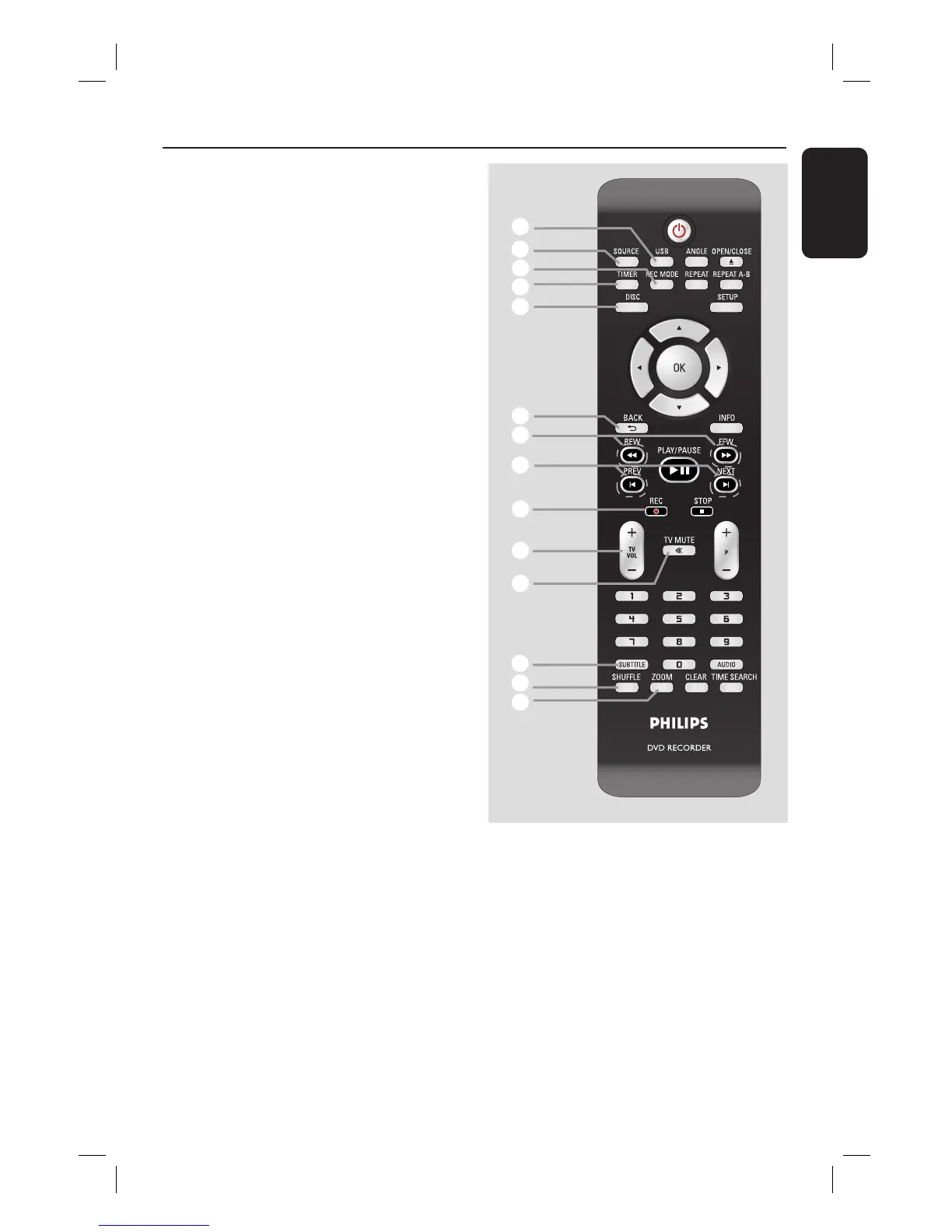
q
USB
– Access the contents of the connected
USB ash drive/ USB memory card reader.
r
SOURCE
– Selects the recorder’s input source
(Tuner, CAM, EXT2 or DV).
s
REC MODE
– Toggles between recording modes :
HQ, SP, SPP, LP, EP, or SLP.
This determines the quality of the
recording and the amount/length of time
you can record on a DVD±R/±RW.
t
TIMER
– Enters/exits the timer recording menu.
u
DISC
– Access DVD disc menu.
– Access VCD disc menu when PBC is
turned on.
v
BACK2
– Returns to the previous menu of the on-
screen menu, a video CD (VCD) or
some DVDs.
w
REW m / FFW M
– Fast reverse or fast forward search.
x
PREVí/ NEXTë
– Skips to previous or next chapter/track/
title.
y
REC z
– Starts recording the current TV channel
or the current video input source.
– Press repeatedly to set the recording
length in 30-minute increments.
z
TV VOL+/ -
– Adjusts the volume of the TV (Philips TV
only).
wj
TV MUTE H
– Mute the volume of the TV set (Philips
TV only).
qj
qk
ql
w;
wa
ws
wd
wf
wg
wh
wj
wk
wl
e;
wk
SUBTITLE
– Selects a subtitle language during playback
of DVD or DivX Ultra Video discs.
wl
SHUFFLE
– Enables random playback of items in
playlist.
e;
ZOOM
– Enlarges a picture on the TV screen
during playback
dvdr3480-05n31_eng_27232a.indd 11dvdr3480-05n31_eng_27232a.indd 11 2007-11-02 11:51:56 AM2007-11-02 11:51:56 AM


 To Next Page