English
18
Step 1: Basic Recorder Connections (continued)
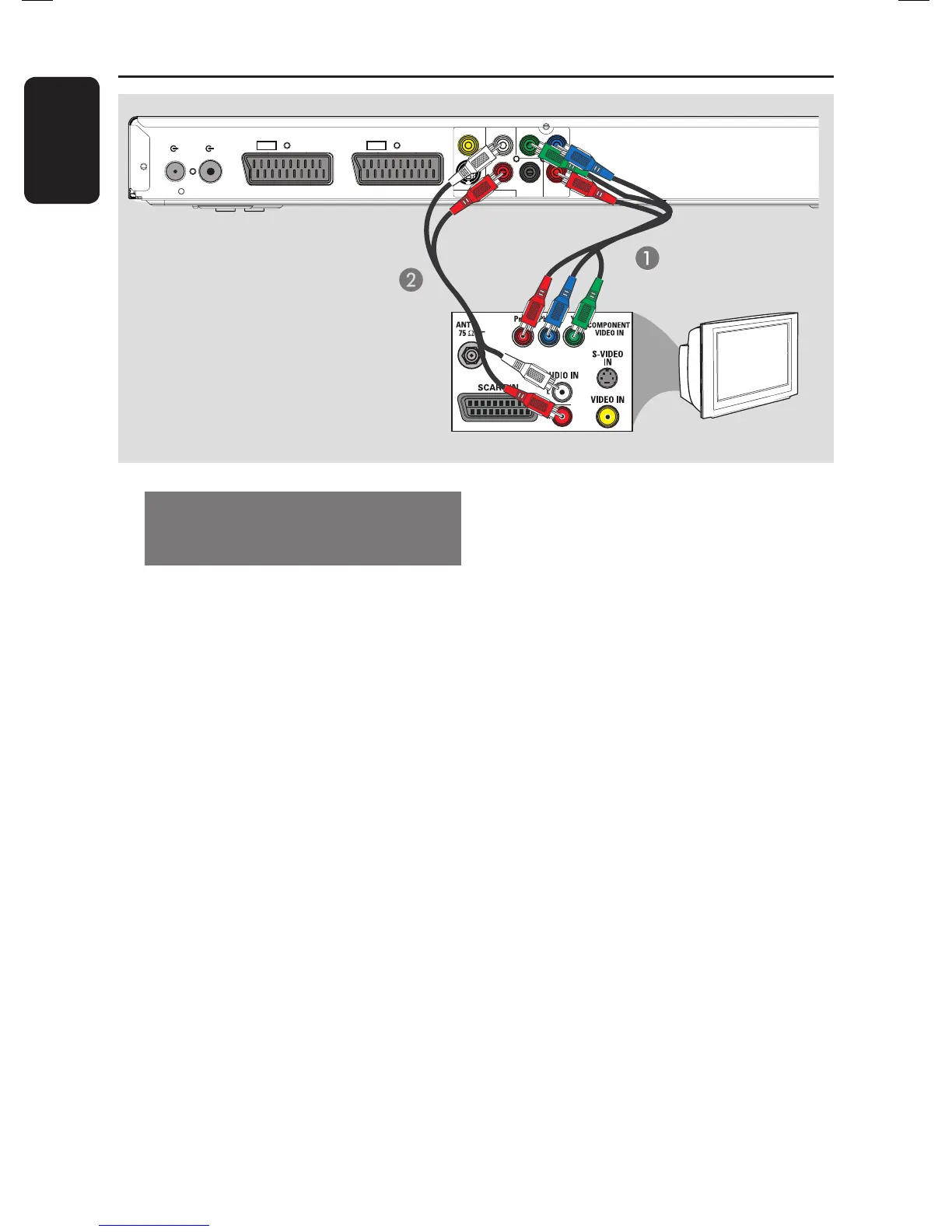
Option 4: Using Component
video socket / Connecting to a
Progressive Scan TV
The progressive scan video quality is only
available when using Y Pb Pr connection
and a progressive scan TV is required. It
provides superior picture quality when
watching DVD movies.
A Connect the component video cables
(red/ blue/green - not supplied) from the
Y PB PR sockets on the recorder to the
corresponding component video input
sockets (usually labelled as Y Pb/Cb Pr/Cr
or YUV) on the TV.
B Connect the audio cable (red/white - not
supplied) from the AUDIO OUT L/R
sockets on the recorder to the audio
input sockets on the TV.
Note:
To enable Y Pb Pr (YUV) connection, you
must set the recorder’s video output
correctly.
A Make an addition video connection from
this recorder to your TV using Scart,
S-Video or Video (CVBS).
B Turn on your TV to the correct viewing
channel for the above video connection.
C When you have completed the
installation and set-up, change the video
output setting of this recorder as
follows:.
1) Press OPTIONS.
2) Move to { Settings } > { Video
output } > { Active video output }
> { Comp. video (YUV) }, then
press OK to con rm.
To activate Progressive Scan output, see
‘Other information - Setting up
Progressive Scan feature’ for details.
D Switch your TV to the correct viewing
channel for the Component video
connection (refer to your TVs user
manual).
COAXIAL
DIGITAL OUT
CVBS OUT
S-VIDEO OUT
VIDEO OUT AUDIO OUT
AUDIO
ANTENNA-IN
TV-OUT
TO TV
EXT1
TO VCR/SAT
EXT2
P
B
P
R
Y
R
L
TV
Option 4















 To Next Page