15
General Setup menu
Some settings need to be made in this menu.
They are: DISC LOCK, PROGRAM, OSD
LANGUAGE and SCREEN SAVER.
Follow the steps below:
1 Press the SYSTEM MENU key in STOP mode to
enter the setup menu.
2 The GENERAL SETUP PAGE will be selected.
3 Press the OK or 4 key to confirm selection.
OSD language
This option is to let you to select a language for
information displayed on TV screen.
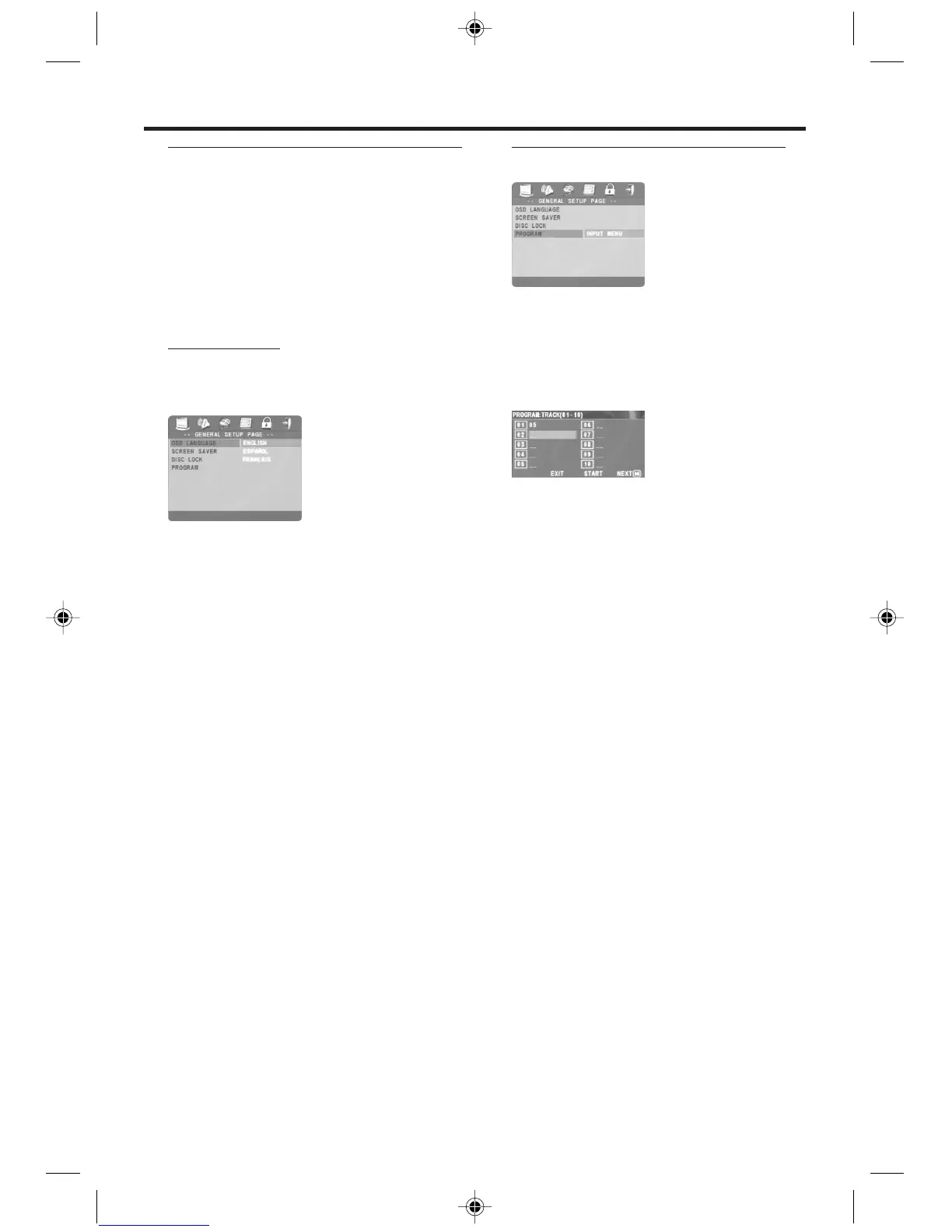
1 Press the 34 keys to highlight OSD
LANGUAGE in the GENERAL SETUP menu.
OSD LANGUAGE will be highlighted in green.
2 Enter its submenu by pressing the 2 key.
3 Move the cursor by pressing the 34 keys to
highlight the selected language.
4 Press the OK key to confirm.
5 Press 1 key to return to the top menu, or press
SYSTEM MENU to remove the menus.
Program (not for Picture CD/MP3)
1 To choose PROGRAM, press 34 keys.
2
Press the 2 key to select the item INPUT MENU,
then press OK.
➜ The PROGRAM menu will appear. This is
where you enter the Track/Chapter numbers in
the order in which you want to play them.
Input your favorite track
1 Input valid track number by pressing the
numerical keys.
➜ The number of available Titles, Chapters, or
Tracks will appear at the top of the screen.
2 Use the 1 234 buttons to move to other
Program positions.
➜ If the track number is more than ten, press
Previous ¡1 or
Next 2™ to access other
Program pages. Or, press 1 234 to highlight
NEXT button, and then press OK.
3
Repeat this process to fill the Program.
Remove a track
1 Press the 1 234 keys to move the cursor to the
track you want to remove.
2 Press OK or PLAY 2 key to remove this track.
Playback tracks
When programing is completed,
1 Press the 1 234 keys to select START at the
bottom of the screen.
2 Press OK.
➜ The Program will start playing automatically.
3 When the disc is loaded again, you also can
playback the tracks in the program menu.
Setup Menu



 To Next Page