EasyManua.ls Logo

Philips DVP620VR - Playback Customization & Parental Controls

Philips DVP620VR
104 pages
Print Icon
To Next Page IconTo Next Page
To Previous Page IconTo Previous Page
Loading...
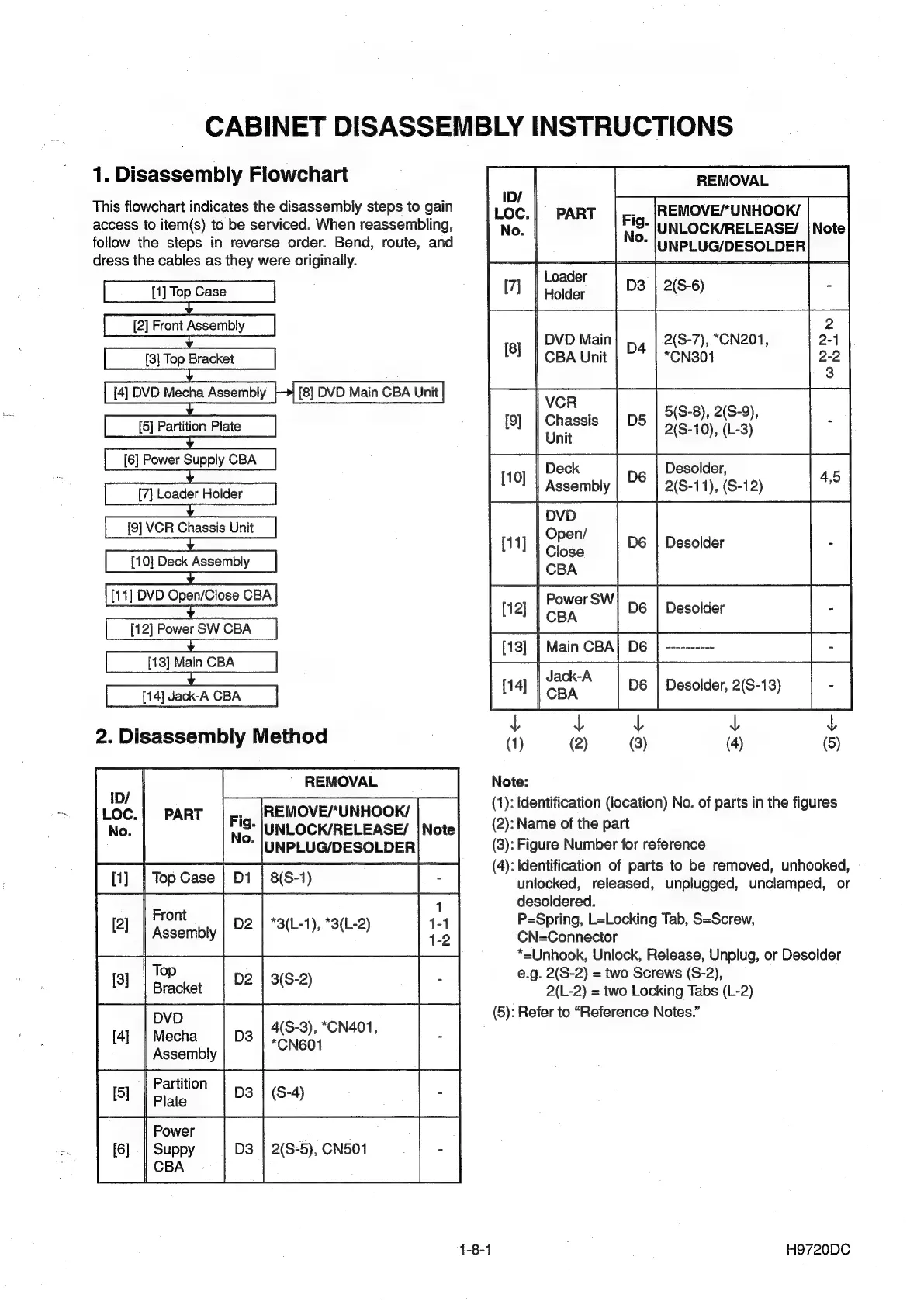
CABINET
DISASSEMBLY
INSTRUCTIONS
1.
Disassembly
Flowchart
This
flowchart
indicates
the
disassembly
steps
to
gain
access
to
item(s)
to
be
serviced.
When
reassembling,
follow
the
steps
in
reverse
order.
Bend,
route,
and
dress
the
cables
as
they
were
originally.
[1]
Top
Case
[2]
Front
Assembly
[3]
Top
Bracket
[4]
DVD
Mecha
Assembly
[5]
Partition
Plate
[6]
Power
Supply
CBA
[7]
Loader
Holder
[9]
VCR
Chassis
Unit
[10]
Deck
Assembly
[11]
DVD
Open/Close
CBA
[12]
Power
SW
CBA
[13]
Main
CBA
[14]
Jack-A
CBA
2.
Disassembly
Method
REMOVAL
ID/
LOC.
PART
REMOVE/*UNHOOK/
No.
UNLOCK/RELEASE/
UNPLUG/DESOLDER
at
[Topco
[OT
Front
Assembly
[2]
[3]
DVD
[4]
|
Mecha
Assembly
Partition
4(S-3),
*CN401,
*CN601
1-8-1
REMOVAL
ID/
Loc.
|
PART
REMOVE/*UNHOOK/
No.
UNLOCK/RELEASE/
UNPLUG/DESOLDER
ee
ee
een
ey
He
2
DVD
Main]
,,,
|
2(S-7),
*CN201,
2-4
CBA
Unit
*CN301
2-2
VCR
Chassis
Unit
Deck
Desolder,
Assembly
2(S-11),
(S-12)
fom
|
Power
SW
BRO
0
[oes
|
=
ia
[man
oaal
oe
[——
ot*
[lomo
|
L
L
L
CBA
(1)
(2)
(3)
(4)
(5)
[10]
[11]
[12]
y
L
Note:
(1):
Identification
(location)
No.
of
parts
in
the
figures
(2):
Name
of
the
part
(3):
Figure
Number
for
reference
(4):
Identification
of
parts
to
be
removed,
unhooked,
unlocked,
released,
unplugged,
unclamped,
or
desoldered.
P=Spring,
L=Locking
Tab,
S=Screw,
‘CN=Connector
*=Unhook,
Unlock,
Release,
Unplug,
or
Desolder
@.g.
2(S-2)
=
two
Screws
(S-2),
2(L-2)
=
two
Locking
Tabs
(L-2)
(5):
Refer
to
“Reference
Notes.”
H9720DC

Other manuals for Philips DVP620VR

Related product manuals