
 Need help?
Do you have a question about the Philips DVP620VR and is the answer not in the manual?
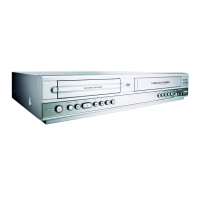
Describes the buttons, lights, and display indicators on the front panel of the DVD/VCR.
Details the various input and output ports available on the rear of the device.
Explains the operation and button functions of the included remote control.
Covers automatic/manual channel setup, language, and clock settings.
Explains Record Link, Direct Record, and their operation.
Guides on starting playback, using disc menus, and title menus.
Explains on-screen info, audio/subtitle language, camera angle, parental controls, and markers.
Offers solutions for power, picture, sound, playback, and recording issues.
 General
| Type | DVD VCR Combo |
|---|---|
| Product Type | DVD VCR Combo |
| DVD Player | Yes |
| VCR Player | Yes |
| Video Format | NTSC |
| Recording Format | VHS |
| Audio Output | Stereo |
| Playable Disk Types | DVD, CD, CD-R, CD-RW |
| Playable File Formats | MP3, JPEG |
| Progressive Scan | Yes |
| Remote Control | Yes |
| VCR Formats | VHS |
| Weight | 8.8 lbs |
| Connections | Composite Video |
| Connectors | Composite Video |
| DVD Formats | DVD-R, DVD-RW |
| Video Output | Composite Video |










 To Next Page

