EasyManua.ls Logo

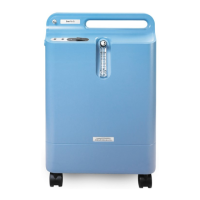
Philips EverFlo Q - User Manual

Philips EverFlo Q
2 pages
Print Icon
To Next Page IconTo Next Page
Loading...
!
Everflo Q
Operating instructions
Warning: Do not use extension cords or electrical adapters.
1. Select a location that allows the machine to draw in room air
without being restricted. Make sure the device is at least 15 to
30cm away from walls, furniture, and especially curtains that could
impede adequate airflow to the device. Keep away from heat.
2. Plug the power cord into an electrical outlet.
3. Do either Step a or Step b below
a. If you are not using a humidifier, connect your nasal cannula to
the Oxygen Outlet Port.
b. If you are using a humidifier, follow the steps below:
i. Open the filter door on the back of the device.
ii. Remove the humidifier connector tube from the back of
the door and replace the filter door.
iii.Fill your humidifier bottle according to the manufacturer's
instructions.
iv. Mount the filled humidifier on the top of the EverFlo
device inside the velcro strap, as shown in the illustration
on the right.
v. Tighten the velcro strap around the bottle and secure it so
it is held firmly in place.
vi. Connect the humidifier connector tube (that you retrieved
from the filter door) to the Oxygen Outlet Port.
vii.Connect the other end of the humidifier connector tube to
the top of the humidifier with the elbow in the tubing
facing the front.

Other manuals for Philips EverFlo Q

Questions and Answers

Summary

Everflo Q Operating Instructions

General Safety Warning

Warning against using extension cords or electrical adapters with the device.

Location and Airflow Requirements

Ensure adequate airflow by placing the device 15-30cm from walls, furniture, and curtains. Keep away from heat.

Power Connection

Plug the power cord directly into an electrical outlet.

Cannula Connection Options

Connect nasal cannula directly or via humidifier following specific instructions.

Humidifier Setup and Connection

Mount humidifier, connect tubing to device and bottle, then connect cannula to humidifier.

Device Power On and Initialization

Press power switch to On; LEDs and audible alert will activate briefly; green LED should remain lit.

Flow Rate Adjustment

Adjust flow meter knob until the ball is centered on the line marking the specific flow rate.

Cannula Usage and Verification

Put on cannula as directed, ensure oxygen is flowing, and refer to manual if not.

Device Power Off

Press the power switch to the Off position when the oxygen concentrator is not in use.

Overview

The EverFlo Q is an oxygen concentrator designed to provide supplemental oxygen to individuals. It is intended for home use and is equipped with features to ensure safe and effective operation.

Function Description:

The primary function of the EverFlo Q is to concentrate oxygen from ambient air and deliver it to the user via a nasal cannula or through a humidifier bottle. It draws in room air, filters out nitrogen and other gases, and delivers a continuous flow of oxygen. The device is designed for ease of use, with clear instructions for setup and operation. It includes an audible alert and LED indicators to provide feedback on its status, ensuring the user is aware of its operational state and oxygen purity levels.

Important Technical Specifications (Inferred from usage instructions):

  • Power Source: Requires an electrical outlet. The manual explicitly warns against using extension cords or electrical adapters, indicating a specific power requirement for safe operation.
  • Airflow Requirements: Needs to be placed at least 15 to 30 cm away from walls, furniture, and curtains to ensure adequate airflow for drawing in room air and preventing overheating.
  • Oxygen Purity Attainment: Typically takes 10 minutes to reach optimal oxygen purity after being turned on.
  • Flow Rate Adjustment: Features a knob on the top of the flow meter for adjusting the oxygen flow rate to the prescribed setting.
  • Indicators: Includes LEDs (green for normal operation) and an audible alert for initial startup and potentially for error conditions (though not explicitly detailed, the initial beep suggests a system check).

Usage Features:

  • Flexible Setup: Can be used with or without a humidifier, offering flexibility based on user needs and medical recommendations.
    • Direct Cannula Connection: For users not requiring humidification, the nasal cannula connects directly to the Oxygen Outlet Port.
    • Humidifier Integration: For users requiring humidification, the device accommodates a humidifier bottle. The bottle is mounted on top of the device and secured with a velcro strap. A dedicated humidifier connector tube, initially stored in the filter door, is used to connect the device to the humidifier bottle and then to the cannula.
  • Intuitive Controls: Features a simple power switch (On/Off) and a flow adjustment knob.
  • Immediate Use: Users can begin breathing from the device immediately after turning it on, even during the initial 10-minute period required to reach full oxygen purity.
  • Visual and Audible Feedback: Upon startup, all LEDs illuminate, and an audible alert beeps for a few seconds, followed by the green LED remaining lit, indicating normal operation.
  • Cannula Connection: The nasal cannula connects either directly to the Oxygen Outlet Port or to the humidifier bottle, depending on the setup.
  • Home Care Provider Guidance: Emphasizes that the cannula should be put on as directed by a home care provider, highlighting the importance of professional medical advice for proper usage.

Maintenance Features (Inferred from instructions):

  • Filter Access: The device has a filter door on the back, suggesting that the filter is accessible for cleaning or replacement, although specific maintenance steps for the filter are not detailed in the provided excerpt. The humidifier connector tube is stored in this door, indicating it's a multi-purpose access point.
  • Humidifier Bottle Management: Requires filling the humidifier bottle according to the manufacturer's instructions, implying regular user interaction for maintenance of the humidification system.
  • Troubleshooting Guide: The manual refers to a troubleshooting guide for situations where oxygen is not flowing through the cannula, indicating that the device comes with resources to help users resolve common issues.

Safety Considerations:

  • Placement: Strict guidelines for placement to ensure proper airflow and prevent overheating.
  • Power Connection: Explicit warning against using extension cords or electrical adapters to ensure safe electrical operation.
  • Heat Source Avoidance: Must be kept away from heat sources.
  • Oxygen Purity Monitoring: The green LED indicates normal operation and presumably adequate oxygen purity, while the initial startup sequence provides a system check.
  • Professional Guidance: The emphasis on following a home care provider's directions for cannula use underscores the medical nature of the device and the need for professional oversight.

The EverFlo Q is designed to be a user-friendly and reliable oxygen concentrator, providing essential respiratory support with clear operational guidelines and safety warnings.

Philips EverFlo Q Specifications

General IconGeneral
BrandPhilips
ModelEverFlo Q
CategoryOxygen Equipment
LanguageEnglish

Related product manuals