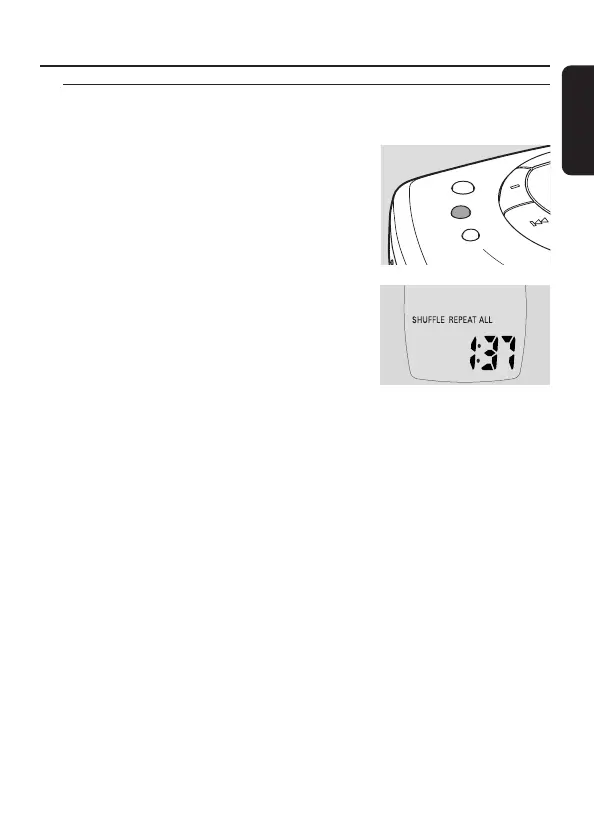
Playing tracks repeatedly or in random order –
MODE
1 Press MODE repeatedly during playback to
select either:
– SHUFFLE ALBUM (with MP3-CDs only):
All tracks of the current album are played in
random order once.
– SHUFFLE ALL: All tracks of the disc are
played in random order once.
– REPEAT SHUFFLE ALBUM (with MP3-CDs
only):
All tracks of the current album are played
repeatedly in random order.
– REPEAT SHUFFLE ALL: All tracks of the disc
are played repeatedly in random order.
– REPEAT:The current track is played repeatedly.
– REPEAT ALBUM (with MP3-CDs only):
All tracks of the current album are played repeatedly.
– REPEAT ALL:The entire disc is played repeatedly.
➜ Playback starts in the selected mode after 2 seconds.
2 To return to normal playback, press MODE repeatedly until REPEAT and
SHUFFLE disappear.
Note:While playing a programme, you can select either SHUFFLE PROGRAM,
SHUFFLE REPEAT PROGRAM or REPEAT PROGRAM.
19
Features
English






 To Next Page