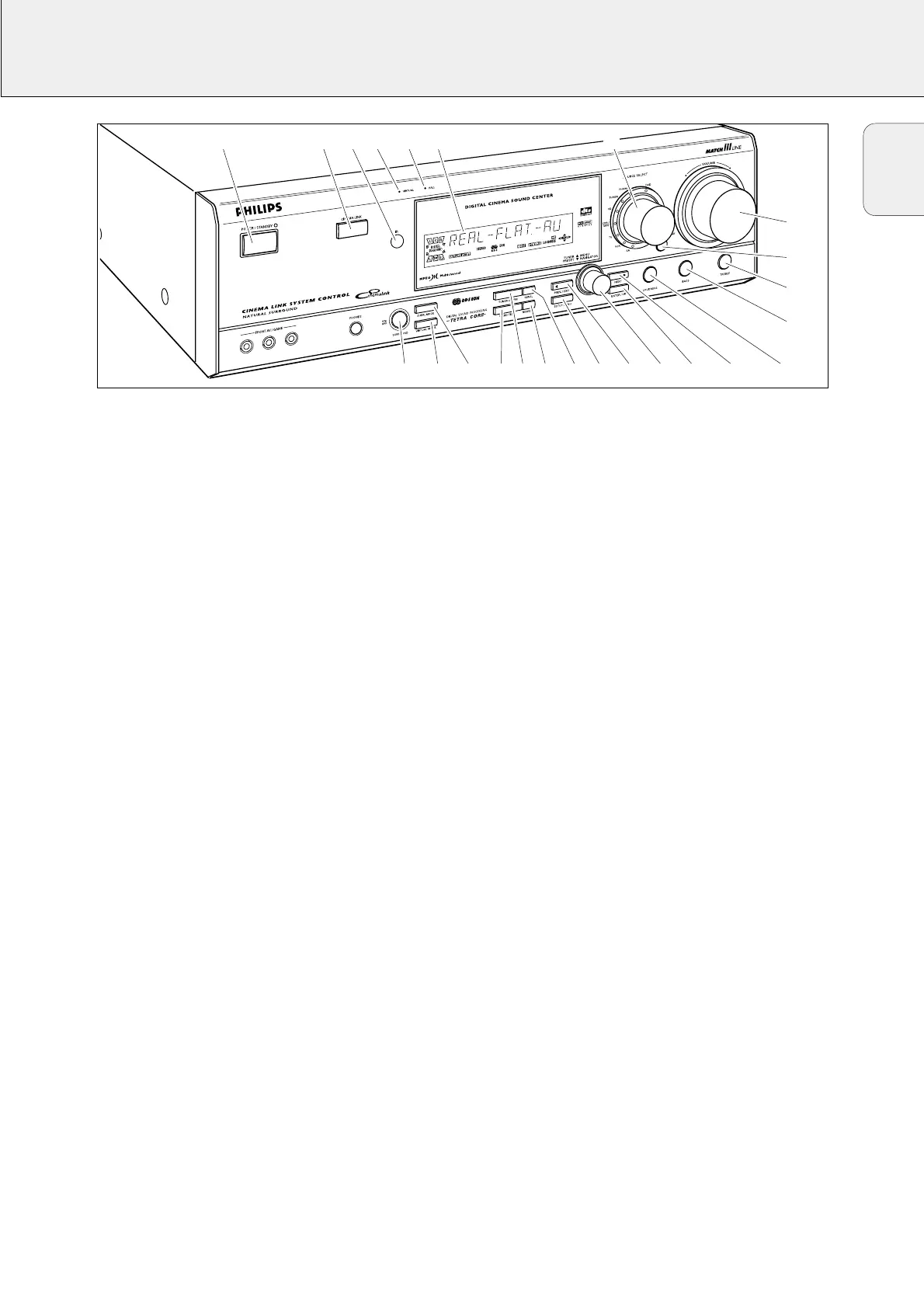
CONTROLS
5
1 POWER / STANDBY.......Switches the receiver on and off.
2 CINEMA LINK................Switches the system control bus
between the receiver and the TV
on and off.
3 ..........................................Sensor for the infrared remote
control.
4 VIRTUAL..........................Control light for virtual surround.
5 HALL................................Control light for HALL.
6 ..........................................Display
7 SOURCE SELECT............Selects the different audio and
video connectors.
Reactivates the receiver from
standby.
8 VOLUME..........................Increases and decreases the
volume level.
9 FRONT AV.......................Selects the FRONT AV / GAME
input (FR 995, FR 996 only).
0 TREBLE............................Adjusts the treble when used in
combination with VOLUME.
! BASS...............................Adjusts the bass when used in
combination with VOLUME.
@ LOUDNESS.....................Switches LOUDNESS on and off.
# NEXT 2 ...........................TUNER: searches radio stations.
MENU: switches to the next
menu level.
$ ENTER / OK.....................Confirms selected menu values.
% TUNER PRESET X MENU NAVIGATOR
TUNER: switches to the next and
previous stored radio station.
MENU: moves upwards and
downwards.
^ 1 PREV. / EXIT...............TUNER: searches radio stations.
MENU: switches to the previous
menu level.
& SETUP MENU ................Switches the menu on and off.
* SENS...............................Switches between low and high
tuner sensitivity.
( NEWS/TA........................Switches the RDS news and
RDS traffic announcement on
and off.
) TUNER AM/FM..............Switches the wavebands of the
tuner.
¡ RADIO TEXT...................Scrolls through the different RDS
information.
™ SURR. MODE..................Switches through the different
speaker configurations.
£ VIRTUAL MODE.............Scrolls through the different
virtual surround sound modes.
≤ SURROUND ON/OFF.....Switches between the last
selected surround mode and
stereo.
English


 To Next Page