EasyManua.ls Logo

Philips FR752/00 - Page 4

Philips FR752/00
28 pages
Print Icon
To Next Page IconTo Next Page
To Previous Page IconTo Previous Page
Loading...
CONTROLS
-
REMOTE
CONTROL
i.
DOLBY
:
‘--
SURROUND
CONTROL
~~~
23
a
.
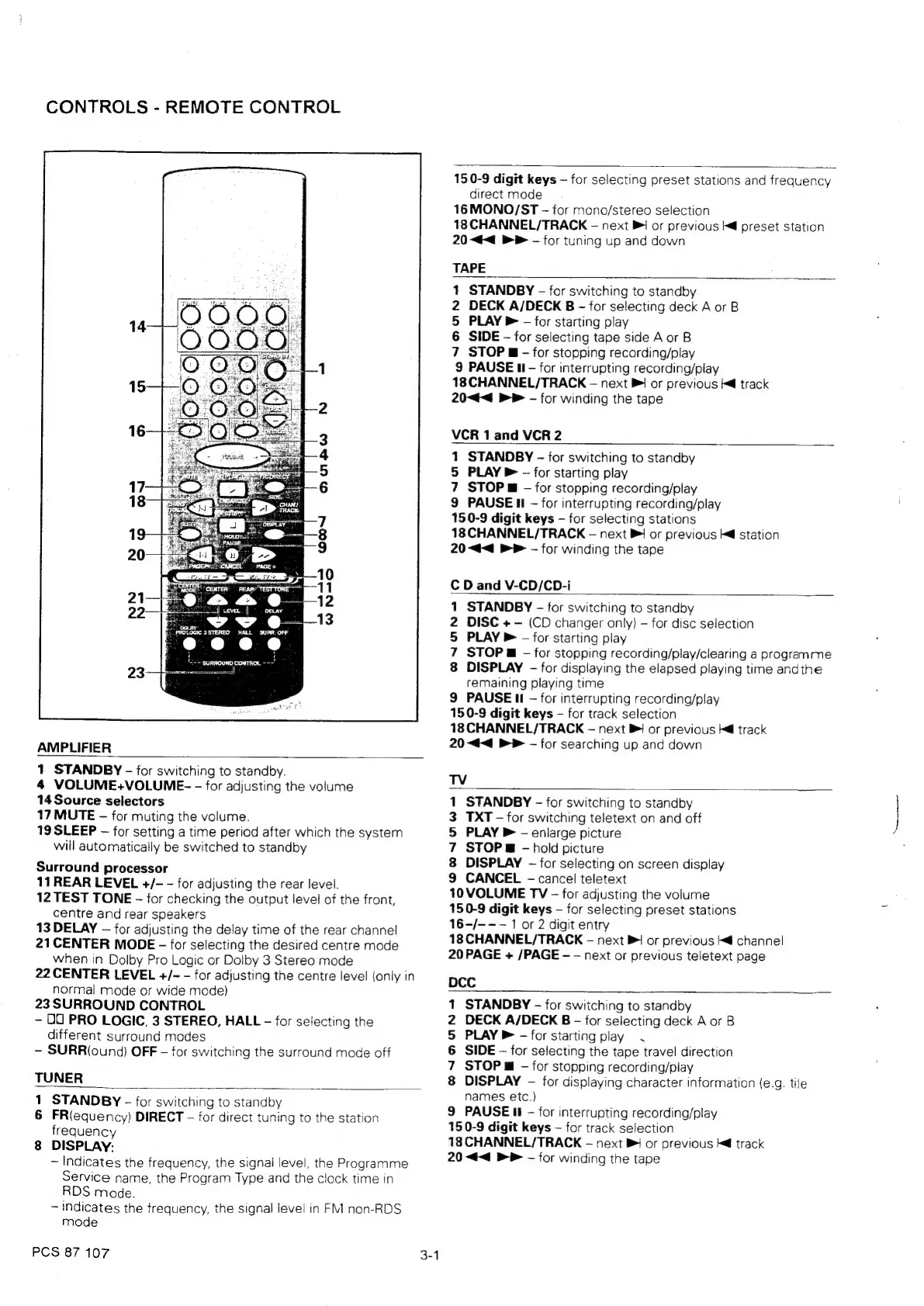
AMPLIFIER
1
STANDBY
-
for
switching
to
standby.
4
VOLUME+VOLUME-
-
for
adjusting
the
volume
14
Source
selectors
17
MUTE
for
muting
the
volume.
19
SLEEP
for
setting
a
time
period
after
which
the
system
will
automatically
be
switched
to
standby
Surround
processor
11
REAR
LEVEL
+/-
for
adjusting
the
rear
level.
12
TEST
TONE
for
checking
the
output
level
of
the
front,
centre
and
rear
speakers
13
DELAY
for
adjusting
the
delay
time
of
the
rear
channel
21CENTER
MODE
-
for
selecting
the
desired
centre
mode
when
in
Dolby
Pro
Logic
or
Dolby
3
Stereo
mode
22
CENTER
LEVEL
+/-
for
adjusting
the
centre
level
{only
in
normal
mode
or
wide
mode)
23
SURROUND
CONTROL
DU
PRO
LOGIC,
3
STEREO,
HALL
-
for
selecting
the
different
surround
modes
SURR(ound)
OFF
-
for
switching
the
surround
mode
off
TUNER
1
STANDBY
-
for
switching
to
standby
6
FR(equency)
DIRECT
for
direct
tuning
to
the
station
frequency
8
DISPLAY:
~
Indicates
the
frequency,
the
signal
level,
the
Programme
Service
name,
the
Program
Type
and
the
clock
time
in
RDS
mode.
~
indicates
the
frequency,
the
signal
leve!
in
FM
non-RDS
mode
PCS
87
107
150-9
digit
keys
for
selecting
preset
stations
and
frequency
direct
mode
16
MONO/ST
for
mono/stereo
selection
18
CHANNEL/TRACK
-
next
Pi
or
previous
@
preset
station
20
<<
&P
—-
for
tuning
up
and
down
TAPE
1
STANDBY
-
for
switching
to
standby
2
DECK
A/DECK
B
-
for
selecting
deck
A
or
B
5
PLAY
&
-
for
starting
play
6
SIDE
-
for
selecting
tape
side
A
or
B
7
STOP
g
-
for
stopping
recording/play
9
PAUSE
II
-
for
interrupting
recording/play
18
CHANNEL/TRACK
next
PI
or
previous
track
20<4<
BP
-
for
winding
the
tape
VCR
1
and
VCR
2
1
STANDBY
-
for
switching
to
standby
5
PLAY
P
-
for
starting
play
7
STOP
-
for
stopping
recording/play
9
PAUSE
Hi
-
for
interrupting
recording/play
150-9
digit
keys
for
selecting
stations
18
CHANNEL/TRACK
next
B!
or
previous
kd
station
20
<<
&&
for
winding
the
tape
C
D
and
V-CD/CD-i
STANDBY
-
for
switching
to
standby
DISC
+
-
(CD
changer
only)
-
for
disc
selection
PLAY
®
-
for
starting
play
STOP
m
-
for
stopping
recording/play/clearing
a
progremme
DISPLAY
-
for
displaying
the
elapsed
playing
time
andthe
remaining
playing
time
9
PAUSE
II
for
interrupting
recording/play
150-9
digit
keys
for
track
selection
18
CHANNEL/TRACK
next
PB
or
previous
ke
track
20
<4<4
BP
for
searching
up
and
down
ON
UN
=
TV
1
STANDBY
-
for
switching
to
standby
3
TXT
-
for
switching
teletext
on
and
off
5
PLAY
&
-
enlarge
picture
7
STOP
@
-
hold
picture
8
DISPLAY
-
for
selecting
on
screen
display
9
CANCEL
-
cancel
teletext
10
VOLUME
TV
-
for
adjusting
the
volume
150-9
digit
keys
for
selecting
preset
stations
16-/---—
1
or
2
digit
entry
18
CHANNEL/TRACK
next
Bi
or
previous
k@
channel
20
PAGE
+
/PAGE
-
-
next
or
previous
teletext
page
DCC
STANDBY
-
for
switching
to
standby
DECK
A/DECK
B
-
for
selecting
deck
A
or
B
PLAY
PB
-
for
starting
play.
SIDE
for
selecting
the
tape
travel
direction
STOP
@
-
for
stopping
recording/play
DISPLAY
-—
for
displaying
character
information
(e.g.
tile
names
etc.)
9
PAUSE
It
-
for
interrupting
recording/play
150-9
digit
keys
for
track
selection
18
CHANNEL/TRACK
next
or
previous
Md
track
20
<4
&P
for
winding
the
tape
On
AON
=
Nace

Related product manuals