EasyManua.ls Logo

Philips FR752/00 - Installation

Philips FR752/00
28 pages
Print Icon
To Next Page IconTo Next Page
To Previous Page IconTo Previous Page
Loading...
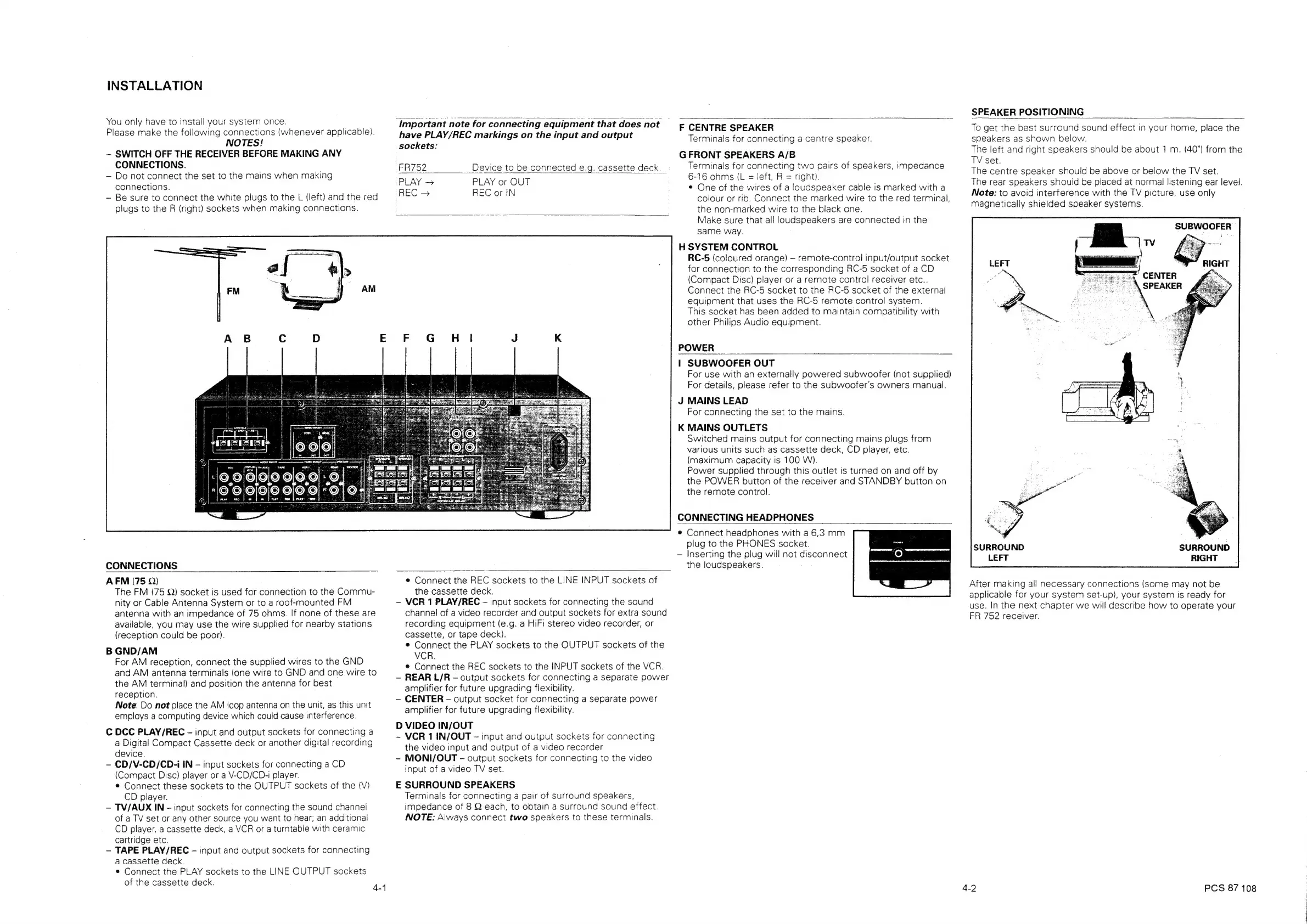
INSTALLATION
You
only
have
to
install
your
system
once.
Please
make
the
following
connections
(whenever
applicable).
NOTES!
SWITCH
OFF
THE
RECEIVER
BEFORE
MAKING
ANY
CONNECTIONS.
Do
not
connect
the
set
to
the
mains
when
making
connections.
Be
sure
to
connect
the
white
plugs
to
the
L
(left)
and
the
red
plugs
to
the
R
(right)
sockets
when
making
connections.
CONNECTIONS
‘Important
note
for
connecting
equipment
that
does
not
have
PLAY/REC
markings
on
the
input
and
output
sockets:
“FR752
Device
to
be
connected
e.g.
cassette
deck.
“PLAY
>
PLAY
or
OUT
REC
or
IN
“REC
>
AFM
(75
Q)
The
FM
(75
Q)
socket
is
used
for
connection
to
the
Commu-
nity
or
Cable
Antenna
System
or
to
a
roof-mounted
FM
antenna
with
an
impedance
of
75
ohms.
If
none
of
these
are
available,
you
may
use
the
wire
supplied
for
nearby
stations
(reception
could
be
poor).
B
GND/AM
For
AM
reception,
connect
the
supplied
wires
to
the
GND
and
AM
antenna
terminals
(one
wire
to
GND
and
one
wire
to
the
AM
terminal)
and
position
the
antenna
for
best
reception.
Note:
Do
not
place
the
AM
loop
antenna
on
the
unit,
as
this
unit
employs
a
computing
device
which
could
cause
interference.
C
DCC
PLAY/REC
-
input
and
output
sockets
for
connecting
a
a
Digital
Compact
Cassette
deck
or
another
digital
recording
device.
-—
CD/V-CD/CD-i
IN
input
sockets
for
connecting
a
CD
(Compact
Disc)
player
or a
V-CD/CD-i
player.
©
Connect
these
sockets
to
the
OUTPUT
sockets
of
the
(V)
CD
player.
TV/AUX
IN
-
input
sockets
for
connecting
the
sound
channel
of
a
TV
set
or
any
other
source
you
want
to
hear;
an
additional
CD
player,
a
cassette
deck,
a
VCR
or
a
turntable
with
ceramic
cartridge
etc.
~—
TAPE
PLAY/REC
-
input
and
output
sockets
for
connecting
a
cassette
deck.
*
Connect
the
PLAY
sockets
to
the
LINE
OUTPUT
sockets
of
the
cassette
deck.
4-4
Connect
the
REC
sockets
to
the
LINE
INPUT
sockets
of
the
cassette
deck.
VCR
1
PLAY/REC
-
input
sockets
for
connecting
the
sound
channel
of
a
video
recorder
and
output
sockets
for
extra
sound
recording
equipment
(e.g.
a
HiFi
stereo
video
recorder,
or
cassette,
or
tape
deck).
*
Connect
the
PLAY
sockets
to
the
OUTPUT
sockets
of
the
VCR.
¢
Connect
the
REC
sockets
to
the
INPUT
sockets
of
the
VCR.
REAR
L/R
-
output
scckets
for
connecting
a
separate
power
amplifier
for
future
upgrading
flexibility.
CENTER
-
output
socket
for
connecting
a
separate
power
amplifier
for
future
upgrading
flexibility.
D
VIDEO
IN/OUT
~
VCR
1
IN/OUT
input
and
output
sockets
for
connecting
the
video
input
and
output
of
a
video
recorder
~
MONI/OUT
-
output
sockets
for
connecting
to
the
video
input
of
a
video
TV
set.
E
SURROUND
SPEAKERS
Terminals
for
connecting
a
pair
of
surround
speakers,
impedance
of
8
Q
each,
to
obtain
a
surround
sound
effect.
NOTE:
Always
connect
two
speakers
to
these
terminals.
SPEAKER
POSITIONING
F
CENTRE
SPEAKER
Terminals
for
connecting
a
centre
speaker.
G
FRONT
SPEAKERS
A/B
Terminals
for
connecting
two
pairs
of
speakers,
impedance
6-16
ohms
(L
=
left,
R
=
right).
¢
One
of
the
wires
of
a
loudspeaker
cable
is
marked
with
a
colour
or
rib.
Connect
the
marked
wire
to
the
red
terminal,
the
non-marked
wire
to
the
black
one.
Make
sure
that
all
loudspeakers
are
connected
in
the
same
way.
H
SYSTEM
CONTROL
RC-5
(coloured
orange)
remote-control
input/output
socket
for
connection
to
the
corresponding
RC-5
socket
of
a
CD
(Compact
Disc)
player
or
a
remote
control
receiver
etc..
Connect
the
RC-5
socket
to
the
RC-5
socket
of
the
external
equipment
that
uses
the
RC-5
remote
control
system.
This
socket
has
been
added
to
maintain
compatibility
with
other
Philips
Audio
equipment.
POWER
|
SUBWOOFER
OUT
For
use
with
an
externally
powered
subwoofer
(not
supplied)
For
details,
please
refer
to
the
subwoofer’s
owners
manual.
J
MAINS
LEAD
For
connecting
the
set
to
the
mains.
K
MAINS
OUTLETS
Switched
mains
output
for
connecting
mains
plugs
from
various
units
such
as
cassette
deck,
CD
player,
etc.
(maximum
capacity
is
100
W).
Power
supplied
through
this
outlet
is
turned
on
and
off
by
the
POWER
button
of
the
receiver
and
STANDBY
button
on
the
remote
control.
CONNECTING
HEADPHONES
e
Connect
headphones
with
a
6,3
mm
plug
to
the
PHONES
socket.
Inserting
the
plug
will
not
disconnect
the
loudspeakers.
To
get the
best
surround
sound
effect
in
your
home,
place
the
speakers
as
shown
below.
The
left
and
right
speakers
should
be
about
1
m.
(40")
from
the
TV
set.
The
centre
speaker
should
be
above
or
below
the
TV
set.
The
rear
speakers
should
be
placed
at
normal
listening
ear
level.
Note:
to
avoid
interference
with
the
TV
picture,
use
only
magnetically
shielded
speaker
systems.
\
SPEAKER
SURROUND
RIGHT
SURROUND
LEFT
After
making
all
necessary
connections
(some
may
not
be
applicable
for
your
system
set-up),
your
system
is
ready
for
use.
In
the
next
chapter
we
will
describe
how
to
operate
your
FR
752
receiver.
PCS
87
108

Related product manuals