EasyManua.ls Logo

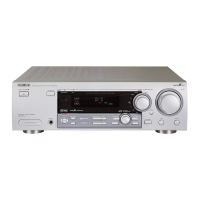
Philips FR752/00 - Controls - Front; Remote Control

Philips FR752/00
28 pages
Print Icon
To Next Page IconTo Next Page
To Previous Page IconTo Previous Page
Loading...
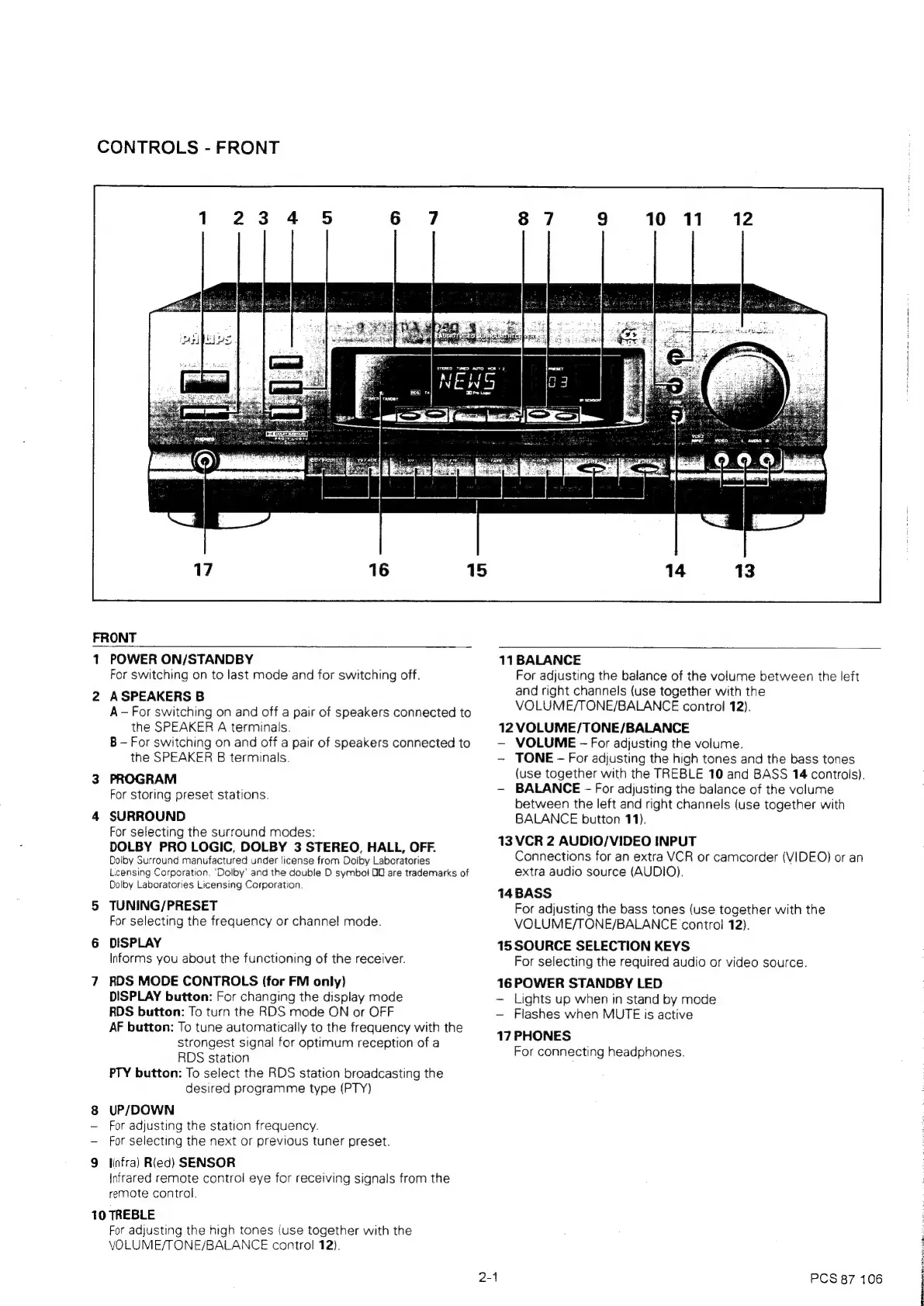
CONTROLS
-
FRONT
FRONT
1
2
POWER
ON/STANDBY
For
switching
on
to
last
mode
and
for
switching
off.
A
SPEAKERS
B
A
-
For
switching
on
and
off
a
pair
of
speakers
connected
to
the
SPEAKER
A
terminals.
B
-
For
switching
on
and
off
a
pair
of
speakers
connected
to
the
SPEAKER
B
terminals.
PROGRAM
For
storing
preset
stations.
SURROUND
For
selecting
the
surround
modes:
DOLBY
PRO
LOGIC,
DOLBY
3
STEREO,
HALL,
OFF.
Dolby
Surround
manufactured
under
license
from
Doiby
Laboratories
Licensing
Corporation.
‘Dolby’
and
the
double
D
symboi
OU
are
trademarks
of
Dolby
Laboratories
Licensing
Corporation
TUNING/PRESET
For
selecting
the
frequency
or
channel
mode.
DISPLAY
Informs
you
about
the
functioning
of
the
receiver.
RDS
MODE
CONTROLS
(for
FM
only)
DISPLAY
button:
For
changing
the
display
mode
RDS
button:
To
turn
the
RDS
mode
ON
or
OFF
AF
button:
To
tune
automatically
to
the
frequency
with
the
strongest
signal
for
optimum
reception
of
a
RDS
station
PTY
button:
To
select
the
RDS
station
broadcasting
the
desired
programme
type
(PTY)
UP/DOWN
For
adjusting
the
station
frequency.
For
selecting
the
next
or
previous
tuner
preset.
linfra)
Ried)
SENSOR
Infrared
remote
control
eye
for
receiving
signals
from
the
remote
control.
10
TREBLE
For
adjusting
the
high
tones
(use
together
with
the
VOLUME/TONE/BALANCE
control
12).
2-1
11
BALANCE
For
adjusting
the
balance
of
the
volume
between
the
left
and
right
channels
(use
together
with
the
VOLUME/TONE/BALANCE
control
12).
12
eV
OEE
TONE
BALANCE
VOLUME
-
For
adjusting
the
volume.
TONE
-
For
adjusting
the
high
tones
and
the
bass
tones
(use
together
with
the
TREBLE
10
and
BASS
14
controls).
-
BALANCE
-
For
adjusting
the
balance
of
the
volume
between
the
left
and
right
channels
(use
together
with
BALANCE
button
11).
13
VCR
2
AUDIO/VIDEO
INPUT
Connections
for
an
extra
VCR
or
camcorder
(VIDEO)
or
an
extra
audio
source
(AUDIO).
14BASS
For
adjusting
the
bass
tones
(use
together
with
the
VOLUME/TONE/BALANCE
control
12).
15
SOURCE
SELECTION
KEYS
For
selecting
the
required
audio
or
video
source.
16
POWER
STANDBY
LED
Lights
up
when
in
stand
by
mode
-
Flashes
when
MUTE
is
active
17
PHONES
For
connecting
headphones.
PCS
87
106

Related product manuals