EasyManua.ls Logo

Philips FR980 - INTRODUCTION; Safety precautions; INSTALLATION; CONNECTIONS

Philips FR980
63 pages
Print Icon
To Next Page IconTo Next Page
To Previous Page IconTo Previous Page
Loading...
O8€
86
SOd
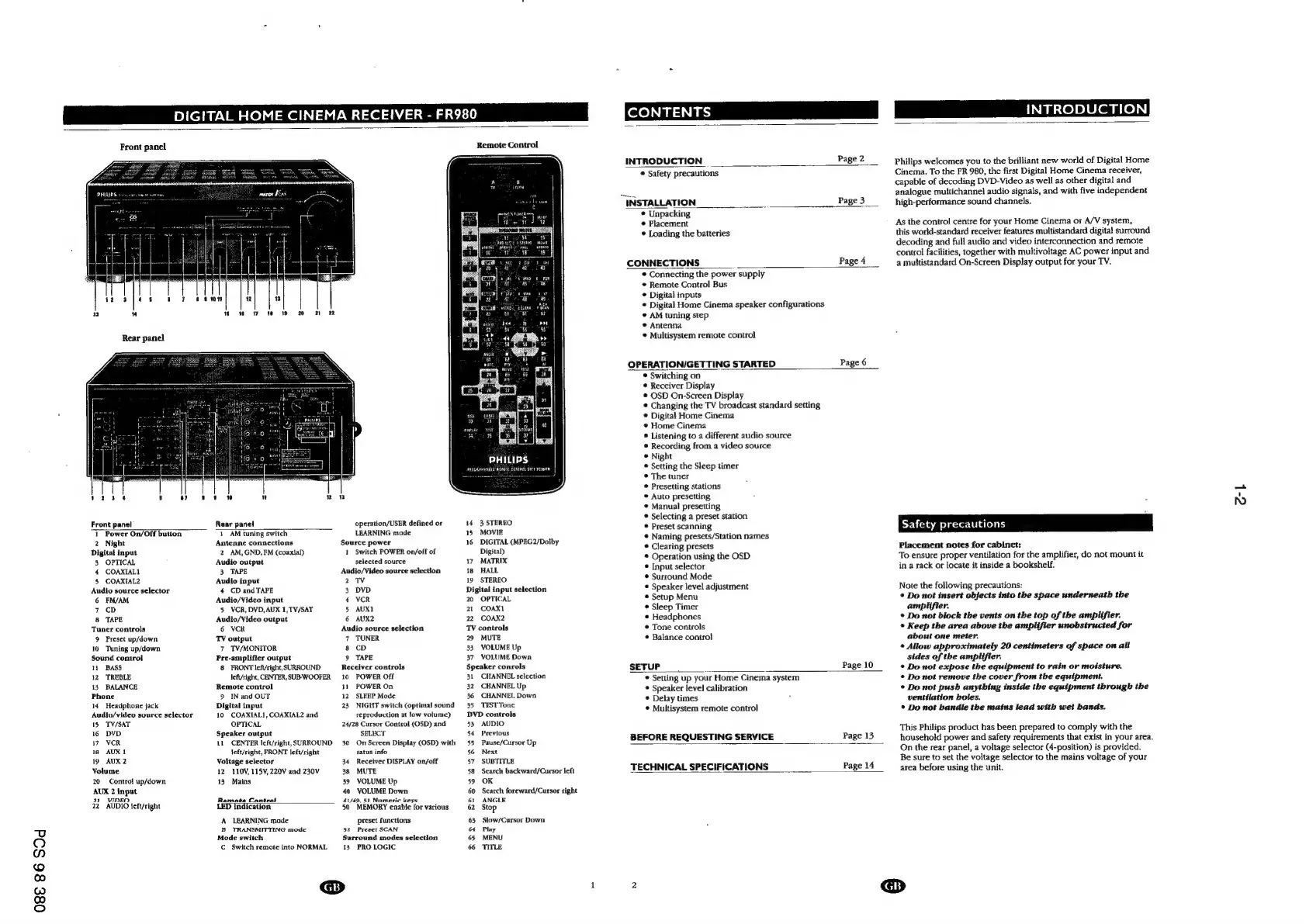
DIGITAL
HOME
CINEMA
RECEIVER
-
FR98
CONTENT
INTRODUCTION
Front
panel
SHIPS
»
Front
panel
Rear
panel
1
Power
On/Off
button
1
AM
tuning
switch
2
Night
Antenne
connections
Digital
input
2
AM,
GND,
EM
(coaxial)
3
OPTICAL
Audio
output
4
COAXIAL
3.
TAPE
5
COAXIAL2
Audio
input
Audio
source
selector
4
CD
and
TAPE
6
FM/AM
Audio/Video
input
7
cD
5
VCR,
DVD,AUX
1,TV/SAT
8
TAPE
Audio/Video
output
Tuner
controls
6
VCR
9
Preset
up/down
TY
output
10
Tuning
up/down
7
TV/MONITOR
Sound
control
11
BASS
12
TREBLE
13,
BALANCE
Phone
14
Headphone
jack
Audio/video
source
selector
15
TV/SAT
16
DVD
17
VCR
18
AUX
1
19
AUX
2
Volume
20
Control
up/down
AUX
2
input
a3
WINKO
22
AUDIO
left/right
Pre-amplifier
output
8
FRONT
left/right,
SURROUND
left/right,
CENTER,
SUB-
WOOFER
Remote
control
9
IN
and
OUT
Digital
input
10
COAXIAL],
COAXIAL2
and
OPTICAL
Speaker
output
11
CENTER
left/right,
SURROUND
left/right,
FRONT
left/right
Voltage
selector
12
110V,
115¥,
220V
and
230V
13°
Mains
Ramoata
Cantrnl
LED
indication
A
LEARNING
made
B
TRANSMITTING
mode
Mode
switch
C
Switch
remote
into
NORMAL
operation/USER
defined
or
LEARNING
mode
Source
power
1
Switch
POWER
on/off
of
selected
source
Audio/Video
source
selection
2
TV
3
DVD
4
VCR
5
AUXI
6
AUX2
Audio
source
selection
7
TUNER
8
CD
9
TAPE
Receiver
controls
10
POWER
Off
31
POWER
On
12
SLEEP
Mode
23
NIGHT
switch
(optimal
sound
reproduction
at
low
volume)
24/28
Cursor
Control
(OSD)
and
SELECT
30
On
Screen
Display
(OSD)
with
satus
info
34
Receiver
DISPLAY
on/off
38
MUTE
39
VOLUME
Up
40
VOLUME
Down
41/49.
51)
Numeric
keys
50
MEMORY
enable
for
various
preset
functions
52
Preset
SCAN
Surround
modes
selection
13,
PRO
LOGIC
@
Remote
Control
1
aE
a
rc
ay
ri
a
MONS
8G
jaa
os
cH
od
putisy
1681
Bois
PHILIPS
proceanyaied
Brisbie
FoNtadl
UHCT
14
3
STEREO
15
MOVIE
16
DIGITAL
(MPEG2/Dolby
Digital)
17
MATRIX
18
HALL
19
STEREO
Digital
input
selection
20
OPTICAL
21
COAXI
22,
COAX2
TV
controls
29
MUTE
33
VOLUME
Up
37
VOLUME
Down
Speaker
conrols
31
CHANNEL
selection
32
CHANNEL
Up
36
CHANNEL
Down
35
TEST
Tone
DVD
controls
53
AUDIO
54
Previous
35
Pause/Cursor
Up
56
Next
57
SUBTITLE
58
Search
backward/Cursor
left
59
OK
60
Search
foreward/Cursor
right
61
ANGLE
62
Stop
63
Slow/Cursor
Down
64
Play
65
MENU
66
TITLE
INTRODUCTION
Page
2
©
Safety
precautions
INSTALLATION
Page
3
©
Unpacking
©
Placement
*
Loading
the
batteries
CONNECTIONS
Page
4
©
Connecting
the
power
supply
©
Remote
Control
Bus
©
Digital
inputs
©
Digital
Home
Cinema
speaker
configurations
©
AM
tuning
step
©
Antenna
©
Multisystem
remote
control
OPERATION/GETTING
STARTED
Page
6
*
Switching
on
¢
Receiver
Display
*
OSD
On-Screen
Display
©
Changing
the
TV
broadcast
standard
setting
©
Digital
Home
Cinema
*
Home
Cinema
®
Listening
to
a
different
audio
source
*
Recording
from
a
video
source
©
Night
®
Setting
the
Sleep
timer
©
The
tuner
©
Presetting
stations
©
Auto
presetting
©
Manual
presetting
*
Selecting
a
preset
station
©
Preset
scanning
©
Naming
presets/Station
names
*
Clearing
presets
*
Operation
using
the
OSD
*
[Input
selector
©
Surround
Mode
©
Speaker
level
adjustment
©
Setup
Menu
*
Sleep
Timer
©
Headphones
*
Tone
controls
©
Balance
control
SETUP
~
©
Setting
up
your
Home
Cinema
system
©
Speaker
level
calibration
*
Delay
times
©
Multisystem
remote
control
Page
10
BEFORE
REQUESTING
SERVICE
Page
13
TECHNICAL
SPECIFICATIONS
Page
14
Philips
welcomes
you
to
the
brilliant
new
world
of
Digital
Home
Cinema.
To
the
FR
980,
the
first
Digital
Home
Cinema
receiver,
capable
of
decoding
DVD-Video
as
well
as
other
digital
and
analogue
multichannel
audio
signals,
and
with
five
independent
high-performance
sound
channels.
As
the
control
centre
for
your
Home
Cinema
or
A/V
system,
this
world-standard
receiver
features
multistandard
digital
surround
decoding
and
full
audio
and
video
interconnection
and
remote
control
facilities,
together
with
multivoltage
AC
power
input
and
a
multistandard
On-Screen
Display
output
for
your
TV.
Safety
precautions
Placement
notes
for
cabinet:
To
ensure
proper
ventilation
for
the
amplifier,
do
not
mount
it
in
a
rack
or
locate
it
inside
a
bookshelf.
Note
the
following
precautions:
*
Do
not
insert
objects
into
the
space
underneath
the
amplifier.
©
Do
not
block
the
vents
on
the
top
of
the
amplifier.
©
Keep
the
area
above
the
amplifier
unobstructed
for
about
one
meter.
©
Allow
approximately
20
centimeters
of
space
on
all
sides
of
the
amplifier.
©
Do
not
expose
the
equipment
to
rain
or
moisture.
*
Do
not
remove
the
cover
from
the
equipment.
©
Do
not
push
anything
inside
the
equipment
through
the
ventilation
holes.
®
Do
not
bandle
the
mains
lead
with
wet
bands.
This
Philips
product
has
been
prepared
to
comply
with
the
household
power
and
safety
requirements
that
exist
in
your
area.
On
the
rear
panel,
a
voltage
selector
(4-position)
is
provided.
Be
sure
to
set
the
voltage
selector
to
the
mains
voltage
of
your
area
before
using
the
unit.
ok

Other manuals for Philips FR980

Related product manuals