EasyManua.ls Logo

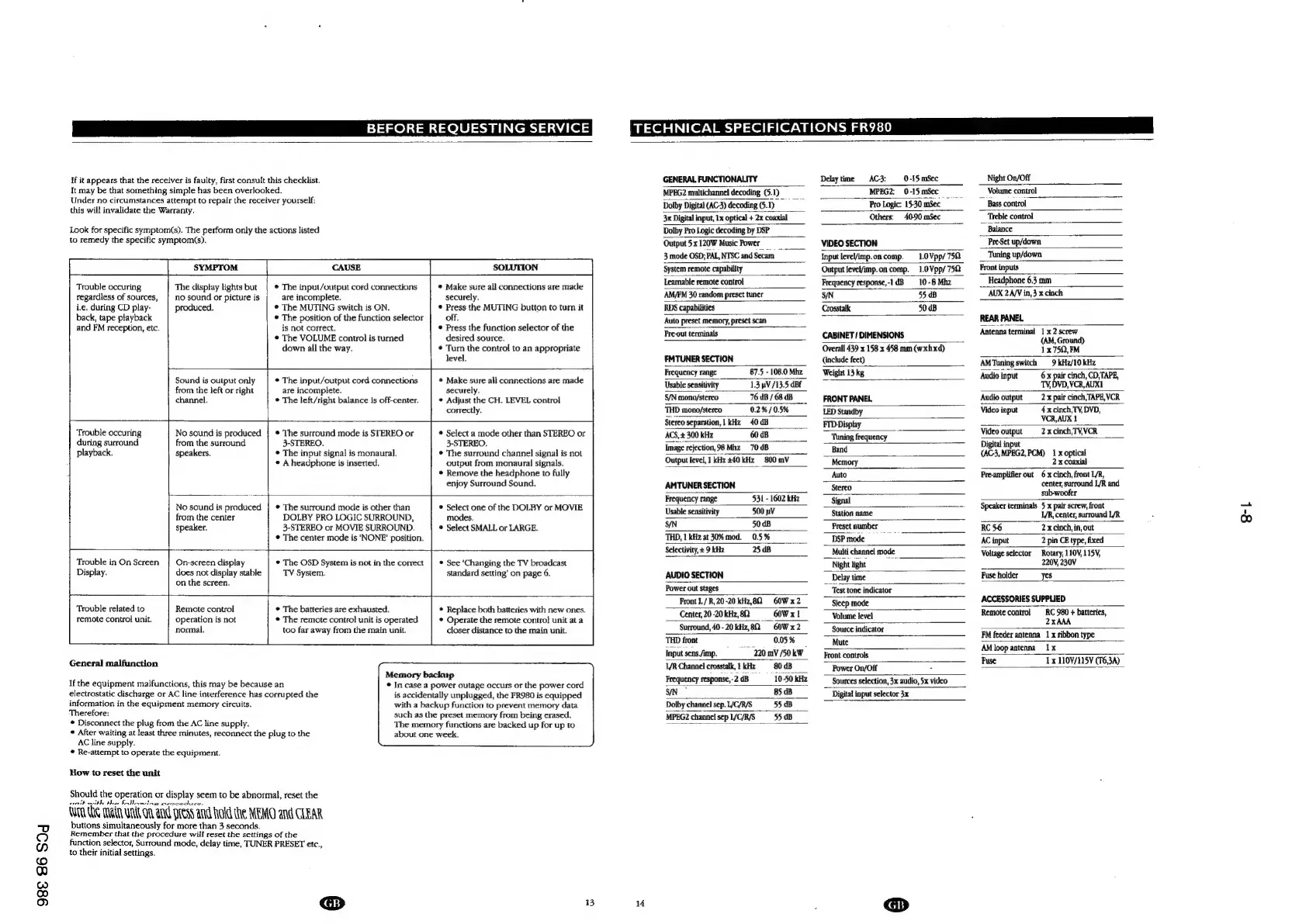
Philips FR980 - BEFORE REQUESTING SERVICE; Troubleshooting Symptoms; General Malfunction

Philips FR980
63 pages
Print Icon
To Next Page IconTo Next Page
To Previous Page IconTo Previous Page
Loading...
98€
86
SOd
BEFORE
REQUESTING
SERVICE
TECHNICAL
SPECIFICATIONS
FR980
¥f
it
appears
that
the
receiver
is
faulty,
first
consult
this
checklist.
It
may
be
that
something
simple
has
been
overlooked.
Under
no
circumstances
attempt
to
repair
the
receiver
yourself;
this
will
invalidate
the
Warranty.
Look
for
specific
symptom(s).
The
perform
only
the
actions
listed
to
remedy
the
specific
symptom(s).
Trouble
occuring
regardless
of
sources,
ite.
during
CD
play-
back,
tape
playback
and
FM
reception,
etc.
‘Trouble
occuring
during
surround
playback.
SYMPTOM
CAUSE
SOLUTION
The
clisplay
lights
but
no
sound
or
picture
is
produced,
¢
The
input/output
cord
connections
are
incomplete.
©
The
MUTING
switch
is
ON.
©
The
position
of
the
function
selector
is
not
correct.
*
The
VOLUME
control
is
turned
down
all
the
way.
@
Make
sure
all
connections
are
made
securely,
©
Press
the
MUTING
button
to
turn
it
off.
©
Press
the
function
selector
of
the
desired
source.
©
Turn
the
control
to
an
appropriate
level.
Sound
is
output
only
from
the
left
or
right
channel.
No
sound
is
produced
from
the
surround
speakers.
¢
The
input/output
cord
connections
are
incomplete.
©
The
left/right
balance
is
off-center.
©
The
surround
mode
is
STEREO
or
3-STEREO.
*
The
input
signal
is
monaural.
*
A
headphone
Is
inserted,
Hit
No
sound
is
produced
from
the
center
speaker.
¢
The
surround
mode
is
other
than
DOLBY
PRO
LOGIC
SURROUND,
3-STEREO
or
MOVIE
SURROUND.
©
The
center
mode
is
‘NONE’
position.
©
Make
sure
all
connections
are
made
securely.
©
Adjust
the
CH.
LEVEL
control
correctly.
*
Select
a
mode
other
than
STEREO
or
3-STEREO.
©
The
surround
channel
signal
is
not
output
from
monaural
signals.
*
Remove
the
headphone
to
fully
enjoy
Surround
Sound.
*
Select
one
of
the
DOLBY
or
MOVIE
modes.
®
Select
SMALL
or
LARGE.
Trouble
in
On
Screen
Display.
On-screen
display
does
not
display
stable
on
the
screen.
*
The
OSD
System
is
not
in
the
correct
TV
System.
*
See
‘Changing
the
TV
broadcast
standard
setting’
on
page
6.
Trouble
related
to
remote
control
unit.
Remote
control
operation
is
not
normal.
©
The
batteries
are
exhausted.
©
The
remote
control
unit
is
operated
too
far
away
from
the
main
unit.
General
malfunction
if
the
equipment
malfunctions,
this
may
be
because
an
electrostatic
discharge
or
AC
line
interference
has
corrupted
the
information
in
the
equipment
memory
circuits.
Therefore:
*
Disconnect
the
plug
from
the
AC
line
supply.
*
After
waiting
at
least
three
minutes,
reconnect
the
plug
to
the
AC
line
supply.
*
Re-attempt
to
operate
the
equipment.
How
to
reset
the
unit
®
Replace
both
batteries
with
new
ones.
*
Operate
the
remote
contro}
unit
at
a
closer
distance
to
the
main
unit.
Should
the
operation
or
display
seem
to
be
abnormal,
reset
the
reeth
cithy
the
bo
Hecetes,
Wim
ie
rae
anand
Press
and
Hold
the
MEMO
and
CLEAR
buttons
simultaneously
for
more
than
3
seconds.
Remember
that
the
procedure
will
reset
the
settings
of
the
function
selector,
Surround
mode,
delay
time,
TUNER
PRESET
etc.,
to
their
initial
settings.
@
Memory
backup
©
In
case
a
power
outage
occurs
or
the
power
cord
is
accidentally
unplugged,
the
FR980
is
equipped
with
a
backup
function
to
prevent
memory
data
such
as
the
preset
memory
from
being
erased.
The
memory
functions
are
backed
up
for
up
to
about
one
week.
13
GENERAL
FUNCTIONALITY
Delaytime
—AC-3:
0-15
mSec
Night
On/Off
MPEG2
multichannel
decoding
(5.1)
MPEG2;
0-15
mSec
ar
7
Volume
control
Dolby
Digital
(AC3)
decoding(5.1)
Pro
Logic:
15-30
mSec
Bass
control
3x
Digital
input,
1x
optical
+
2x
coaxial
Others;
40-90
mSec
__
Treble
control
Dolby
Pro
Logic
decoding
by
DSP
Balance
Output
5x
120W
Music
Power
VIDEO
SECTION
Pre-Set
up/down
3
mode
OSD;
PAL,
NTSC
and
Secam
input
leveVimp.oncomp.
1.0
Vpp/
750
Tuning
up/down
System
remote
capability
Output
Jevel/imp.on
comp.
1.0Vpp/75Q
‘Front
inputs
Learnable
remote
control
Frequency
response,-1dB
10-8
Mhz
Headphone
6.3
mm
‘AM/FM
30
random
preset
tuner
5/N
55
dB
‘AUX
2A/V
in,
3
x
cinch
RDS
capabilities
Crosstalk
50
dB
Auto
preset
memory,
preset
scan
a
REAR
PANEL
Pre-out
terminals
CABINET
/
DIMENSIONS
Antenna
terminal
aL
fia
Overall
439
x
158
x
458
mm
(wxhxd)
1.x
750,
FM
FMTUNER
SECTION
{include
feet)
AMTuning
switch
9
kiz/10
kHz
Frequency
range
87.5
-1080
Mhz
Weight
13
kg
Audio
input
6x
pair
cinch,
CD,TAPE,
Usable
sensitivity
1.3
pV
/13.5
dBE
TV,DVD,VCR,AUX1
S/N
mono/stereo
76
UB
/
68
dB
FRONT
PANEL
‘Audio
output
2x
pair
cinch,
TAPE,VCR
THD
mono/stereo
——0.2%/05%
LED
Standby
Video
input
4x
cinch,TV,
DVD,
Stereo
separation,
1
kHz
40
dB
FID
Display
Lae
VCR,AUX
1
ACS,
300
kHz
60
dB
“Tuning
frequency
_
a:
Video
output
2x
cinch,
TV,VCR
Image
rejection,
98Mhz_70dB
Band
Cee
Mn,
POM)
1
x
optical
Output
level,
1
kHz 240 kHz
800
mV
Memory
2x
coaxial
‘Auto
Preamplifier
out
6xcinch,
front
/R,
AMTUNER
SECTION
Stereo
center,
surround
L/R
and
Frequency
range
531-1602
Signal
subwoofer
Usbiseivy
SOR
Sn
i
=
ae
eae
,
center,
surround
L/R
SN
bok
Preset
number
RC56
2x
cinch,
in,
out
THD,
1
kHz
at
30%
mod.
0.5
%
__
DSP
mode
AC
input
2
pin
CE
type,
fixed
Selectivity,
+
9
kita
25
dB
_
Multi
channel
mode
Voltage
selector
_
Rotary,
110V)115¥,
Night
light
220V,
230V
AUDIO
SECTION
Delay
time
Fuse
holder
yes
Power
out
stages
~
‘Test
tone
indicator
Front
L/R,20-20
kHiz,8Q
OW
x2
Sleep
mode
ACCESSORIES
SUPPLIED
Center,
20-20
kHz,
8Q
GOW
xt
Volume
level
Remote
control
RC
980
+
batteries,
Surround,
40-20
ktiz,82
_
60W
x2
Source
indicator
2xhih
THD
front
0.05%
Mure
FM
feeder
antenna
1
x
ribbon
type
Input
sens/imp.
220m
/50kW
ont
controls
SS
I/R
Channel
crosstalk,
!
kHz
80 dB
Power
On/Off
7
Fuse
1x
1109/115V
(T6,3A)
Frequency
response,-2
dB
SN
85
dB
Dolby
channel
sep.
/C/R/S_55.dB
MPEG2
channel
sepl/C/R/S__-55dB
14
Sources
selection,
3x
audio,
5x
video
Digital
input
selector
3x
8-1

Other manuals for Philips FR980

Related product manuals