EasyManua.ls Logo

Philips FR980 - Speaker level calibration; Delay times; Digital Surround; Pro Logic

Philips FR980
63 pages
Print Icon
To Next Page IconTo Next Page
To Previous Page IconTo Previous Page
Loading...
G8
86
SOd
SETUP
SETUP
©
Set
LFE
(Low
Frequency
Effect)
to
Off,
0
dB
or
-10
dB
to
set
your
preferred
bass
response.
If
you
have
too
loud
low
frequency
sound
with
disortion,
you
can
attenuate
-10dB
or
mute
the
LFE
signal.
This
setting
is
‘no
relation
for
speaker
setting.
When
“OdB”
is
selected,
the
FID
indicate
“LFE”.
Press
the
OSD
DOWN
YW
[2s]
key.
©
If
you
want
to
listen
to
low-volume
music
from
a
digital
source,
as
at
night,
set
Night
Mode
to
On
(this
function
only
operates
if
the
digital
source
contains
sound
compression
data)
and
press
the
OSD
DOWN
W
[2s]
key.
©
Your
Setup
procedure
is
complete.
If
you
like
to
prevent
accidental
changes
move
‘Setup
lock’
to
lock.
®
Move
the
cursor
down
to
Return
to
Main
Menu,
and
press
SELECT
(26).
NOTE
To
change
any
set-up
function,
you
must
first
go
to
Setup
Menu
3
and
select
Setup
Unlock.
SETUP
MENU
3
t>
LFE
LEVEL
CONTROL
{eidiouB
~1008
NIGHT
MODE
[eid
ON
SETUP
LOCK
LOCK
LUNLOCK|
GO
TO
SETUP
MENU
4
MAI
mer
Ulle
tate)
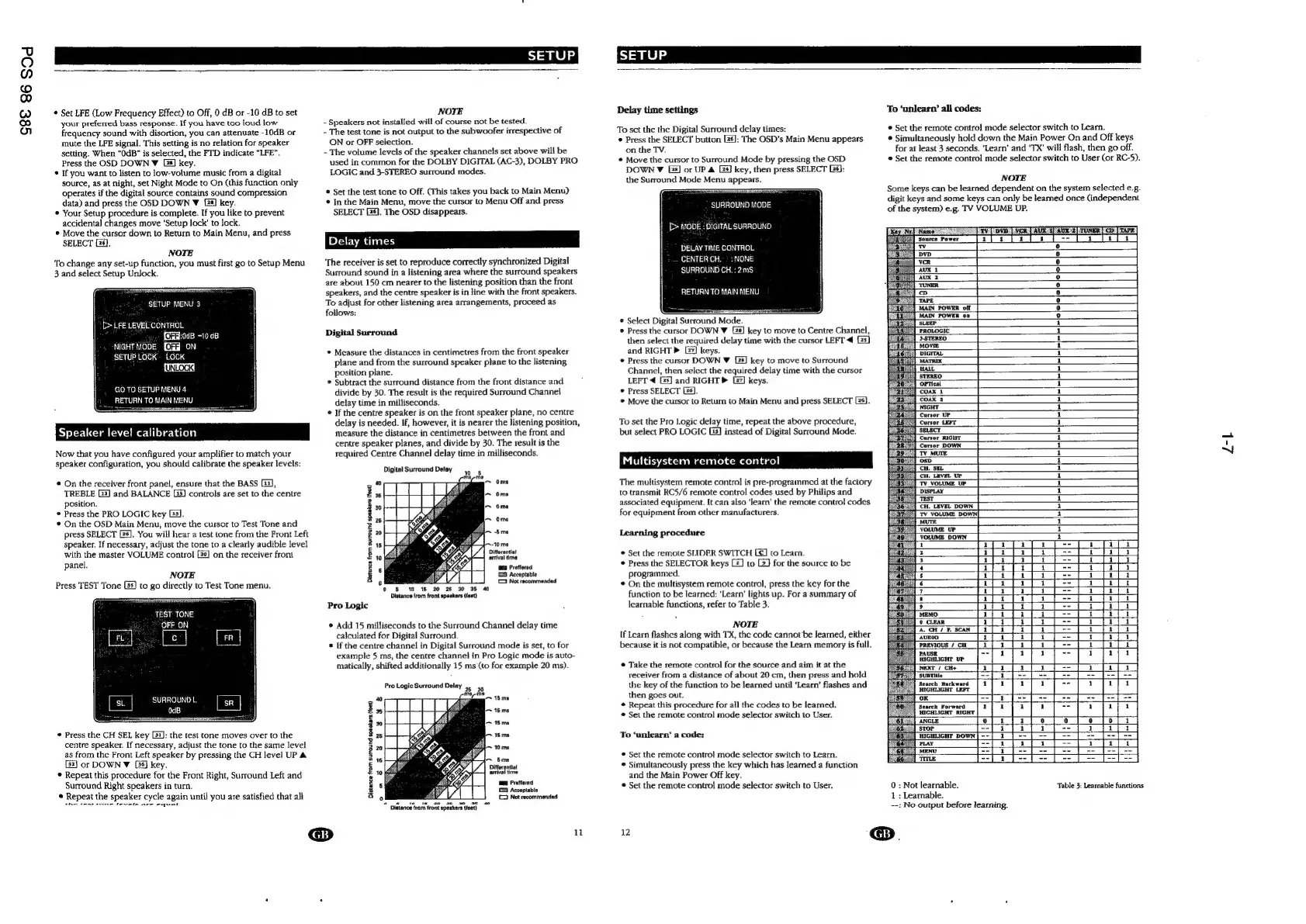
Now
that
you
have
configured
your
amplifier
to
match
your
speaker
configuration,
you
should
calibrate
the
speaker
levels:
*
On
the
receiver
front
panel,
ensure
that
the
BASS
[3],
TREBLE
(2)
and
BALANCE
(33)
controls
are
set
to
the
centre
position.
©
Press
the
PRO
LOGIC
key
G3].
On
the
OSD
Main
Menu,
move
the
cursor
to
Test
Tone
and
press
SELECT
G6].
You
will
hear
a
test
tone
from
the
Front
Left
speaker.
If
necessary,
adjust
the
tone
to
a
clearly
audible
level
with
the
master
VOLUME
control
[]
on
the
receiver
front
panel.
NOTE
Press
TEST
Tone
[35)
to
go
directly
to
Test
Tone
menu.
TEST
TONE
‘OFF_ON
SURROUND
L
OdB
Press
the
CH
SEL
key
[53]:
the
test
tone
moves
over
to
the
centre
speaker.
If
necessary,
adjust
the
tone
to
the
same
level
as
from
the
Front
Left
speaker
by
pressing
the
CH
level
UP
&
[32]
or
DOWN
V
[35]
key.
*
Repeat
this
procedure
for
the
Front
Right,
Surround
Left
and
Surround
Right
speakers
in
turn.
©
Repeat
the
speaker
cycle
again
until
you
are
satisfied that
all
the
tune
rene
fevela
are
equal,
NOTE
-
Speakers
not
installed
will
of
course
not
be
tested.
-
The
test
tone
is
not
output
to
the
subwoofer
irrespective
of
ON
or
OFF
selection.
-
The
volume
levels
of
the
speaker
channels
set
above
will
be
used
in
common
for
the
DOLBY
DIGITAL
(AC-3),
DOLBY
PRO
LOGIC
and
3-STEREO
surround
modes.
®
Set
the
test
tone
to
Off.
(This
takes
you
back
to
Main
Menu)
¢
In
the
Main
Menu,
move
the
cursor
to
Menu
Off
and
press
SELECT
GS).
The
OSD
disappears.
Delay
times
‘The
receiver
is
set
to
reproduce
correctly
synchronized
Digital
Surround
sound
in
a
listening
area
where
the
surround
speakers
are
about
150
cm
nearer
to
the
listening
position
than
the
front
speakers,
and
the
centre
speaker
is
in
line
with
the
front
speakers.
To
adjust
for
other
listening
area
arrangements,
proceed
as
follows:
Digital
Surround
©
Measure
the
distances
in
centimetres
from
the
front
speaker
plane
and
from
the
surround
speaker
plane
to
the
listening
position
plane.
®
Subtract
the
surround
distance
from
the
front
distance
and
divide
by
30.
The
result
is
the
required
Surround
Channel
delay
time
in
milliseconds.
©
If
the
centre
speaker
is
on
the
front
speaker
plane,
no
centre
delay
is
needed.
If,
however,
it
is
nearer
the
listening
position,
measure
the
distance
in
centimetres
between
the
front
and
centre
speaker
planes,
and
divide
by
30.
The
result
is
the
required
Centre
Channel
delay
time
in
milliseconds.
Digital
Surround
Delay
tial
arrival
time
Be
Preffered
[0
Acceptable
1
Not
recommended
0
©
5
10
15 20
25
3%
35
40
Distance
from
front
speakers
(fest)
Pro
Logic
*
Add
15
milliseconds
to
the
Surround
Channel
delay
time
calculated
for
Digital
Surround.
©
If
the
centre
channel
in
Digital
Surround
mode
is
set,
to
for
example
5
ms,
the
centre
channel
in
Pro
Logic
mode
is
auto-
matically,
shifted
additionally
15
ms
‘(to
for
example
20
ms).
Pro
Logic
Surround
Delay
4, 45
a
ss as
)
a
2
a
3
>
Acceptable
e
Not
recommended
Distance
from
surround
speakers
(feet)
yy
8
*
Distance
trom
front
speakers
(feet)
~
1
Delay
time
settings
To
sct
the
the
Digital
Surround
delay
times:
Press
the
SELECT
button
[26]:
The
OSD's
Main
Menu
appears
on
the
TV.
©
Move
the
cursor
to
Surround
Mode
by
pressing
the
OSD
DOWN
¥
LG]
or
UP
&
24)
key,
then
press
SELECT
[5]:
the
Surround
Mode
Menu
appears.
SURROUND
MODE
|
[>
MODE
:
DIGITAL
SURROUND
DELAY
TIME
CONTROL
CENTER
CH.
>:
NONE
SURROUND
C!
ms
RETURN
TO
MAIN
MENU
*
Select
Digital
Surround
Mode.
*
Press
the
cursor
DOWN
¥
[2s]
key
to
move
to
Centre
Channel,
then
select
the
required
delay
time
with
the
cursor
LEFT
[2s]
To
‘unlearn’
all
codes:
®
Set
the
remote
control
mode
selector
switch
to
Learn.
®
Simultaneously
hold
down
the
Main
Power
On
and
Off
keys
for
at
least
3
seconds.
‘Learn’
and
'TX’
will
flash,
then
go
off.
©
Set
the
remote
control
mode
selector
switch
to
User
(or
RC-5).
NOTE
Some
keys
can
be
learned
dependent
on
the
system
selected
e.g.
digit
keys
and
some
keys
can
only
be
leamed
once
(independent
of
the
system)
e.g.
TV
VOLUME
UP.
[iv]
bye
[WOR
AUN
t
AUK
e[
TUNER]
Cb
|
TAFE]
afrta
1
=~
[oa
ay
and
RIGHT
>
keys.
*
Press
the
cursor
DOWN
W
[2s]
key
to
move
to
Surround
Channel,
then
select
the
required
delay
time
with
the
cursor
LEFT
4
[25]
and
RIGHTP
[27]
keys.
©
Press
SELECT
[6].
©
Move
the
cursor
to
Retum
to
Main
Menu
and
press
SELECT
[26].
To
set
the
Pro
Logic
delay
time,
repeat
the
above
procedure,
but
select
PRO
LOGIC
G3]
instead
of
Digital
Surround
Mode.
Multisystem
remote
control
The
multisystem
remote
control
is
pre-programmed
at
the
factory
to
transmit
RC5/6
remote
control
codes
used
by
Philips
and
associated
equipment,
It
can
also
‘learn’
the
remote
control
codes
for
equipment
from
other
manufacturers.
Learning
procedure
Set
the
remote
SLIDER
SWITCH
[E€]
to
Learn.
©
Press
the
SELECTOR
keys
[2]
to
[2]
for
the
source
to
be
programmed.
©
On
the
multisystem
remote
control,
press
the
key
for
the
function
to
be
learned:
‘Learn’
lights
up.
For
a
summary
of
learnable
functions,
refer
to
Table
3.
NOTE
If
Learn
flashes
along
with
TX,
the
code
cannot’be
learned,
either
because
it
is
not
compatible,
or
because
the
Learn
memory
is
full.
©
Take
the
remote
control
for
the
source
and
aim
it
at
the
receiver
from
a
distance
of
about
20
cm,
then
press
and
hold
the
key
of
the
function
to
be
learned
until
‘Learn’
flashes
and
then
goes
out.
©
Repeat
this
procedure
for
ail
the
codes
to
be
learned.
©
Set
the
remote
control
mode
selector
switch
to
User.
To
‘uniearn’
a
code:
©
Set
the
remote
control
mode
selector
switch
to
Learn.
*
Simultaneously
press
the
key
which
has
learned
a
function
and
the
Main
Power
Off
key.
*
Set
the
remote
control
mode
selector
switch
to
User.
Cursor
UP
Cursor
LEFT
at
| |
|
||
fs
i
|
bat
Jt
ome]
He
FO]
10
JOJO JSIO
Fea
bel
bl
fed
bl
8
:
:
AUDIO
PREVIOUS
/
CH
PAUSE
HIGHLIGHT
UP
NEXT
/
CH+
Search
Backward
HIGHLIGHT
LEFT
OK
Search
Forward
HIGHLIGHT
RIGHT
0
:
Not
learnable.
Learnable.
--:
No
output
before
learning.
Table
3:
Learnable
functions
12
@®.
Z-4

Other manuals for Philips FR980

Related product manuals