EasyManua.ls Logo

Philips FR980 - SETUP; Input Selector; Speaker level adjustment; Setting up your Home Cinema system

Philips FR980
63 pages
Print Icon
To Next Page IconTo Next Page
To Previous Page IconTo Previous Page
Loading...
v8E
86
SOd
OPERATION
/
GETTING
JON
/
GETTING
STi
SETUP
Input
Select
(input
Selector
Menu)
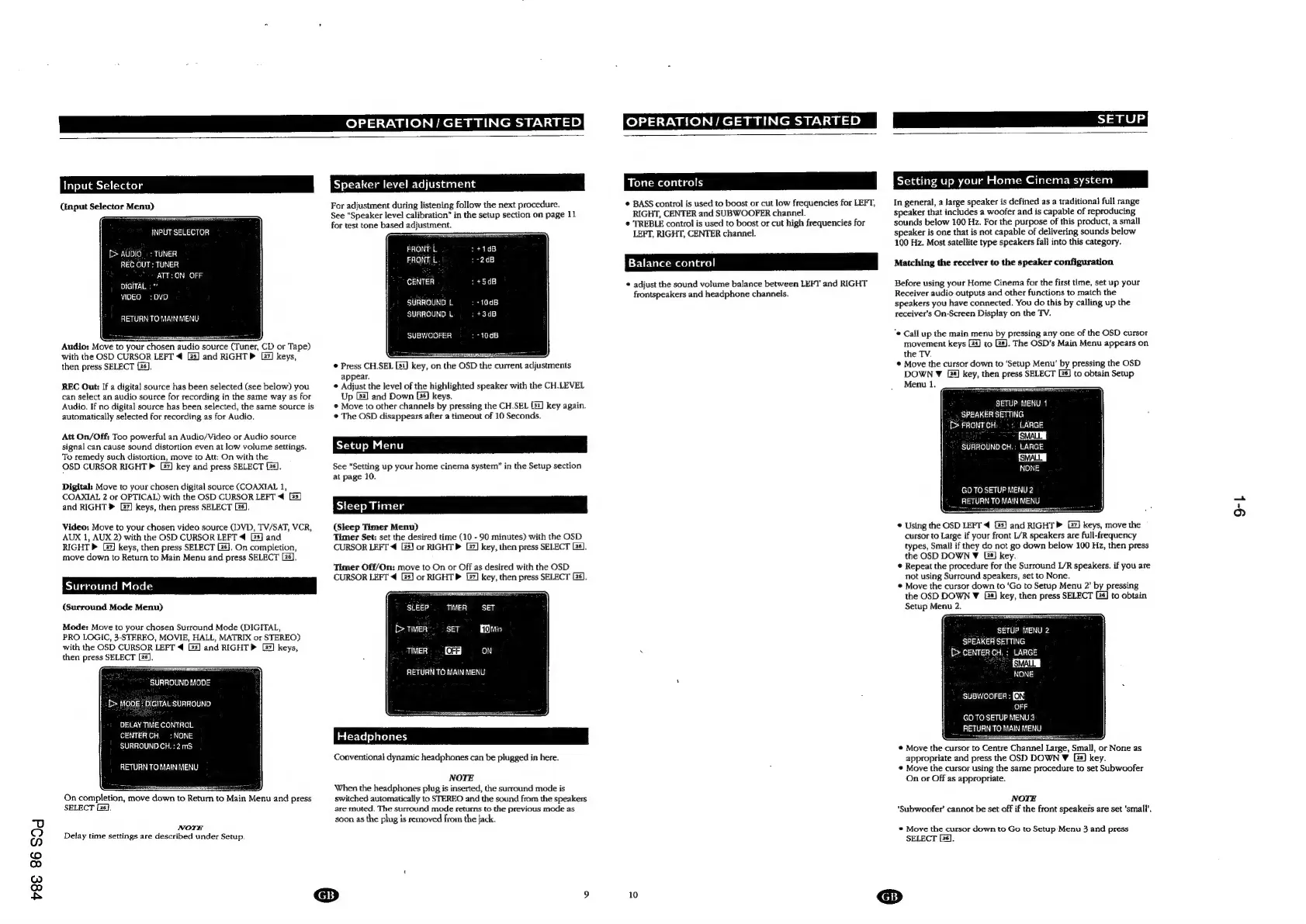
INPUT
SELECTOR
[>
AUDIO.
:
TUNER
REC
OUT:
TUNER
ATT:
ON
OFF
DIGITAL
:”
VIDEO
=:
DVO
RETURN
TO
MAIN
MENU
Audio:
Move
to
your
chosen
audio
source
(Tuner,
CD
or
Tape)
with
the
OSD
CURSOR
LEFT
4
G3]
and
RIGHT
[27]
keys,
then
press
SELECT
(26).
REC
Out:
If a
digital
source
has
been
selected
(see
below)
you
can
select
an
audio
source
for
recording
in
the
same
way
as
for
Audio.
If
no
digital
source
has
been
selected,
the
same
source
is
automatically
selected
for
recording
as
for
Audio.
Att
On/Off:
Too
powerful
an
Audio/Video
or
Audio
source
signal
can
cause
sound
distortion
even
at
low
volume
settings.
To
remedy
such
distortion,
move
to
Att:
On
with
the
OSD
CURSOR
RIGHT
P
key
and
press
SELECT
[28].
Digital:
Move
to
your
chosen
digital
source
(COAXIAL
1,
COAXIAL
2
or
OPTICAL)
with
the
OSD
CURSOR
LEFT
4
[33]
and
RIGHT
®
[27]
keys,
then
press
SELECT
Ls].
Video:
Move
to
your
chosen
video
source
(IVD,
TV/SAT,
VCR,
AUX
1,
AUX
2)
with
the
OSD
CURSOR
LEFT
4
[3s]
and
RIGHT
[2]
keys,
then
press
SELECT
Gs}.
On
completion,
move
down
to
Return
to
Main
Menu
and
press
SELECT
Lé].
Surround
Mode
(Surround
Mode
Menu)
Mode:
Move
to
your
chosen
Surround
Mode
(DIGITAL,
PRO
LOGIC,
3-STEREO,
MOVIE,
HALL,
MATRIX
or
STEREO)
with
the
OSD
CURSOR
LEFT
4
2s]
and
RIGHTP
[27]
keys,
then
press
SELECT
[26].
SURROUND
MODE
:f>
MODE:
DIGITAL:
SURROUND
DELAY
TIME
CONTROL
CENTER
CH,
:
NONE
SURROUND
CH.
:
2mS
RETURN
TO
MAIN
MENU
On
completion,
move
down
to
Return
to
Main
Menu
and
press
SELECT
Es].
NOTE
Delay
time
settings
are
described
under
Setup.
Speaker
level
adjustmen
For
adjustment
during
listening
follow
the
next
procedure.
See
“Speaker
level
calibration’
in
the
setup
section
on
page
11
for
test
tone
based
adjustment.
FRONT
L
FRONE
£
CENTER
SURROUND
L
SURROUND
L
SUBWOOFER
©
Press
CH.SEL
[31]
key,
on
the
OSD
the
current
adjustments
appear.
¢
Adjust
the
level
of
the
highlighted
speaker
with
the
CH.LEVEL
Up
G2]
and
Down
keys.
©
Move
to
other
channels
by
pressing
the
CH.SEL
[31]
key
again.
¢
The
OSD
disappears
after
a
timeout
of
10
Seconds.
See
“Setting
up
your
home
cinema
system”
in
the
Setup
section
at
page
10.
Steep
Timer
(Sleep
Timer
Menu)
Timer
Set:
set
the
desired
time
(10
-
90
minutes)
with
the
OSD
CURSOR
LEFT
4
G3]
or
RIGHT»
[27]
key,
then
press
SELECT
Ls].
Timer
Off/On:
move
to
On
or
Off
as
desired
with
the
OSD
CURSOR
LEFT
4
[5]
or
RIGHT
[2]
key,
then
press
SELECT
Gs].
SLEEP
TIMER
=
SET
[>
TIMER
SET
min
as
ae
OFF}
ON
RETURN
TO
MAIN
MENU
Conventional
dynamic
headphones
can
be
plugged
in
here.
NOTE
When
the
headphones
plug
is
inserted,
the
surround
mode
is
switched
automatically
to
STEREO
and
the
sound
from
the
speakers
are
muted.
The
surround
mode
returns
to
the
previous
mode
as
soon
as
the
plug
is
removed
from
the
jack.
Tone
controls
*
BASS
control
is
used
to
boost
or
cut
low
frequencies
for
LEFT,
RIGHT,
CENTER
and
SUBWOOFER
channel.
©
TREBLE
control
is
used
to
boost
or
cut
high
frequencies
for
LEFT,
RIGHT,
CENTER
channel.
Balance
control
*
adjust
the
sound
volume
balance
between
LEF1'
and
RIGHT
frontspeakers
and
headphone
channels.
Setting
up
your
Home
Cinema
system
In
general,
a
large
speaker
is
defined
as
a
traditional
full
range
speaker
that
includes
a
woofer
and
is
capable
of
reproducing
sounds
below
100
Hz.
For
the
purpose
of
this
product,
a
small
speaker
is
one
that
is
not
capable
of
delivering
sounds
below
100
Hz.
Most
satellite
type
speakers
fall
into
this
category.
Matching
the
receiver
to
the
speaker
configuration
Before
using
your
Home
Cinema
for
the
first
time,
set
up
your
Receiver
audio
outputs
and
other
functions
to
match
the
speakers
you
have
connected.
You
do
this
by
calling
up
the
receiver's
On-Screen
Display
on
the
TV.
“e
Call
up
the
main
menu
by
pressing
any
one
of
the
OSD
cursor
movement
keys
4)
to
Gs].
The
OSD’s
Main
Menu
appears
on
the
TV.
©
Move
the
cursor
down
to
‘Setup
Menu’
by
pressing
the
OSD
DOWN
¥
[2]
key,
then
press
SELECT
Bs]
to
obtain
Setup
Menu
1.
SETUP
MENU
1
SPEAKER
SETTING
[>
FRONTCH:
-:
LARGE
;
SMALL
|
SURROUND
CH.
;
LARGE
SMALL
|
NONE
GO
TO
SETUP
MENU
2
RETURN
TO
MAIN
MENU
©
Using
the
OSD
LEFT
4
2s]
and
RIGHT»
keys,
move
the
cursor
to
Large
if
your
front
L/R
speakers
are
full-frequency
types,
Small
if
they
do
not
go
down
below
100
Hz,
then
press
the
OSD
DOWN
V
Lé]
key.
*
Repeat
the
procedure
for
the
Surround
L/R
speakers.
if
you
are
not
using
Surround
speakers,
set
to
None.
*
Move
the
cursor
down
to
‘Go
to
Setup
Menu
2’
by
pressing
the
OSD
DOWN
Y
[2s]
key,
then
press
SELECT
[4]
to
obtain
Setup
Menu
2.
SETUP
MENU
2
SPEAKER
SETTING
[>
CENTER
CH.
:
LARGE
ISMALL
NE
SUBWOOFER:
[OS
OFF
GO
TO
SETUP
MENU
3
__
RETURN
TO
MAIN
MENU
©
Move
the
cursor
to
Centre
Channel
Large, Small,
or
None
as
appropriate
and
press
the
OSD
DOWN
W
La]
key.
*
Move
the
cursor
using
the
same
procedure
to
set
Subwoofer
On
or
Off
as
appropriate.
NOTE
‘Subwoofer’
cannot
be
set
off
if
the
front
speakers
are
set
‘small’.
©
Move
the
cursor
down
to
Go
to
Setup
Menu
3
and
press
SELECT
[26].
10
GB)
9-|

Other manuals for Philips FR980

Related product manuals