11
English
EN
Compatible iPod/iPhone
The unit supports the following iPod/iPhone
models.
Made for.
• iPod touch (1st, 2nd, 3rd, and 4th
generation)
• iPod classic
• iPod nano (2nd, 3rd, 4th, 5th, and 6th
generation)
• iPhone 4S
• iPhone 4
• iPhone 3GS
• iPhone 3G
• iPhone
Load the iPod/iPhone
1 Insert your iPod/iPhone into the dock on
either the left (A) or the right (B).
2 If needed, adjust the direction of the dock.
Remove the iPod/iPhone
• Pull the iPod/iPhone out of the dock.
Charge the iPod/iPhone
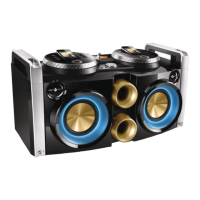
The dual docks allow you to load and charge
two iPods/iPhones at the same time.
When the unit is powered on, the docked iPod/
iPhone begins to charge automatically.
Listen to the iPod/iPhone
Note
•
Make sure that your iPod/iPhone has been loaded
securely.
1 Depending on which source you want to
listen to, press SOURCE A or SOURCE
B repeatedly to select the iPod/iPhone
source.
2 Start music play on your iPod/iPhone.
» You can hear music from the Hi-Fi
system.
Basic play operations
Besides the basic play operations, you can also
control iPod/iPhone play through the following
operations.
Function Action
To access the iPod/
iPhone menu
press MENU/
.
To navigate up/down press
.
To navigate left/right press
/ .
To pause or resume play press OK/
.



 To Next Page