10 EN
1 Turn thePOWER ON/OFF switch on the
back panel to the | position.
2 Press .
» The unit switches to the last selected
source.
Switch to standby mode
• Press to switch the unit to standby
mode.
» The backlight on the display panel
turns off.
4 Play
Basic play operations
You can control play through the following
operations.
Function Action
To stop play press MENU/
.
To pause/
resume play
press
.
To skip to a
track
press
/ .
To search
during play
press and hold
/ , then
release to resume normal play.
To swap play
between
audio source
A and B
• Press SOURCE A or
SOURCE Brepeatedly.
• * On the top panel, move
the channel fader to the left
(A) or right (B) to fade in
and fade out.
* When you use the channel fader to swap play
between source A and B, the music play will not
be interrupted. For example, when you move
the channel fader from the left to the right, the
song played from source A will gradually reduce
to silence (fade-out), while at the same time,
the song played from source B will gradually
increase from silence (fade-in).
Play from iPod/iPhone
You can enjoy music from your iPod/iPhone
through this unit.
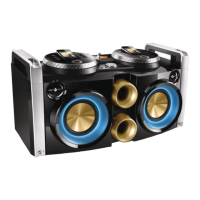
With the dual docks, you can load two iPods/
iPhones at the same time and swap play
between them.



 To Next Page