EasyManua.ls Logo

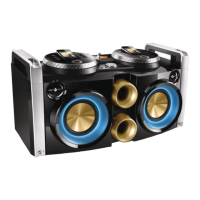
Philips FWP3200 - User Manual

Philips FWP3200
21 pages
Print Icon
To Next Page IconTo Next Page
Loading...
Register your product and get support at
www.philips.com/welcome
Always there to help you
用户手册 19 User manual 3
Question?
Contact
Philips
Question?
Contact
Philips
FWP3200

Questions and Answers

  • C
    Cameron ConnerJul 29, 2025
    Why is the radio reception poor on my Philips FWP3200 Stereo System?
    • T
      Teresa JonesJul 29, 2025
      If you experience poor radio reception on your Philips Stereo System, try increasing the distance between the unit and any TVs or VCRs. Also, fully extend the FM antenna to improve signal reception.
  • S
    shawdanielAug 3, 2025
    How to fix Philips FWP3200 Stereo System when it has no power?
    • M
      morrisraymondAug 3, 2025
      If your Philips Stereo System has no power, ensure the AC power plug is correctly connected. Check that the AC outlet has power. Confirm that the POWER ON/OFF switch on the back is set to the | position. Also, the system may automatically switch off after 30 minutes of inactivity to save power.
  • C
    Christopher TranAug 8, 2025
    What to do if my Philips Hi-Fi system is not responding?
    • H
      Holly HarperAug 8, 2025
      If your Philips Hi-Fi system isn't responding, try disconnecting and reconnecting the AC power plug, then turn the system on again. As a power-saving feature, the unit switches off automatically 30 minutes after track play reaches the end and no control is operated.
  • M
    Michelle Knight DVMAug 12, 2025
    Why is there no sound on my Philips FWP3200?
    • J
      Jerry JohnsonAug 12, 2025
      If you're experiencing no sound or poor sound quality on your Philips Stereo System, first adjust the volume. Also, check if the speaker is muted and, if so, press the mute button to restore the sound output.
  • N
    Noah DavisAug 18, 2025
    How to troubleshoot Philips FWP3200 Stereo System remote control not working?
    • M
      Michael RiddleAug 18, 2025
      If the remote control for your Philips Stereo System isn't working, first select the correct source using the remote. Reduce the distance between the remote and the unit, ensuring you aim directly at the sensor. Verify that the batteries are correctly inserted with the proper polarities (+/– signs). If problems persist, replace the batteries.
  • P
    Patrick SalinasAug 23, 2025
    What to do if my Philips FWP3200 says USB device not supported?
    • M
      msmithAug 23, 2025
      The USB device may be incompatible with your Philips Stereo System. Try using a different USB device.

Summary

Important Safety Information

General Safety Guidelines

General safety precautions, warnings, and identification of safety symbols.

Key Safety Instructions

First set of safety instructions covering reading, keeping, heeding, and following instructions.

Further Safety Instructions

Hearing Safety Guidelines

Recommendations for safe listening volumes and periods, especially with headphones.

Product Notice and Disposal

Product Notice and Modifications

Information on modifications, product design, and recycling responsibilities.

Copyright Responsibility

Warning against unauthorized copying and copyright infringement.

Environmental Information and Disposal

Details on packaging, recycling, and disposal of product and batteries.

Apple Device Compatibility

Information on 'Made for iPod/iPhone' certification and compatibility.

Your Mini Hi-Fi System Introduction

System Capabilities and Features

Overview of what the Hi-Fi system can do and its sound effects.

Package Contents

List of items included in the product package.

Main Unit Overview and Controls

Microphone Connections

Connection points for microphones.

Microphone Volume Control

Adjustment for the volume of connected microphones.

Display and Playback Controls

Controls for display, playback, USB, and headphone monitoring.

Sound and Power Controls

Controls for volume, bass, sound effects, power, and FM tuner.

Connectivity and Source Controls

Controls for cross fader, MP3 link, docks, and source selection.

Remote Control Overview

Basic Remote Controls

Power, light, source selection, and playback/confirmation buttons.

Tuner and Playback Navigation

Navigating radio stations, USB content, and playback.

Sound, Mode, and Utility Controls

Volume, bass, sound effects, modes, programming, and mute functions.

Getting Started Guide

Operational Safety Caution

Warning about hazardous radiation exposure from improper procedures.

Remote Control Setup

Instructions for inserting batteries into the remote control.

Connecting Power

Steps to connect the AC power cord to the unit and wall socket.

Powering On the Unit

Procedure to turn on the Hi-Fi system.

Playing Audio

Standby Mode Operation

How to switch the unit to standby mode.

Basic Playback Operations

Controls for stopping, pausing, resuming, skipping, and swapping sources.

Playing Audio from iPod;iPhone

Instructions for playing music from connected iPod/iPhone devices.

Compatible iPod;iPhone Models

Loading iPod;iPhone

Steps to insert and adjust iPod/iPhone into the dock.

Removing iPod;iPhone

Procedure for safely removing the iPod/iPhone from the dock.

Charging iPod;iPhone

Information on how the unit charges docked iPod/iPhone devices.

Listening to iPod;iPhone Audio

Steps to select and play audio from iPod/iPhone.

iPod;iPhone Playback Controls

Specific playback controls for iPod/iPhone playback.

Playing Audio from USB

Playback Options

Settings for repeat, shuffle, and normal play modes.

Listening Through Headphones

Instructions for connecting headphones and adjusting volume.

Listening to the Radio

Tuning Radio Stations

Steps to tune to stations automatically or manually.

Storing Radio Stations

How to program and save up to 20 FM radio stations.

Selecting Preset Radio Stations

Methods to select stored radio stations using buttons or keypad.

Adjusting Sound Settings

Speaker Volume Adjustment

How to increase or decrease the main speaker volume.

Selecting Sound Effects (DSC)

Choosing from preset sound effects like SAMBA, ROCK, JUNGLE, POP.

Boost Sound Power (MAX SOUND)

Enabling instant power boost for increased sound output.

Dynamic Bass Enhancement (DBB)

Selecting different levels of bass enhancement.

Muting Sound Output

Muting or restoring the sound output.

Audio Output Mode Selection

Choosing audio output for right, left, or both channels.

Additional Features

Playing External Audio Devices

Connecting and playing audio from external devices via MP3 link.

Karaoke Function

Connecting microphones to speak or sing through the system.

Simultaneous Play Feature

Decoration Light Adjustment

Adjusting the LED light effects around the speakers.

Product Information and Specifications

General Product Information

Details on AC power, power consumption, dimensions, and weight.

Technical Specifications

Detailed specifications for amplifier, tuner, and speakers.

USB Playability Details

Information on compatible USB devices and supported audio formats.

Troubleshooting Common Issues

Troubleshooting Warning

Warning against opening the unit or attempting self-repair.

Troubleshooting: No Power

Steps to resolve issues when the unit does not power on.

Troubleshooting: No Sound

Solutions for missing or low-quality audio output.

Troubleshooting: System Unresponsive

Steps to take when the Hi-Fi system does not respond.

Troubleshooting: Remote Control Issues

Tips for resolving problems with the remote control.

Troubleshooting: Radio Reception

Tips for improving FM radio reception.

Troubleshooting: USB Device Compatibility

Information on incompatible USB devices.

Philips FWP3200 Specifications

General IconGeneral
BrandPhilips
ModelFWP3200
CategoryStereo System
Audio output channels2.0
BluetoothYes
USB PlaybackYes
CD PlayerYes
FM RadioYes
Playable formatsMP3, WMA
USB direct recordingYes
Audio in (3.5mm)Yes
Input Sensitivity500 mV
Signal-to-Noise Ratio70 dB
Power Supply220-240V

Related product manuals